

This article has been machine-translated from Chinese. The translation may contain inaccuracies or awkward phrasing. If in doubt, please refer to the original Chinese version.
Key Content of This Lesson
Why WebGL / Why GPU?
- What is WebGL?
- GPU ≠ WebGL ≠ 3D
- Why isn’t WebGL as simple as other front-end technologies?
Modern Graphics Systems
- Raster: Almost all modern graphics systems are based on rasters to draw graphics. A raster refers to the pixel array that composes an image.
- Pixel: A pixel corresponds to a point on an image. It typically stores color and other information about a specific location on the image.
- Frame Buffer: During the drawing process, pixel information is stored in the frame buffer, which is a block of memory addresses.
- CPU (Central Processing Unit): Responsible for logical computation.
- GPU (Graphics Processing Unit): Responsible for graphics computation.
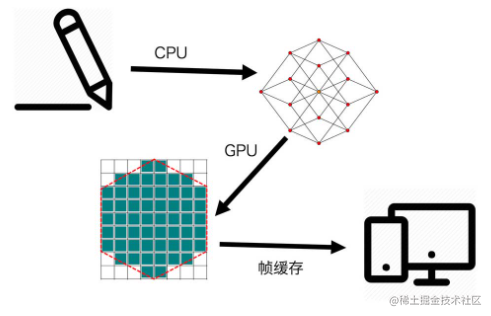
- As shown above, the rendering process of modern graphics follows these steps:
- Contour extraction / meshing
- Rasterization
- Frame buffer
- Rendering
The Pipeline
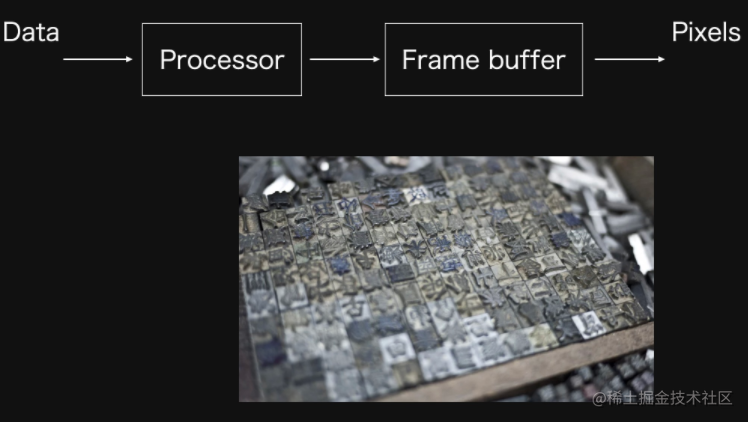
GPU
- The GPU consists of a large number of small computing units
- Each computing unit handles only very simple computations
- Each computing unit is independent of the others
- Therefore, all computations can be processed in parallel
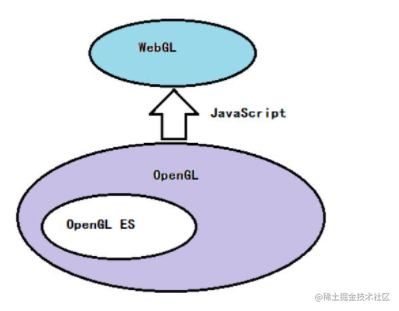
WebGL & OpenGL Relationship
OpenGL, OpenGL ES, WebGL, GLSL, GLSL ES API Tables (umich.edu)
WebGL Drawing Steps
Steps
- Create a WebGL context
- Create a WebGL Program
- Store data in the buffer
- Read buffer data into the GPU
- The GPU executes the WebGL program and outputs the result
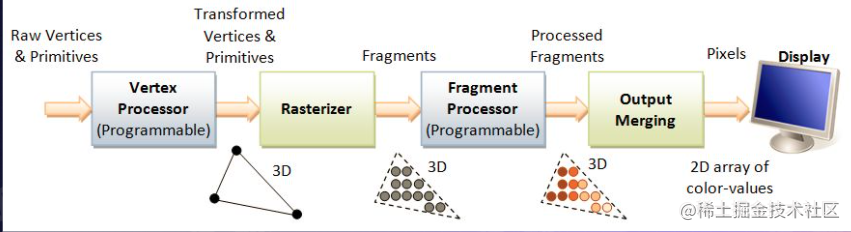
As shown in the figure, here are explanations for several terms:
- Raw Vertices & Primitives
- Vertex Processor — Vertex Shader
- After processing, sent to the Fragment Shader for processing: Fragment Processor
Creating a WebGL Context
const canvas = document.querySelector('canvas');
const gl = canvas.getContext('webgl');
// Create context, note compatibility
function create3DContext(canvas, options) {
  const names = ['webgl', 'experimental-webgL', 'webkit-3d', 'moz-webgl']; // Feature detection
  if (options.webgl2) names.unshift(webgl2);
  let context = null;
  for (let ii = 0; ii < names.length; ++ii) {
    try {
      context = canvas.getContext(names[ii], options);
    } catch (e) {
      // no-empty
    }
    if (context) {
      break;
    }
  }
  return context;
}
Creating a WebGL Program (The Shaders)
-
Vertex Shader
Processes each vertex’s position in parallel through typed array position
attribute vec2 position;// vec2 two-dimensional vector void main() { gl_PointSize = 1.0; gl_Position = vec4(position, 1.0, 1.0); } -
Fragment Shader
Colors all pixels within the area enclosed by vertex outlines
precision mediump float;
void main() {
    gl_FragColor = vec4(1.0, 0.0, 0.0, 1.0);//corresponds to rgba(255, 0, 0, 1.0), red
}
The specific steps are as follows:
-
Create vertex shader and fragment shader code:
// Vertex shader program code const vertexShaderCode = ` attribute vec2 position; void main() { gl_PointSize = 1.0; gl_Position = vec4(position, 1.0, 1.0); } `; // Fragment shader program code const fragmentShaderCode = ` precision mediump float; void main() { gl_FragColor = vec4(1.0, 0.0, 0.0, 1.0); } `; -
Use
createShader()to create a shader object -
Use
shaderSource()to set the shader’s program code -
Use
compileShader()to compile a shader// Vertex shader const vertexShader = gl.createShader(gl.VERTEX_SHADER); gl.shaderSource(vertexShader, vertex); gl.compileShader(vertexShader); // Fragment shader const fragmentShader = gl.createShader(gl.FRAGMENT_SHADER); gl.shaderSource(fragmentShader, fragment); gl.compileShader(fragmentShader); -
Use
createProgram()to create aWebGLProgramobject -
Use
attachShader()to attach a fragment or vertex shader to theWebGLProgram. -
Use
linkProgram()to link the givenWebGLProgram, completing the process of preparing GPU code for the program’s fragment and vertex shaders. -
Use
useProgram()to add the definedWebGLProgramobject to the current rendering state// Create shader program and link const program = gl.createProgram(); gl.attachShader(program, vertexShader); gl.attachShader(program, fragmentShader); gl.linkProgram(program); gl.useProgram(program);
Storing Data in the Buffer (Data to Frame Buffer)
- Coordinate system: WebGL’s coordinate system is normalized. Browsers and canvas2D use a coordinate system with the top-left corner as the origin, y-axis pointing down, x-axis pointing right, with coordinate values relative to the origin. WebGL’s coordinate system uses the center of the drawing canvas as the origin, following a standard Cartesian coordinate system.
Represent vertices through a vertex array, use createBuffer() to create and initialize a WebGLBuffer object for storing vertex data or shader data and return a bufferId, then use bindBuffer() to bind the given bufferId to the target, and finally use bufferData() to bind data to the buffer.
// Vertex data
const points = new Float32Array([-1, -1, 0, 1, 1, -1]);
// Create buffer
const bufferId = gl.createBuffer();
gl.bindBuffer(gl.ARRAY_BUFFER, bufferId);
gl.bufferData(gl.ARRAY_BUFFER, points, gl.STATIC_DRAW);
Reading Buffer Data to GPU (Frame Buffer to GPU)
- getAttribLocation() returns the index location of a given attribute in the
WebGLProgramobject.- vertexAttribPointer() tells the graphics card to read vertex data from the currently bound buffer (the buffer specified by bindBuffer()).
- enableVertexAttribArray() enables the generic vertex attribute array at the specified index in the attribute array list.
const vPosition = gl.getAttribLocation(program, 'position'); // Get the address of the position variable in the vertex shader
gl.vertexAttribPointer(vPosition, 2, gl.FLOAT, false, 0, 0); // Set the length and type for the variable
gl.enableVertexAttribArray(vPosition); // Activate this variable
Output
drawArrays() draws primitives from vector array data
// output
gl.clear(gl.COLOR_BUFFER_BIT); //Clear the buffered data
gl.drawArrays(gl.TRIANGLES, 0, points.length / 2);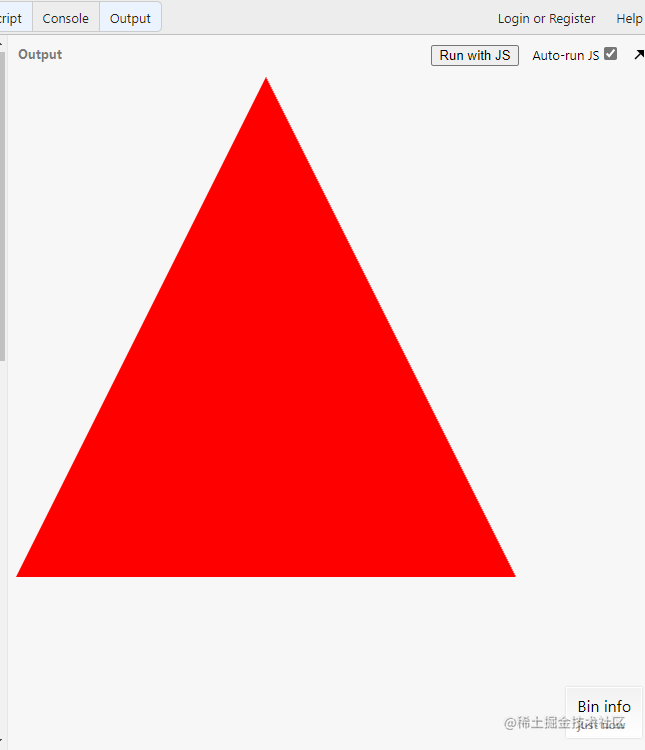
WebGL Too Complex? Other Approaches
Canvas 2D
Look at how canvas2D draws the same triangle:
// canvas is simple and straightforward, everything is encapsulated
const canvas = document.querySelector('canvas');
const ctx = canvas.getContext('2d');
ctx.beginPath();
ctx.moveTo(250, 0);
ctx.lineTo(500, 500);
ctx.lineTo(0, 500);
ctx.fillStyle = 'red';
ctx.fill();
Mesh.js
mesh-js/mesh.js: A graphics system born for visualization. (github.com)
const {Renderer, Figure2D, Mesh2D} = meshjs;
const canvas = document.querySelector ('canvas');
const renderer = new Renderer(canvas);

const figure = new Figure2D();
figurie.beginPath();
figure.moveTo(250, 0);
figure.lineTo(500,500);
figure.lineTo(0, 500);
const mesh = new Mesh2D(figure, canvas);
mesh.setFill({
    color: [1, 0, 0, 1],
});
renderer.drawMeshes([mesh]);
Earcut
Using Earcut for triangulation
const vertices = [
    [-0.7, 0.5],
    [-0.4, 0.3],
    [-0.25, 0.71],
    [-0.1, 0.56],
    [-0.1, 0.13],
    [0.4, 0.21],
    [0, -0.6],
    [-0.3, -0.3],
    [-0.6, -0.3],
    [-0.45, 0.0],
];
const points = vertices.flat();
const triangles = earcut(points)
3D Meshing
Exported by designers, then extracted by us
SpriteJS/next - The next generation of spritejs.
Graphics Transforms
This is digital image processing knowledge (everything I learned has been returned.jpg)
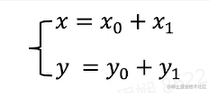
Translation
Rotation

Scaling

Linear Transform (Rotation + Scaling)
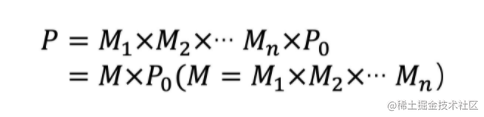
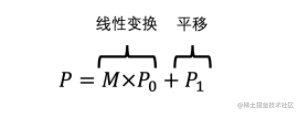
From linear transforms to homogeneous matrices
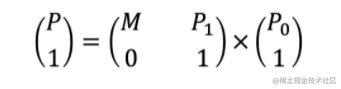
Another example from the teacher: Apply Transforms
3D Matrix
The four homogeneous matrices (mat4) of a standard 3D model:
- Projection Matrix (orthographic projection and perspective projection)
- Model Matrix (transforms applied to vertices)
- View Matrix (3D viewpoint — imagine it as a camera, within the camera’s viewport)
- Normal Matrix (normals perpendicular to the object surface, typically used for lighting calculations)
Read More
- The Book of Shaders (Introduction to fragment shaders, very fun)
- Mesh.js (Low-level library)
- Glsl Doodle (A lightweight library for fragment shaders with many small demos)
- SpriteJS (An open-source library by Teacher Yueying)
- Three.js (Many interesting
gamesprojects) - Shadertoy BETA (Many interesting projects)
Summary
This lesson provided a very detailed explanation of WebGL drawing and related libraries, and showcased many interesting WebGL mini-projects~
Most of the content cited in this article comes from Teacher Yueying’s course and MDN! Teacher Yueying is truly amazing!
喜欢的话,留下你的评论吧~