

This article has been machine-translated from Chinese. The translation may contain inaccuracies or awkward phrasing. If in doubt, please refer to the original Chinese version.
Finally, the lesson I’ve been most looking forward to~~
Course objectives:
- Understand the business and product value of mini programs
- Learn and master the technical principles of mini programs
Development History of Mini Programs
History
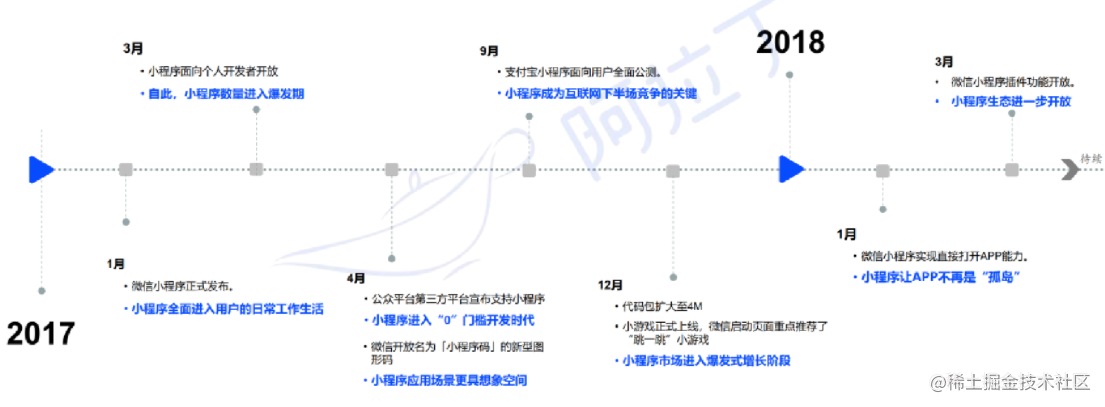
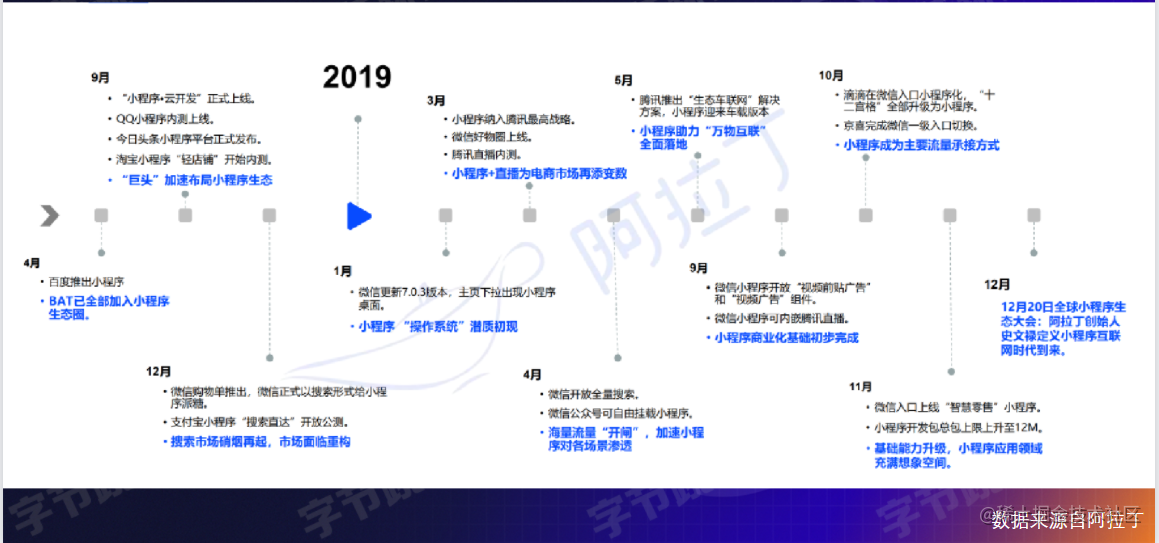
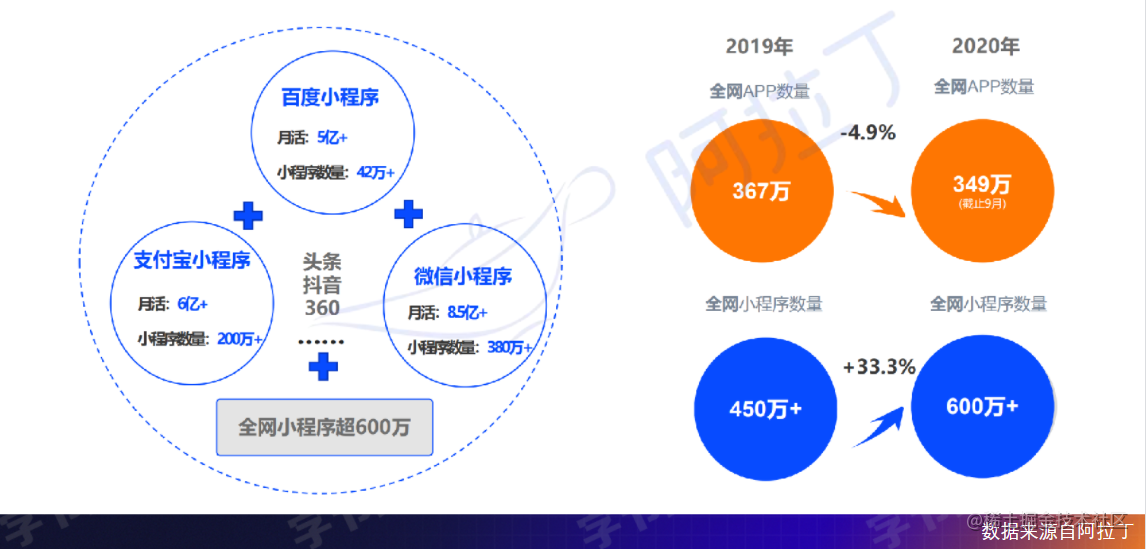
Core Data
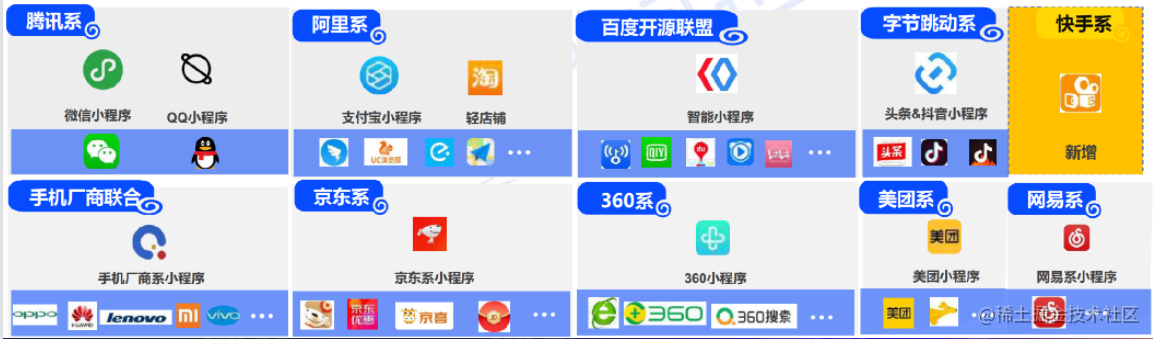
Mini Program Ecosystem
Business Value
Differences from Web
- Fixed syntax and unified version management, making it easier for platforms to conduct reviews
- Platforms can control various entry points, such as QR codes, article embeds, and in-app sharing. Entry points also provide a better user experience
- Based on a special architecture, mini programs have better smoothness than Web, with superior navigation experience
Three Core Values
Channel Value
- Convenient traffic routing
Due to the convenience of mini programs and their reliance on super platforms, mini programs can fully route traffic for many scenarios. For example, Meituan and Meituan Select WeChat mini programs contribute 40% and 80% of traffic respectively.
Business Exploration Value
- Fast trial and error
Compared to native APPs, mini program development difficulty and costs are much lower. This creates many scenarios where developers can use mini programs to quickly iterate and experiment, continuously exploring new business value.
Digital Upgrade Value
- Large room for error, wide coverage
How to go from offline to online? From light consumption like fast food and beverages to big-ticket items like real estate and automobiles, mini programs have demonstrated good error tolerance. Mini programs cover a wide range of offline scenarios.
Mini Program Technical Analysis
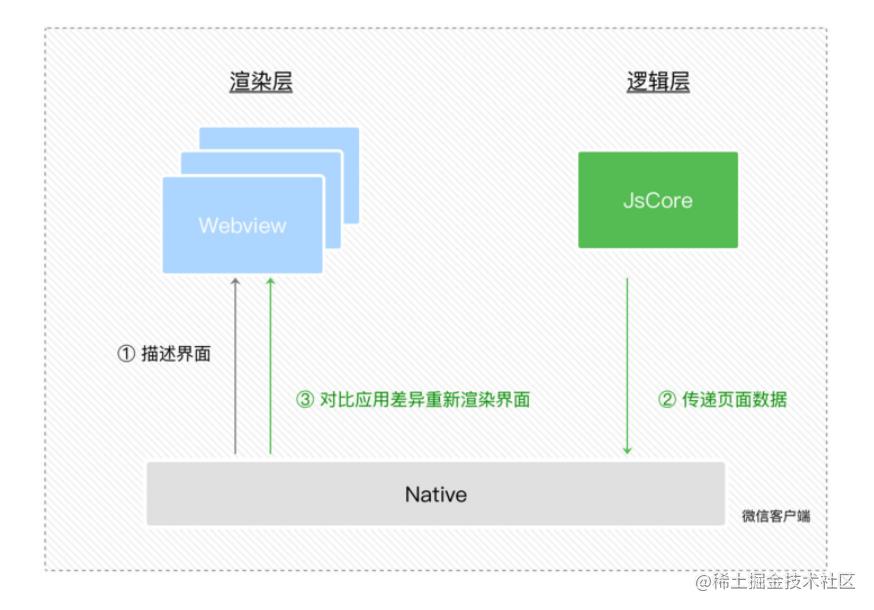
Mini Program Principles
What’s the simplest and most convenient way for third parties to develop applications?
- WebView + JSBridge
- WebView: A mobile environment for running JavaScript, equivalent to a browser page within an App
- JSBridge: As the name suggests, it serves as a bridge allowing developers to call some native App APIs
Several issues:
- Poor experience without network
- Poor webpage switching experience
- How to manage and ensure security
Mini programs solve these problems through the following approaches:
- Low development barrier - HTML+JS+CSS
- Near-native user experience - resource loading + rendering + page switching
- Security management - Independent JS sandbox: isolates DOM manipulation
- How to control page rendering without DOM manipulation?
- Data -> Process DOM based on data -> Page
Mini Program Syntax
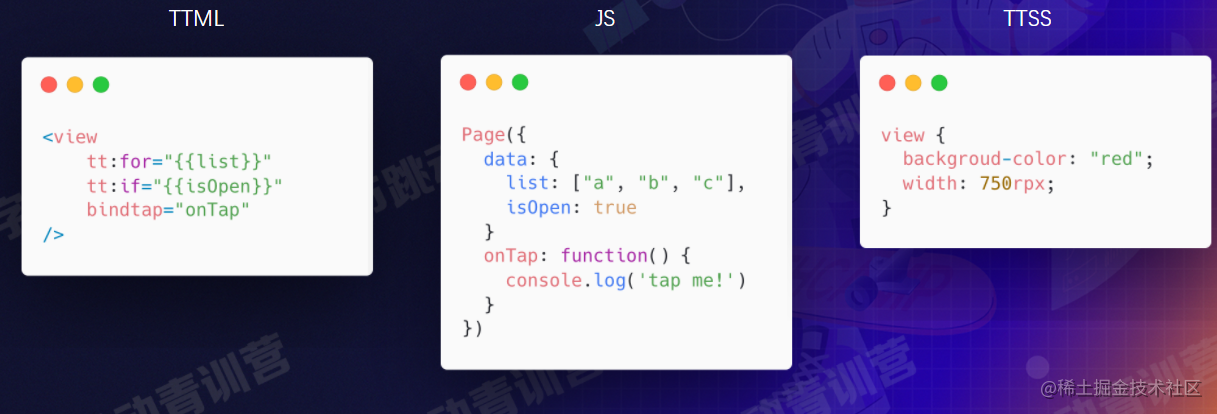
As shown: ByteDance mini programs use TTML/JS/TTSS, while WeChat mini programs use WXML/JS/WXSS, corresponding to HTML/JS/CSS.
Implementing a Simple Pomodoro Timer
Let’s try implementing a Pomodoro timer on WeChat mini program as shown~ (Different mini program syntaxes are largely similar)
Writing tomatoClock.wxml (HTML)
Let’s start with a simple HTML interface~
<view class="container">
  <view class="clock">{{timeText}}</view>
  <button wx:if="{{running}}" class="button" bindtap="onReset">Reset</button>
  <button wx:else class="button" bindtap="onStart">Start</button>
</view>
{{timeText}} implements two-way data binding between the page and JS data (the page will re-render when this data updates~)
Writing tomatoClock.js
Writing JS for event functions and page data binding:
// pages/apply/tomatoClock/tomatoClock.js
const DEFAULT_TIME = 25 * 60; // 25 minutes
function formatTime(time) {
  const minutes = Math.floor(time / 60);
  const seconds = time % 60;
  const mText = `0${minutes}`.slice(-2);
  const sText = `0${seconds}`.slice(-2);
  return `${mText} : ${sText}`;
}
Truncating from the end to pad with leading zeros for two-digit time display (learned something new!)
Then the event handling: setTimer function sets a 1-second interval timer, initializes time to the default value, decrements time by 1 every second (the page also refreshes). The onStart event sets the timer and sets running to true when started. The onReset event clears the timer on reset, sets running to false and resets timeText to the default time.
Page({
  /**
   * Page initial data
   */
  data: {
    timeText: formatTime(DEFAULT_TIME),
    running: false,
  },
  setTimer: function () {
    this.timer = setInterval(() => {
      this.time = this.time - 1;
      if (this.time < 0) {
        clearInterval(this.timer);
        return;
      }
      this.setData({
        timeText: formatTime(this.time),
      });
    }, 1000);
  },
  // Event function: set timer and set running to true when started
  onStart: function () {
    if (!this.timer) {
      this.time = DEFAULT_TIME;
      this.setTimer();
      this.setData({
        running: true,
      });
    }
  },
  // Event function: clear timer on reset, set running to false and reset timeText to default
  onReset: function () {
    clearInterval(this.timer);
    this.timer = null;
    this.time = DEFAULT_TIME;
    this.setData({
      timeText: formatTime(DEFAULT_TIME),
      running: false,
    });
  },
  // else: lifecycle functions (listen for page load, render, etc.)
});
Writing a bit of wxss (CSS)
You can implement globally common CSS like container in app.wxss:
/**app.wxss**/
page {
  background-color: #97abff;
}
.container {
  height: 100%;
  display: flex;
  flex-direction: column;
  align-items: center;
  justify-content: space-between;
  gap: 10px;
  padding: 200rpx 0;
  box-sizing: border-box;
  background-color: #97abff;
}
In the page’s own CSS file (index.wxss), write the CSS specific to that page~
/**index.wxss**/
.clock {
  line-height: 400rpx;
  width: 400rpx;
  text-align: center;
  border-radius: 50%;
  border: 5px solid white;

  color: white;
  font-size: 50px;
  font-weight: bold;
}

.button {
  margin-top: 200rpx;
  text-align: center;
  border-radius: 10px;
  border: 3px solid white;
  background-color: transparent;

  font-size: 25px;
  color: white;
  padding: 5px 10px;
}
Related Extensions
What are cross-platform frameworks?
- Complex application building
- Develop once, deploy across multiple platforms (WeChat mini programs, various mini program platforms, etc.)
Cross-Platform Framework Introduction
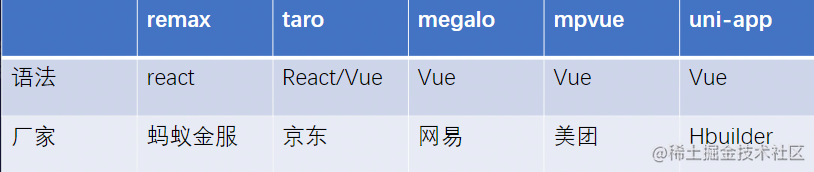
Cross-Platform Framework Principles
Compile-Time
AST Syntax Tree
Abstract Syntax Tree - Wikipedia
In computer science, an Abstract Syntax Tree (AST), or simply Syntax tree, is an abstract representation of source code syntax structure. It represents the syntactic structure of a programming language in tree form, where each node represents a structure in the source code. The syntax is called “abstract” because it doesn’t represent every detail of the actual syntax. For example, nested parentheses are implied in the tree structure rather than shown as nodes; and conditional statements like
if-condition-thencan be represented with three-branch nodes.In contrast to abstract syntax trees are concrete syntax trees (usually called parse trees). Generally, during source code translation and compilation, parsers create parse trees, then generate ASTs from them. Once created, additional information may be added during subsequent processing, such as the semantic analysis phase.
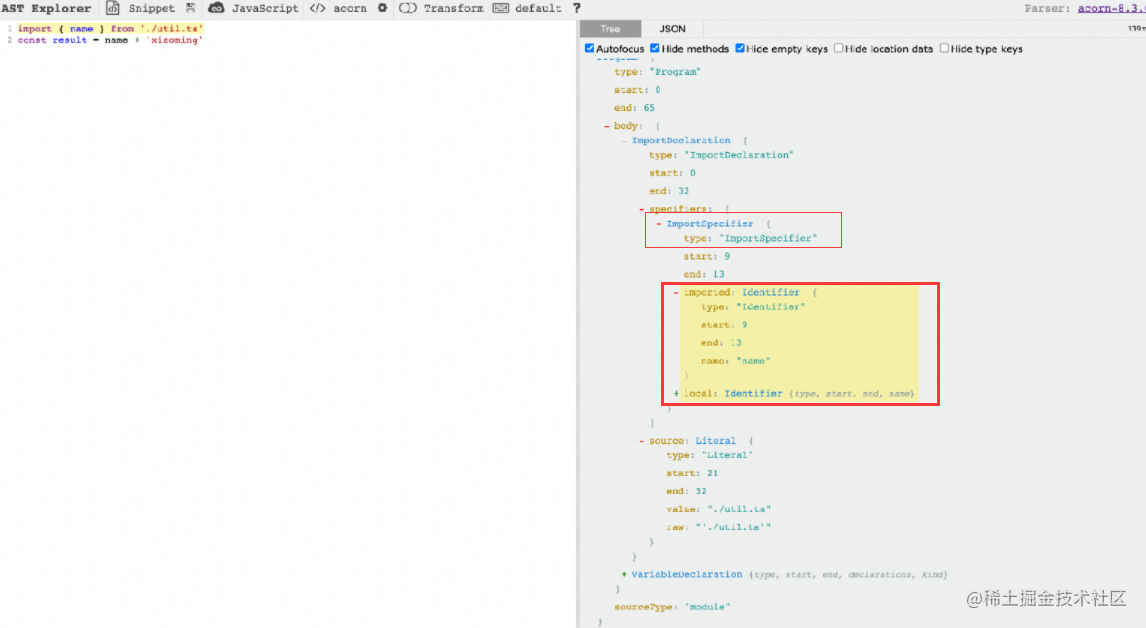
Parse -> Generate AST -> Generate page
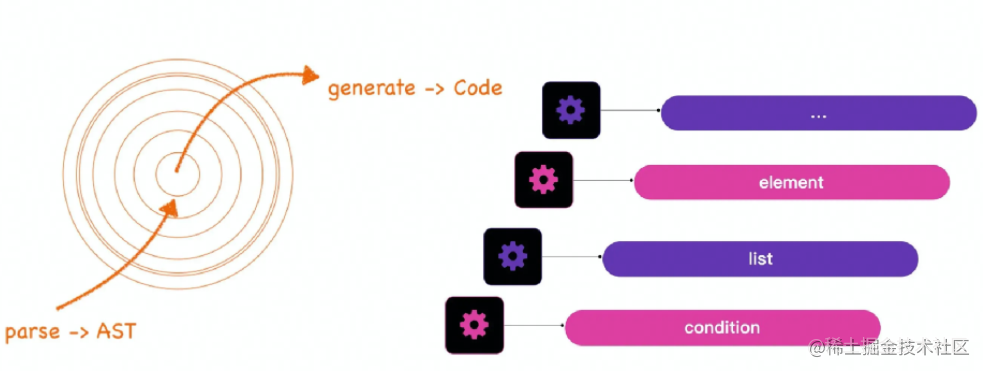
For example:
<View>{foo ? <View /> : <Text />}</View>-> Converted to ByteDance mini program syntax:
<view><block tt: if={foo}><view /></block><block tt:else><text /></block></view>Inherent flaw: Cannot completely smooth over differences!
- Mini programs themselves have many limitations
- So most solutions are runtime solutions
Runtime
Virtual DOM
Essentially a JavaScript object with many DOM-like property values and tags. Through this object, we can generate our actual DOM.
Template Component
Dynamically generated templates provided by mini programs.
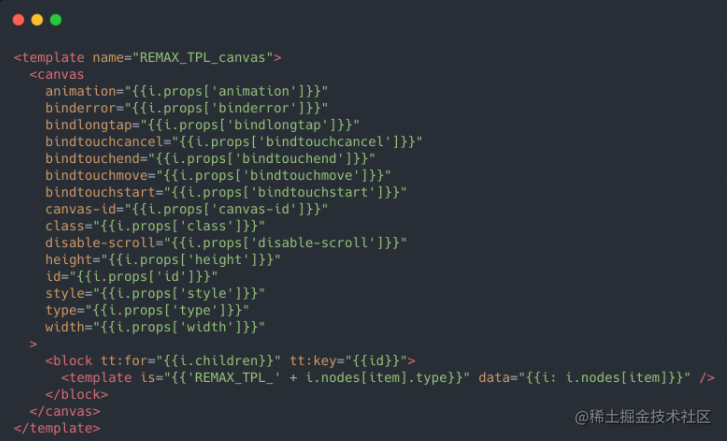
Runtime Architecture
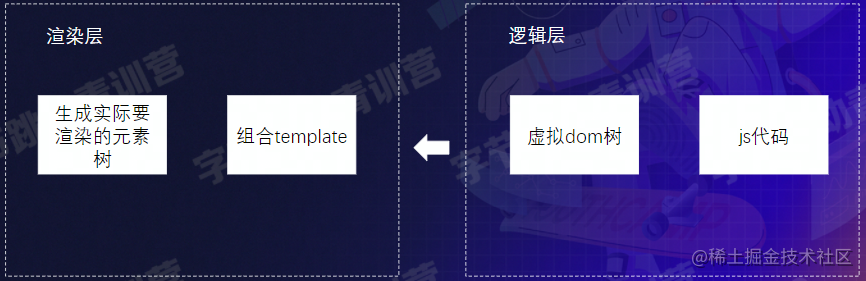
- The runtime solution isn’t perfect either
- In some scenarios, performance may be worse compared to native mini program syntax
- Works well in most scenarios!
Summary and Reflections
This lesson provided an overview of mini program development history and technical analysis, and implemented a simple Pomodoro timer mini program~
Most of the content cited in this article comes from Teacher Zhang Xiaowei’s class.
喜欢的话,留下你的评论吧~