

This article has been machine-translated from Chinese. The translation may contain inaccuracies or awkward phrasing. If in doubt, please refer to the original Chinese version.
This lesson was taught by Teacher Yueying, packed with valuable content, including object-oriented design, component encapsulation, and higher-order functions (throttle, debounce, batch processing, iterability).
Key Content of This Lesson
Principles for Writing Good JS
Separation of Concerns
Here’s an example: Write some JS to control a webpage, making it support both light and dark modes. How would you do it?
My first reaction: Write a dark class and toggle it on a button click event. This is also what the second version in the slides describes.
- Version 1: Directly toggle styles - not ideal, but works
const btn = document.getElementById('modeBtn');
btn.addEventListener('click', (e) => {
  const body = document.body;
  if (e.target.innerHTML === '☀️') {
    body.style.backgroundColor = 'black';
    body.style.color = 'white';
    e.target.innerHTML = '🌙';
  } else {
    body.style.backgroundColor = 'white';
    body.style.color = 'black';
    e.target.innerHTML = '☀️';
  }
});- Version 2: Encapsulated a dark class
const btn = document.getElementById('modeBtn');
btn.addEventListener('click', (e) => {
  const body = document.body;
  if (body.className !== 'night') {
    body.className = 'nignt';
  } else {
    body.className = '';
  }
});-
Version 3: Since it’s purely presentational behavior, it can be implemented entirely with HTML and CSS
Make the toggle a
checkboxcontrol with type checkbox and idmodeCheckBox, use thelabeltag’sforattribute to associate it with this control, then hide the checkbox to achieve click-to-toggle mode switching.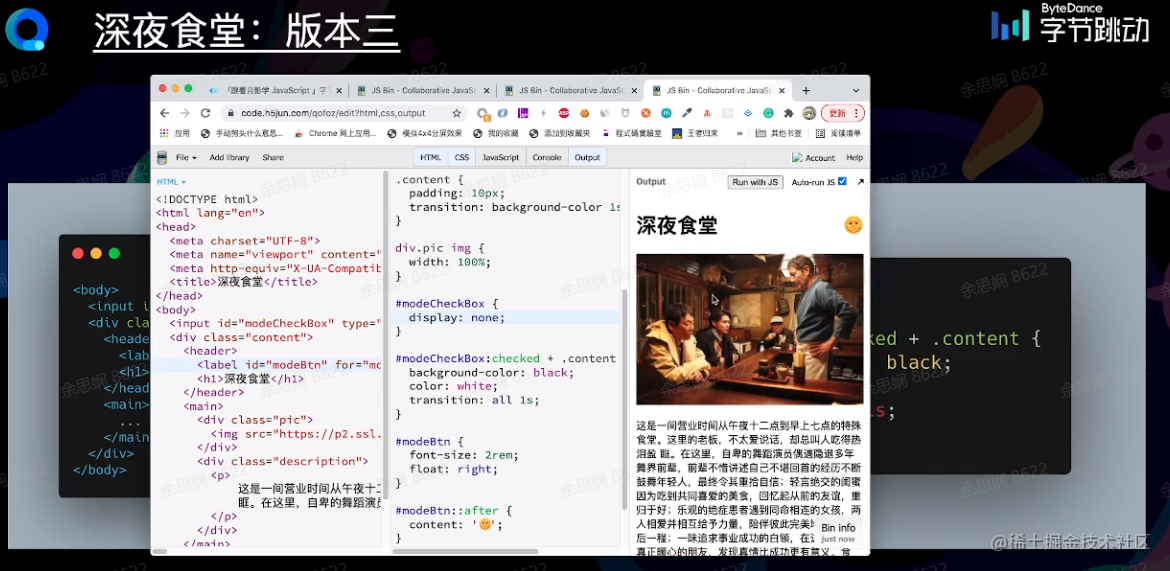
“
As long as you don’t write code, there won’t be bugs” - this is also a manifestation of separation of concerns.
Summary: Avoid unnecessary direct JS manipulation of styles. Use classes to represent states, and seek zero-JS solutions for purely presentational interactions. Version 2 also has its merits, as its adaptability may not always be as good as Version 3.
Component Encapsulation
A component refers to a unit extracted from a web page that contains a template (HTML), functionality (JS), and styling (CSS). Good components have encapsulation, correctness, extensibility, and reusability. Although nowadays, with many excellent existing components, we often don’t need to design one ourselves, we should still try to understand their implementation.
Here’s an example: How would you implement an e-commerce carousel using vanilla JS?
-
Structure: HTML unordered list (
<ul>)- A carousel is a typical list structure that can be implemented with the
<ul>element, with each image placed in an li tag.
- A carousel is a typical list structure that can be implemented with the
-
Presentation: CSS absolute positioning
- Use CSS absolute positioning to overlay images in the same position
- Use modifiers for state switching
- selected
- Carousel transition animations using CSS
transition
-
Behavior: JS
- API design should ensure atomic operations, single responsibility, and flexibility
- PS: Atomic operations are indivisible operations, like OS primitives such as wait, read, etc.
- Encapsulate some events: getSelectedItem(), getSelectedItemIndex(), slideTo(), slideNext(), slidePrevious()…
- Going further: control flow, using custom events for decoupling.
- API design should ensure atomic operations, single responsibility, and flexibility
Summary: Component encapsulation requires attention to whether structure design, presentation effects, and behavior design (API, Events, etc.) meet standards.
Thinking: How can we improve this carousel?
Refactoring 1: Plugin-based, Decoupled
-
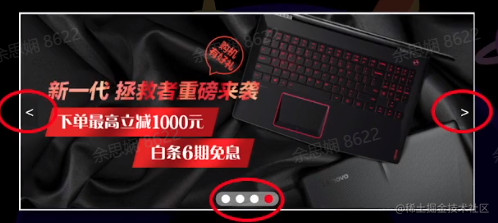
Extract control elements into individual plugins (left/right arrows, bottom dots, etc.)
-
Establish connections between plugins and components through dependency injection
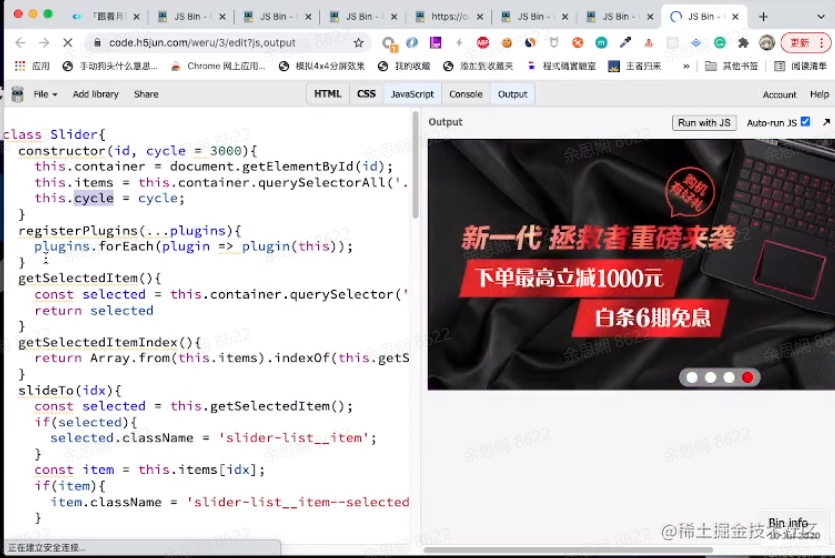
Benefits? The component constructor only registers components one by one. When reusing, you just comment out the constructor for unneeded components without worrying about anything else.
Further extension?
Refactoring 2: Templatized
Templatize the HTML too, so only a <div class='slider'></div> is needed for the carousel. Modify the controller’s constructor to accept an image list.
Refactoring 3: Abstracted
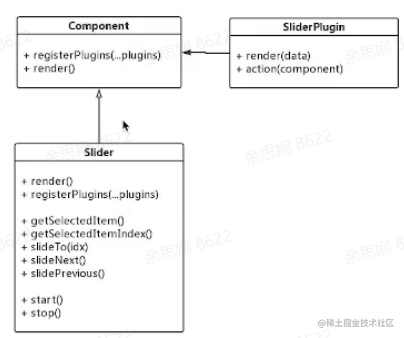
Abstract the general component model into a Component class. Other component classes inherit from this class and implement its render method.
class Component {
  constructor(id, opts = { name, data: [] }) {
    this.container = document.getElementById(id);
    this.options = opts;
    this.container.innerHTML = this.render(opts.data);
  }
  registerPlugins(...plugins) {
    plugins.forEach((plugin) => {
      const pluginContainer = document.createElement('div');
      pluginContainer.className = `${name}__plugin`;
      pluginContainer.innerHTML = plugin.render(this.options.data);
      this.container.appendchild(pluginContainer);

      plugin.action(this);
    });
  }
  render(data) {
    /* abstract */
    return '';
  }
}
Summary:
- Component design principles - encapsulation, correctness, extensibility, and reusability
- Implementation steps: structure design, presentation effects, behavior design
- Three refactorings
- Plugin-based
- Templatized
- Abstracted
- Improvements: CSS templatization, parent-child component state synchronization and messaging, etc.
Process Abstraction
-
Methods for handling local detail control
-
Basic application of functional programming thinking
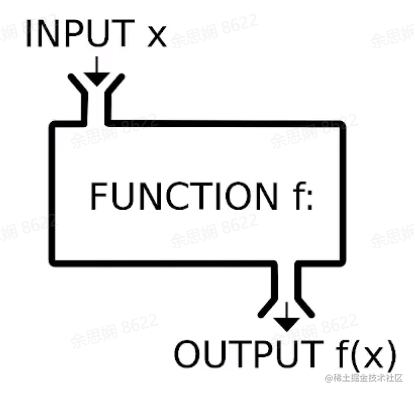
Application: Operation Count Limiting
- Some asynchronous interactions
- One-time HTTP requests
Consider this code: on each click, the node is removed after a 2s delay. But if the user clicks several more times before the node is fully removed, it will throw an error.
const list = document.querySelector('ul');
const buttons = list.querySelectorAll('button');
buttons.forEach((button) => {
  button.addEventListener('click', (evt) => {
    const target = evt.target;
    target.parentNode.className = 'completed';
    setTimeout(() => {
      list.removeChild(target.parentNode);
    }, 2000);
  });
});
This operation count limiting can be abstracted into a higher-order function:
function once(fn) {
  return function (...args) {
    if (fn) {
      const ret = fn.apply(this, args);
      fn = null;
      return ret;
    }
  };
}
const list = document.querySelector('ul');
const buttons = list.querySelectorAll('button');
buttons.forEach((button) => {
  button.addEventListener(
    'click',
    once((evt) => {
      const target = evt.target;
      target.parentNode.className = 'completed';
      setTimeout(() => {
        list.removeChild(target.parentNode);
      }, 2000);
    }),
  );
});
As shown in the code, the function once accepts a function and returns a function. It checks if the received function is null; if not, it executes the function and returns its result. If the received function is null, it returns a function that does nothing. The click event actually registers the function returned by once, so no matter how many times you click, there won’t be an error.
PS: What a brilliant application example!
To make the “execute only once” requirement cover different event handlers, this requirement is extracted out. This process is called process abstraction.
Higher-Order Functions
- Takes a function as a parameter
- Returns a function as a value
- Commonly used as function decorators
funtion HOF(fn) {
    return function(...args) {
        return fn.apply(this, args);
    }
}
Common Higher-Order Functions
Once - Execute Only Once
Discussed earlier, won’t elaborate here.
Throttle
Adds an interval time to a function. The function is called once every time period, saving resources. For example, an event that fires continuously (like triggering on mouse hover) would keep calling the event function at very high speed. Adding a throttle function prevents crashes and saves bandwidth.
function throttle(fn, time = 500) {
  let timer;
  return function (...args) {
    if (!timer) {
      fn.apply(this, args);
      timer = setTimeout(() => {
        timer = null;
      }, time);
    }
  };
}
btn.onclick = throttle(function (e) {
  /* event handling */
  circle.innerHTML = parseInt(circle.innerHTML) + 1;
  circle.className = 'fade';
  setTimeout(() => (circle.className = ''), 250);
});
It wraps the original function. If there’s no timer, it registers one that expires after 500ms. During those 500ms the timer still exists, so the function won’t execute (or rather, executes an empty function). After 500ms the timer is cleared and the function can be called again.
Debounce
In throttle above, the function won’t execute while the timer exists. Debounce clears the timer at the start of each event and sets a new timer for dur. When the event hasn’t been called again for dur time (e.g., mouse stops moving and hovers), the function can execute.
function debounce(fn, dur) {
  dur = dur || 100; // if dur doesn't exist, set to 100ms
  var timer;
  return function () {
    clearTimeout(timer);
    timer = setTimeout(() => {
      fn.apply(this, arguments);
    }, dur);
  };
}
Consumer
This converts a function into an asynchronous operation similar to setTimeout. When an event is called many times, those events are pushed into a list and executed at set intervals, returning results. Let’s look at the code:
function consumer(fn, time) {
  let tasks = [],
    timer;
  return function (...args) {
    tasks.push(fn.bind(this, ...args));
    if (timer == null) {
      timer = setInterval(() => {
        tasks.shift().call(this);
        if (tasks.length <= 0) {
          clearInterval(timer);
          timer = null;
        }
      }, time);
    }
  };
}
btn.onclick = consumer((evt) => {
  /*
   * Event handling: when an event is called many times,
   * put those events into a list and execute them at set intervals.
   */
  let t = parseInt(count.innerHTML.slice(1)) + 1;
  count.className = 'hit';
  let r = (t * 7) % 256,
    g = (t * 17) % 128,
    b = (t * 31) % 128;
  count.style.color = `rgb(${r}, ${g}, ${b})`.trim();
  setTimeout(() => {
    count.className = 'hide';
  }, 500);
}, 800);
The event handling here implements showing a continuously incrementing +count on button click that fades out after 500ms. When clicked rapidly, the click events are stored in an event list and executed every 800ms (otherwise the previous +count hasn’t disappeared yet).
To understand the function’s principle, we need to start with the bind, shift, and call functions:
bind()creates a new function wherethisis set to the first argument ofbind(), and the remaining arguments serve as the new function’s arguments when called.
shift()removes the first element from an array and returns that element’s value. This method changes the array’s length. The opposite isunshift()which inserts at the beginning.A similar pair of methods are
pop()andpush(), which operate on the last element of the array.
call()calls a function with a specifiedthisvalue and individual arguments.
So the purpose of the above function is clear: put each function to be called into the tasks list. If the timer is empty, set a timer that periodically dequeues tasks; if all tasks are cleared (no current tasks), clear the timer. If the timer is not empty, do nothing (but it’s been added to the tasks list).
Iterative
Transforms a function to be usable iteratively, typically used when a function needs to perform batch operations on a group of objects. For example, batch setting colors:
const isIterable = (obj) => obj != null && typeof obj[Symbol.iterator] === 'function';
function iterative(fn) {
  return function (subject, ...rest) {
    if (isIterable(subject)) {
      const ret = [];
      for (let obj of subject) {
        ret.push(fn.apply(this, [obj, ...rest]));
      }
      return ret;
    }
    return fn.apply(this, [subject, ...rest]);
  };
}
const setColor = iterative((el, color) => {
  el.style.color = color;
});
const els = document.querySelectorAll('li:nth-child(2n+1)');
setColor(els, 'red');
Toggle
State toggling can also be encapsulated as a higher-order function, so any number of states can be added.
Example:
function toggle(...actions) {
  return function (...args) {
    let action = actions.shift();
    action.push(action);
    return action.apply(this, args);
  };
}
// Works with any number of states!
switcher.onclick = toggle(
  (evt) => (evt.target.className = 'off'),
  (evt) => (evt.target.className = 'on'),
);
Thinking
Why use higher-order functions?
Understanding a concept: A pure function is a function whose return value only depends on its parameters and has no side effects during execution.
This means pure functions are very reliable and won’t affect the outside world.
- Convenient for unit testing!
- Reduces the number of impure functions in the system, thereby increasing system reliability
Other Thoughts
- Imperative vs. declarative - neither is inherently better
- Process abstraction / HOF / Decorators
- Imperative / Declarative
- Trade-offs between code style, efficiency, and quality
- Weigh based on the scenario
Summary and Reflections
Amazing!!
After watching this lesson, I gained a tremendous amount. Implementing a component in the true sense requires so many steps. JS can achieve such object-oriented design! Combined with C++/Java design patterns I’ve learned before, I found there are commonalities - a component can be subdivided into many sub-components. The higher-order functions section was completely new territory - I didn’t know JS could implement such methods.
Most of the content cited in this article comes from Teacher Yueying’s class and MDN.
喜欢的话,留下你的评论吧~