

This article has been machine-translated from Chinese. The translation may contain inaccuracies or awkward phrasing. If in doubt, please refer to the original Chinese version.
History and Applications of React
Applications
- Frontend application development, such as Facebook, Instagram, Netflix web version.
- Mobile native application development, such as Instagram, Discord, Oculus.
- Combined with Electron for desktop application development.
History
- In 2010, Facebook introduced the xhp framework in its PHP ecosystem, first introducing the idea of composable components, which inspired React’s later design.
- In 2011, Jordan Walke created FaxJS, the later prototype of React:
- Could render on both client and server
- Reactive - UI automatically updates when state changes
- Good performance, fast rendering
- Highly encapsulated components, functional declaration
- In 2013, React was officially open-sourced. At 2013 JSConf, Jordan Walke introduced this brand new framework: React
- 2014 - Present: Ecosystem explosion, various new tools/frameworks around React began emerging
React Design Philosophy
UI Programming Pain Points
- When state updates, UI doesn’t automatically update, requiring manual DOM manipulation for updates.
- Lack of basic code-level encapsulation and isolation, no componentization at the code level.
- Data dependencies between UIs need manual maintenance. Long dependency chains lead to “Callback Hell.”
Reactive vs. Transformational
Transformational systems: Given input, compute output, such as compilers, numerical computation
Reactive systems: Listen for events, message-driven, such as monitoring systems, UI interfaces
Event -> Execute predefined callbacks -> State changes -> UI updates
Reactive Programming and Componentization
We want to solve the above pain points:
- State updates, UI auto-updates.
- Frontend code componentization, reusable, encapsulatable.
- Interdependencies between states only need to be declared.
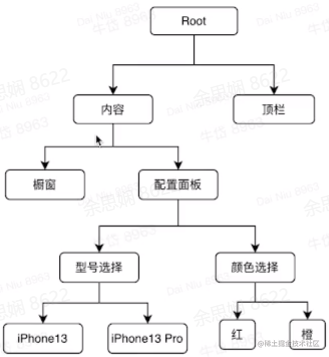
Componentization
- A component is an atomic component or a composition of components
- Components have internal state, invisible to the outside
- Parent components can pass state into child components to control their operation
State Ownership Problem
The current price belongs to the Root node! Because it needs to be passed down, this is actually unreasonable. The solution is discussed in the state management libraries section below.
State should belong to the nearest common ancestor found by going up from two (or more) nodes.
Thinking:
- Is React one-way data flow or two-way data flow?
Answer: One-way. Only parent components pass things to child components, but this doesn’t mean child components can’t change parent component state.
- How to solve the problem of unnecessary state elevation?
Answer: Through state management libraries, discussed next.
- After a component’s state changes, how is the DOM updated?
Answer: This is covered when explaining React’s implementation.
Component Design:
- Components declare the mapping between state and UI
- Components have two types of properties: Props (external) / State (internal)
- Props accept state passed from parent components
- State is internal properties
- Can be composed by other components
PS: Those who’ve learned mini programs should know that the two-way binding of properties in mini programs actually uses this concept too.
Lifecycle
Mount -> State Update -> Unmount
React (Hooks) Syntax
For React Hooks, refer to the official documentation. Most of the following content is from: Introducing Hooks - React (reactjs.org)
Hooks are a new addition in React 16.8. They let you use state and other React features without writing a class.
State Hook
import React, {useState} from 'react';
function Example() {
 // Declare a state variable called "count"
 const [count, setCount] = useState(0);
    return (
        <div>
         <p>You clicked {count} times</p>
   <button onClick={() => setCount(count + 1)}>
          Click me
            </button>
        </div>
    );
}
The function above displays a counter. When the button is clicked, the counter value automatically increments.
Here,
useStateis a Hook. We call it inside a function component to add some local state to it. React will preserve this state between re-renders.useStatereturns a pair of values: the current state and a function that updates it. You can call this function from an event handler or somewhere else.
The only argument to
useStateis the initial state. In the example above, since our counter starts from zero, the initial state is0. Note that unlikethis.state, the state here doesn’t have to be an object — though it can be if you want. This initial state argument is only used during the first render.
Hooks are functions that let you “hook into” React state and lifecycle features from function components.
You can use State Hook multiple times in a single component:
function ExampleWithManyStates() {
  // Declare multiple state variables!
  const [age, setAge] = useState(42);
  const [fruit, setFruit] = useState('banana');
  const [todos, setTodos] = useState([{ text: 'Learn Hooks' }]);
  // ...
}
Effect Hook
Side effects of a function refer to additional effects beyond the return value that affect the caller when calling the function. For example, modifying global variables (variables outside the function) or modifying parameters. A pure function is one without side effects — this was covered in the JS lesson.
For example, the following component sets the page title after React updates the DOM:
import React, { useState, useEffect } from 'react';

function Example() {
  const [count, setCount] = useState(0);

  // Similar to componentDidMount and componentDidUpdate:
  useEffect(() => {
    // Update the document title using the browser API
    document.title = `You clicked ${count} times`;
  });

  return (
    <div>
      <p>You clicked {count} times</p>
      <button onClick={() => setCount(count + 1)}>
        Click me
      </button>
    </div>
  );
}
When you call
useEffect, you’re telling React to run your “side effect” function after flushing changes to the DOM. Since side effects are declared inside the component, they have access to the component’s props and state.
Rules of Hooks
Hooks are JavaScript functions, but they come with two additional rules:
- Only call Hooks at the top level. Don’t call Hooks inside loops, conditions, or nested functions.
- Only call Hooks from React function components. Don’t call Hooks from regular JavaScript functions. (There’s one other place you can call Hooks — your own custom Hooks.)
We also provide a linter plugin to enforce these rules automatically. These rules might seem limiting or confusing at first, but they are essential for Hooks to work properly.
The above is from the official React documentation.
React’s Implementation
Three questions:
- JSX is syntax that doesn’t conform to JS standards
- When the returned JSX changes, how is the DOM updated?
- When State/Props update, the render function needs to be re-triggered
Problem 1
The solution is simple: convert JSX to valid JS syntax.
const element = (
  <h1 className="greeting">
    Hello, world!
  </h1>
);
// Equivalent to
const element = React.createElement(
  'h1',
  {className: 'greeting'},
  'Hello, world!'
);
Problem 2
The returned JSX is DOM-like but not actual DOM. DOM operations themselves are very performance-expensive. So we need to compute a diff between the returned JSX and the original DOM structure. But the diff algorithm itself can’t be too expensive — it should be as small and fast as possible.
Virtual DOM
Virtual DOM is an object maintained in JS memory that synchronizes with the real DOM. It has a tree structure similar to DOM and can establish a one-to-one relationship with the DOM.
This approach gives React a declarative API: You tell React what state you want the UI to be in, and React ensures the DOM matches that state. This frees you from attribute manipulation, event handling, and manual DOM updates that are necessary when building applications.
State update -> diff compare Virtual DOM with real DOM -> Re-render Virtual DOM to change real DOM
How to Diff?
Fewer updates <-> Trade-off <-> Faster computation
The perfect minimal diff algorithm requires O(n^3) complexity.
Sacrificing the theoretical minimum diff for speed yields an O(n) complexity algorithm that is locally optimal: Heuristic O(n) Algorithm.
-
Different element types -> Replace
-
Same type DOM elements -> Update
-
Same type component elements -> Recurse
This algorithm only traverses once to compute the diff.
This is also a drawback of React: when a component changes, all its child components re-render. To solve this, we need React state management libraries.
React State Management Libraries
Core Idea
Extract state outside the UI for unified management, but this reduces component reusability, so it’s generally used in business code. Any of the following frameworks work:
- Redux Chinese Documentation
- XState - JavaScript State Machines and Statecharts
- MobX Introduction - MobX Chinese Documentation
- Recoil Chinese Documentation | Recoil Chinese Website (recoiljs.cn)
State Machine
Transitions to the next state based on the current state when receiving external events.
Which states should go in the state management library?
- States that might be used by many levels of components
Application-Level Framework Overview
React itself doesn’t provide enough engineering capabilities, like routing, page configuration, etc.
- Next.js - React Application Development Framework: Silicon Valley star startup Vercel’s React development framework. Stable, great development experience, supports Unbundled Dev, SWC, etc. Also has a Serverless one-click deployment platform. Motto: “Let’s Make Web Faster”
- Modern.js - Modern Web Engineering System (modernjs.dev): Full-stack development framework by ByteDance’s Web Infra team. Built-in many out-of-the-box capabilities and best practices, reducing time spent researching and selecting tools.
- Get Started with Blitz (blitzjs.com): API-free full-stack development framework. No need to write API calls or CRUD logic during development. Suitable for tightly-knit small team projects with frontend and backend together.
Homework
- Under what circumstances will a React component’s render function be re-executed?
- What are the advantages and disadvantages of React’s functional programming approach vs. Vue’s template syntax-based frontend framework?
- Why does React recommend using composition for component reuse instead of inheritance? What’s the thinking behind this?
Personal thoughts
Summary and Reflections
This lesson provided an overview of React and its principles, component-based architecture, and some application-level frameworks.
Most of the content cited in this article comes from Teacher Niu Dai’s class and the official React documentation.
喜欢的话,留下你的评论吧~