

This article has been machine-translated from Chinese. The translation may contain inaccuracies or awkward phrasing. If in doubt, please refer to the original Chinese version.
Introduction to HTTP
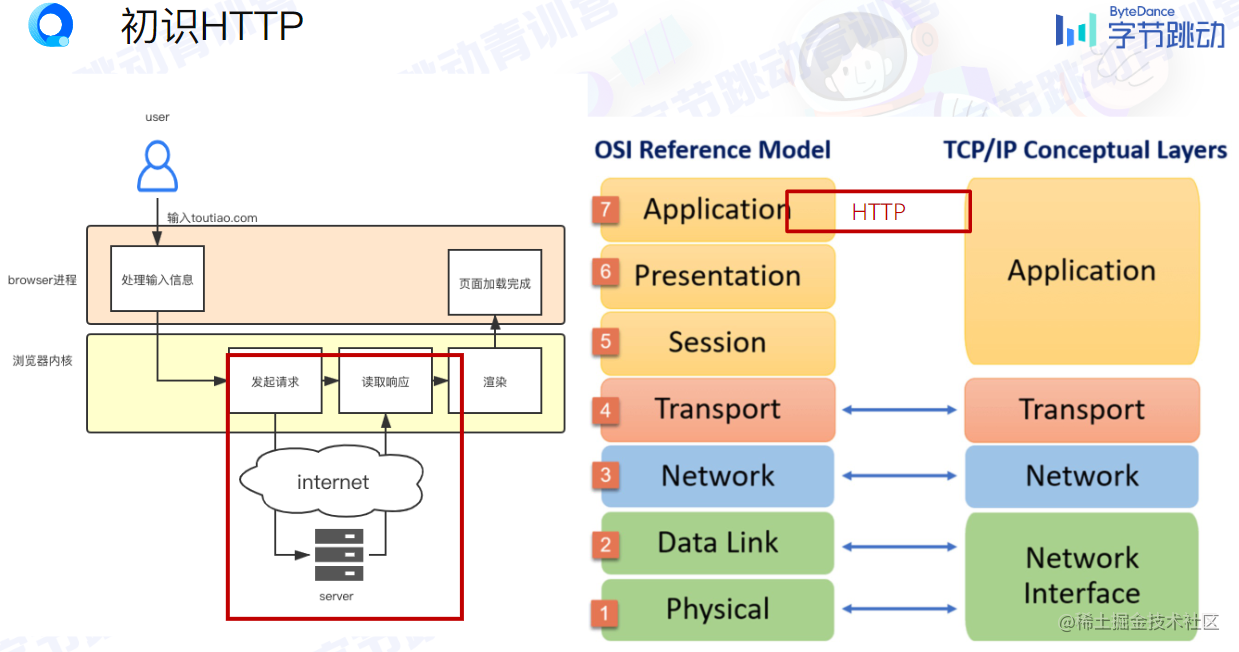
Enter URL -> browser process handles input -> browser kernel sends request to server -> browser kernel reads response -> browser kernel renders -> browser process completes page loading
-
Hyper Text Transfer Protocol (HTTP)
-
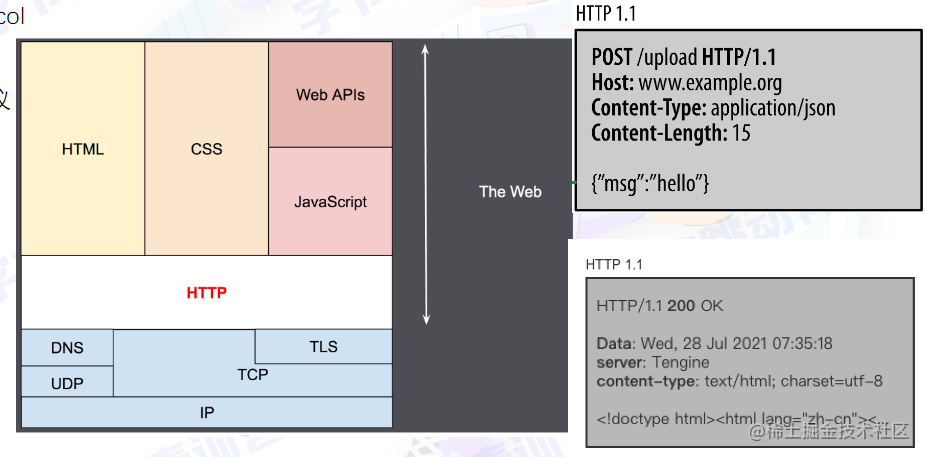
It is an application layer protocol, based on the transport layer TCP protocol
-
Request, Response
-
Simple and extensible (custom request headers can be defined, as long as client and server can understand each other)
-
Stateless
Protocol Analysis
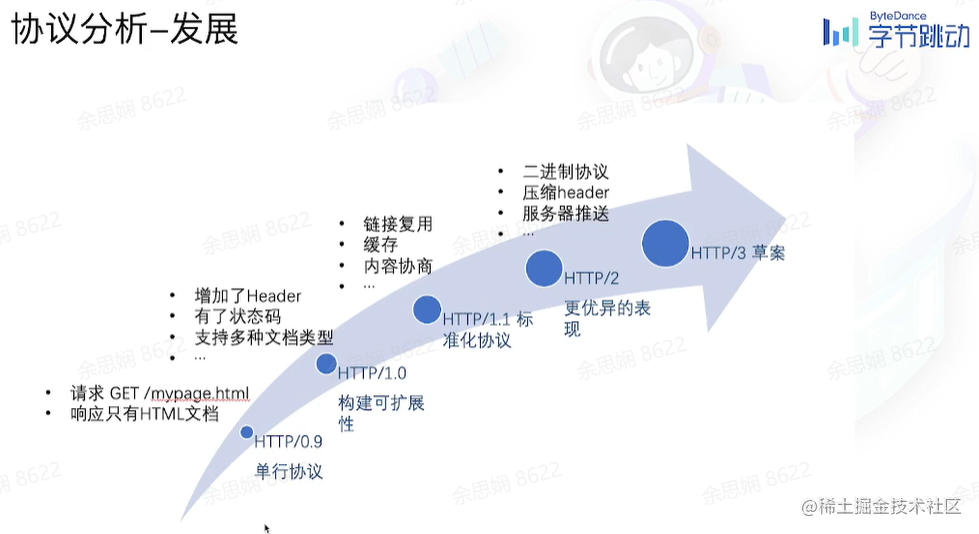
Development History
Message Structure
HTTP/1.1
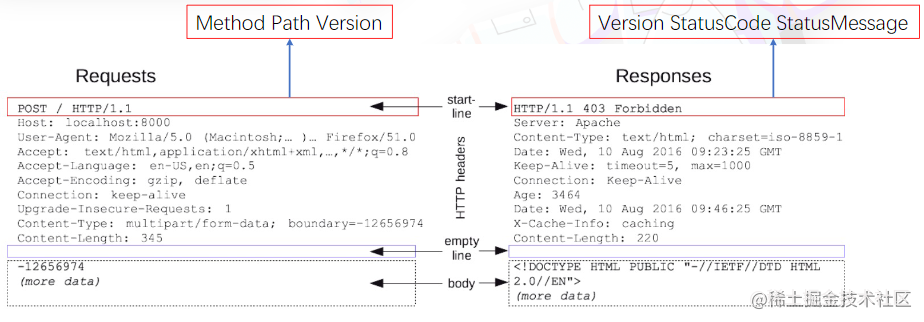
As shown, you can see the request headers, response status codes, etc.
| Method | Description |
|---|---|
| GET | Requests a representation of the specified resource. GET requests should only be used to retrieve data |
| POST | Submits an entity to the specified resource, often causing a state change or side effects on the server |
| PUT | Replaces all current representations of the target resource with the request payload |
| DELETE | Deletes the specified resource |
| HEAD | Requests a response identical to a GET request, but without the response body (rarely used) |
| CONNECT | Establishes a tunnel to the server identified by the target resource (rarely used) |
| OPTIONS | Describes the communication options for the target resource |
| TRACE | Performs a message loop-back test along the path to the target resource (rarely used) |
| PATCH | Applies partial modifications to a resource |
-
Safe: Methods that don’t modify server data, such as GET, HEAD, OPTIONS for reading data
-
Idempotent: The effect of executing the same request once or multiple times is the same, and the server state is the same. All safe methods are Idempotent, such as GET, HEAD, OPTIONS, PUT, DELETE
Status Codes
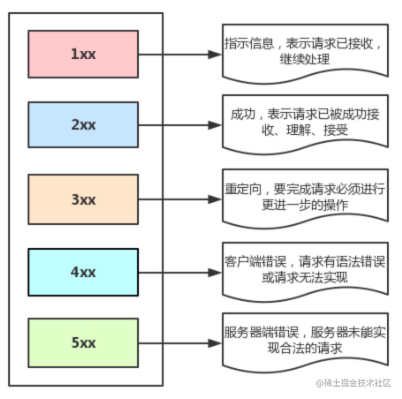
- 200 OK - Client request successful
- 301 - Resource (webpage, etc.) has been permanently moved to another URL
- 302 - Temporary redirect
- 401 - Unauthorized - Request not authorized
- 404 - Requested resource doesn’t exist, possibly entered wrong URL
- 500 - Unexpected internal server error
- 504 Gateway Timeout - The gateway or proxy server couldn’t get the desired response within the specified time
RESTful API
An API design style: REST - Representational State Transfer
- Each URI represents a resource
- Between client and server, a certain representation layer of this resource is transferred
- The client uses HTTP methods to operate on server-side resources, achieving “representation layer state transfer”
| Request | Return Code | Meaning |
|---|---|---|
| GET /zoos | 200 OK | List all zoos, server returned successfully |
| POST /zoos | 201 CREATED | Create a new zoo, server created successfully |
| PUT /zoos/ID | 400 INVALID REQUEST | Update a specific zoo’s info (provide all info); user’s request has errors, server didn’t create/modify data |
| DELETE /zoos/ID | 204 NO CONTENT | Delete a specific zoo, data deleted successfully |
Common Request Headers
| Request Header | Description |
|---|---|
| Accept | Accept types, indicating MIME types supported by the browser (corresponds to server’s Content-Type) |
| Content-Type | Type of entity content sent by the client |
| Cache-Control | Specifies caching mechanism for requests and responses, e.g., no-cache |
| If-Modified-Since | Corresponds to server’s Last-Modified, used to check if file has changed, accurate only to 1s |
| Expires | Cache control, won’t request within this time, uses cache directly, server time |
| Max-age | How many seconds the resource is cached locally, uses cache during valid time without requesting |
| If-None-Match | Corresponds to server’s ETag, used to check if file content changed (very precise) |
| Cookie | Will be automatically sent when there’s a cookie and same-domain access |
| Referer | Source URL of the page (applies to all request types, precise to detailed page address, commonly used for CSRF interception) |
| Origin | Where the original request was initiated from (only precise to port), Origin respects privacy more than Referer |
| User-Agent | Some necessary client information, such as UA headers |
Common Response Headers
| Response Header | Description |
|---|---|
| Content-Type | Type of entity content returned by the server |
| Cache-Control | Specifies caching mechanism for requests and responses, e.g., no-cache |
| Last-Modified | Last modification time of the requested resource |
| Expires | When the document should be considered expired and no longer cached |
| Max-age | How many seconds the client should cache local resources, effective when Cache-Control is enabled |
| ETag | Identifier for a specific version of the resource, ETags are like fingerprints |
| Set-Cookie | Set cookie associated with the page, server passes cookie to client through this header |
| Server | Some information about the server |
| Access-Control-Allow-Origin | Origin headers allowed by the server for requests (e.g., *) |
Caching
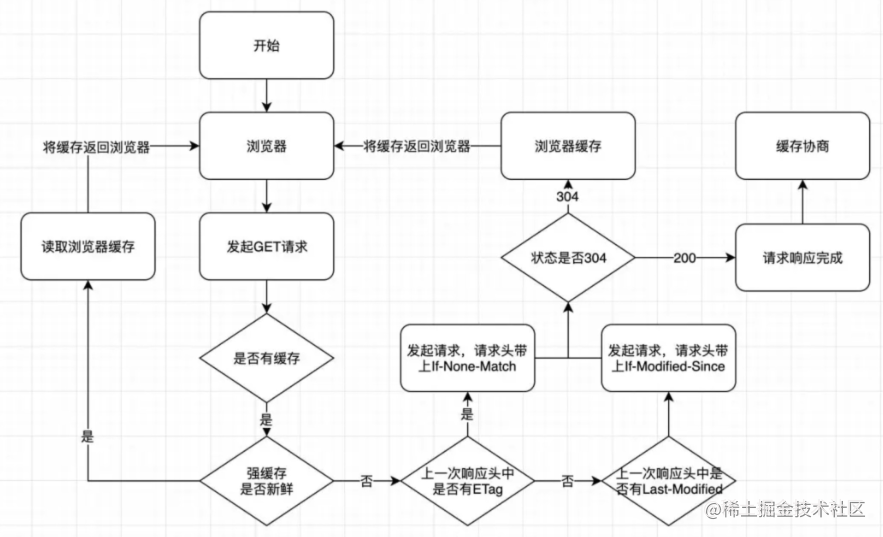
Strong Cache
Use it directly when available locally.
- Expires (expiration time), timestamp
- Cache-Control
- Cacheability
- no-cache: negotiated cache validation
- no-store: don’t use any cache
- public, private, etc.
- Expiration
- max-age: unit is seconds, maximum storage lifetime, relative to request time
- Revalidation/Reload
- must-revalidate: once the resource expires, it cannot be used until successfully validated with the origin server
- Cacheability
Negotiated Cache
Must communicate with the Server to confirm whether to use it.
- Etag/If-None-Match: identifier for a specific version of the resource, similar to a fingerprint
- Last-Modified/If-Modified-Since: last modification time (absolute)
Cookie
Set-Cookie - response
| Name=value | Various cookie names and values |
|---|---|
| Expires=Date | Cookie expiration date; when omitted, the Cookie is only valid while the browser is open |
| Path=Path | Limits the file directory scope for sending the specified Cookie, defaults to current |
| Domain=domain | Limits the domain where the cookie is effective, defaults to the server domain that created the cookie |
| secure | Cookie can only be sent over HTTPS secure connections |
| HttpOnly | JavaScript cannot access the Cookie |
| SameSite=[None|Strict|Lax] | None: sent with same-site and cross-site requests; Strict: sent only with same-site requests; Lax: sent with top-level navigation and GET requests from third-party sites |
Evolution
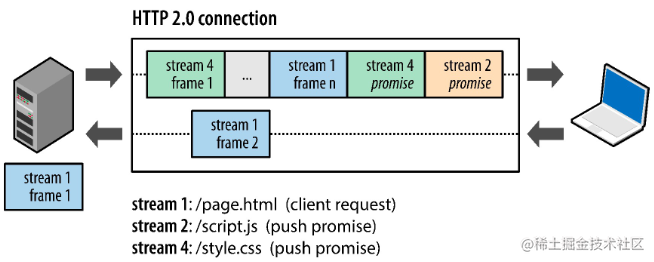
HTTP/2 Overview: Faster, more stable, more simple
-
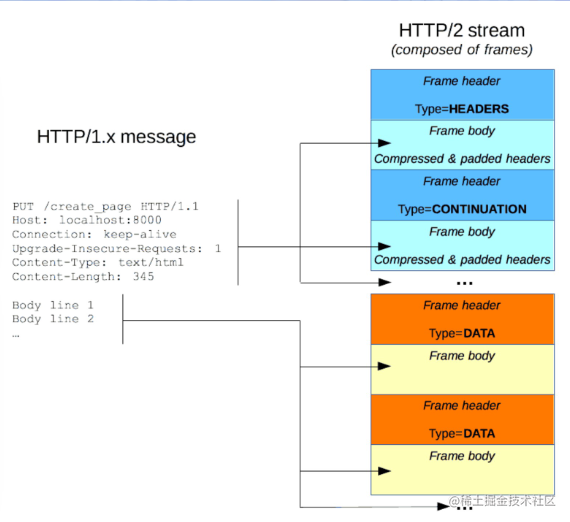
Frames
-
The smallest unit of HTTP/2 communication, each frame contains a frame header that at minimum identifies the data stream the frame belongs to.
-
1.0 transmits text, while 2 transmits binary data, which is more efficient. It also has new compression algorithms.
-
-
-
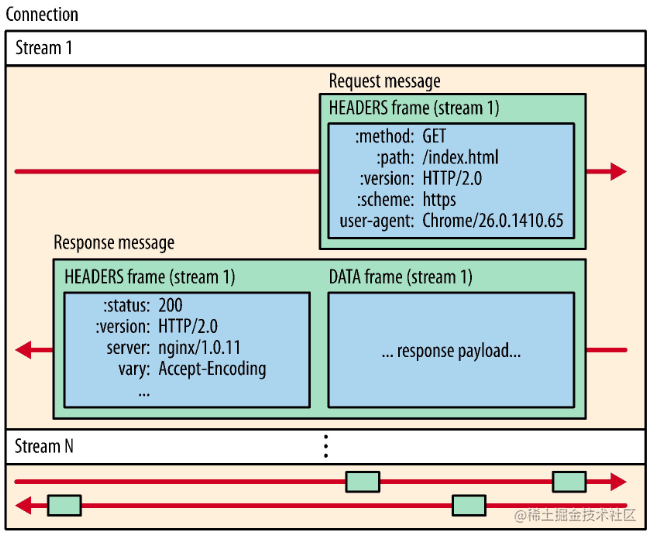
Messages: A complete series of frames corresponding to a logical request or response message.
-
Data Streams: Bidirectional byte streams within an established connection that can carry one or more messages.
-
Interleaved sending, receiver reorganizes.
-
-
HTTP/2 connections are all persistent, requiring only one connection per origin
-
Flow control: mechanism to prevent sender from sending too much data to receiver
-
Server push
HTTPS Overview
-
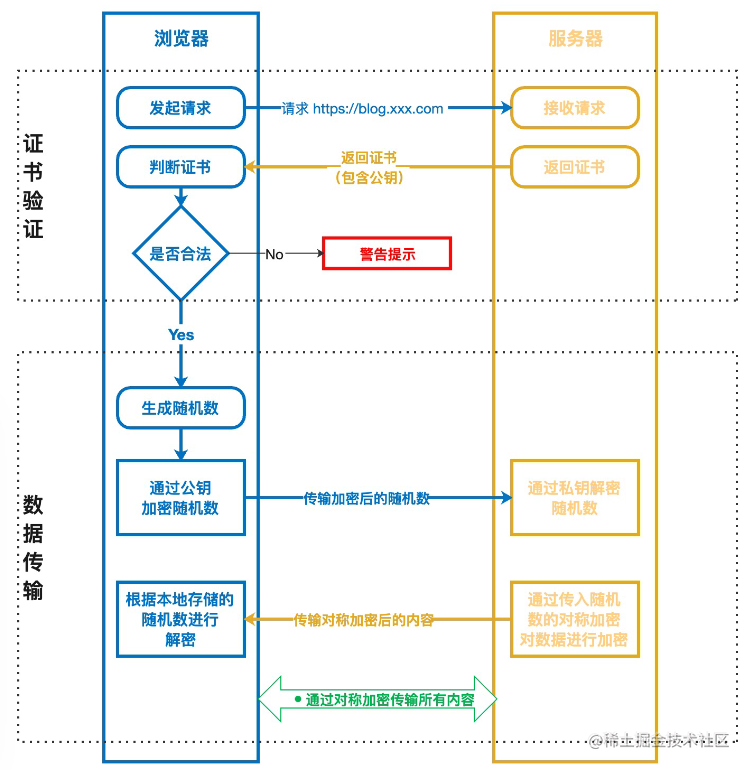
HTTPS: Hypertext Transfer Protocol Secure
-
Encrypted via TLS/SSL
-
Symmetric encryption: same key used for both encryption and decryption
-
Asymmetric encryption: two different keys needed: public key and private key
Common Scenario Analysis
Static Resources
Using Toutiao (Today’s Headlines) as an example, opening the network panel to check its requests and finding CSS file requests.
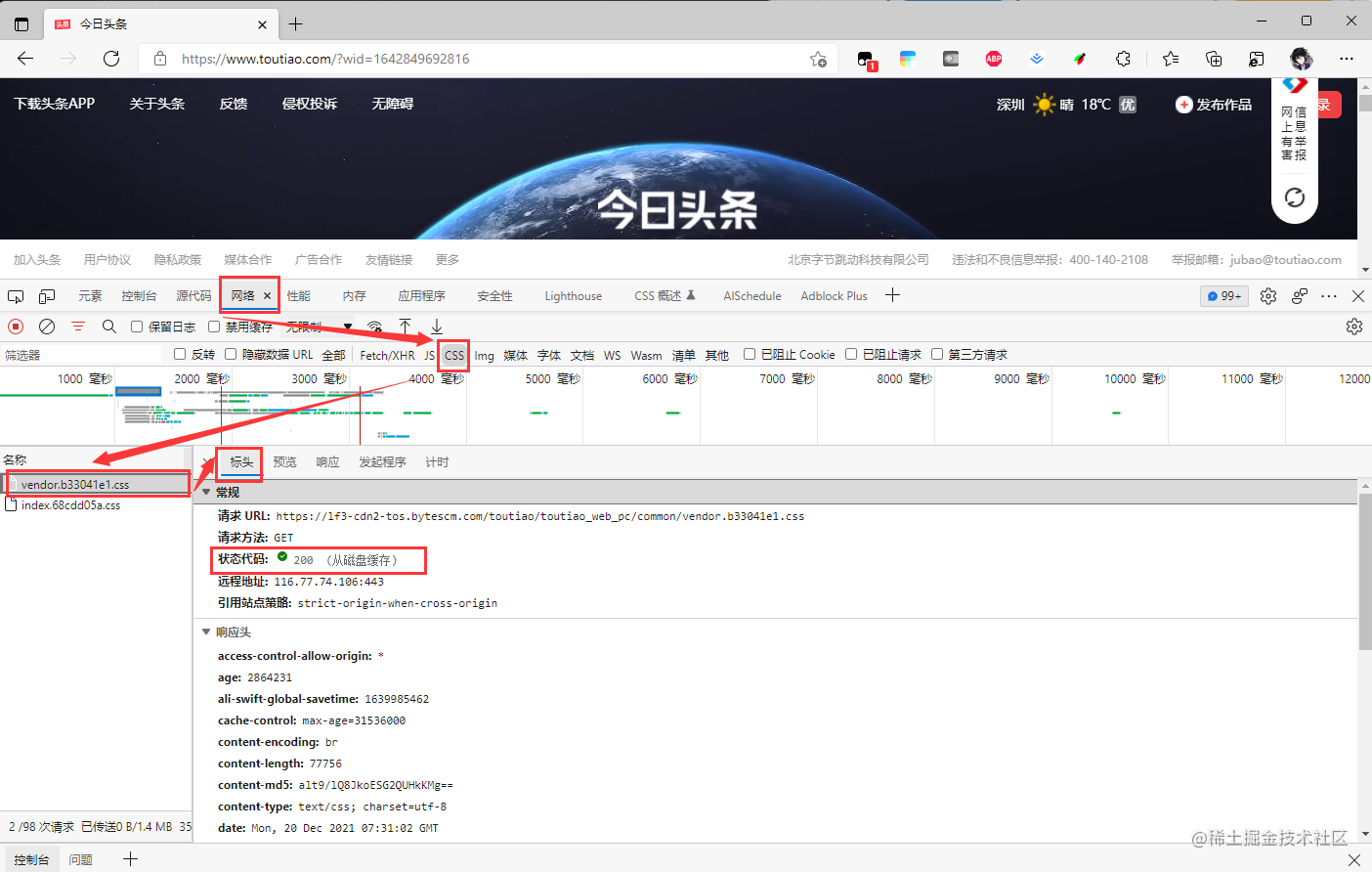
The returned status code is 200, but did it really make a request? (The parentheses say it - from disk cache)
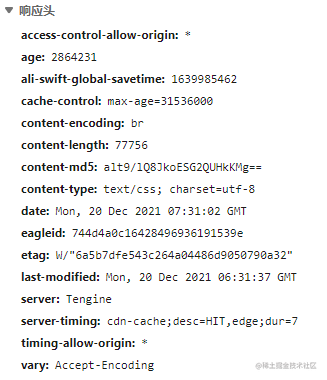
From the response headers above, we can see:
- Caching strategy?
- Strong cache (max-age=xxxxx)
- Cache-control: converted, 1 year
- Strong cache (max-age=xxxxx)
- Other information?
- Allows all domain access (access-control-allow-origin)
- Resource type: css (content-type)
Static resource strategy: Cache + CDN + filename hash
- CDN: Content Delivery Network
- Through user proximity and server load assessment, CDN ensures content is served to users in an extremely efficient manner
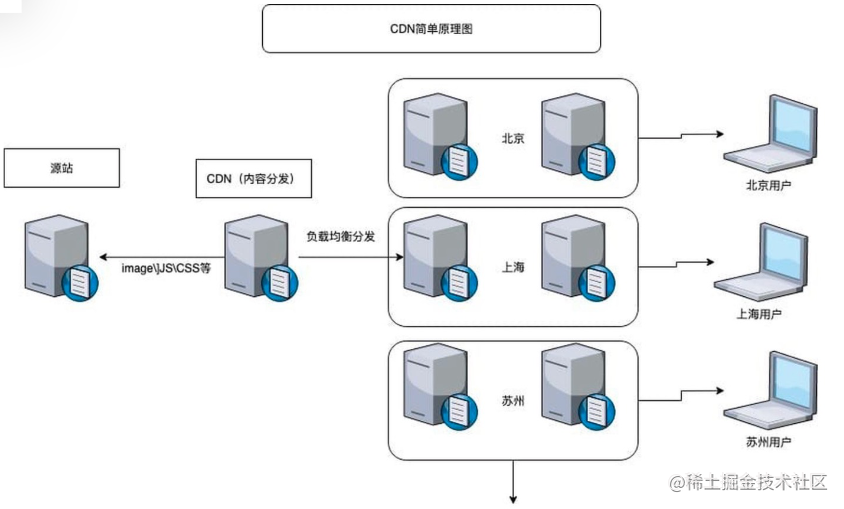
With such a long cache period, how do we ensure users get the latest content?
Filename hash - when file content changes, the filename changes/version number is added, so the cached file can’t match and must be re-requested.
Login - Cross-Origin
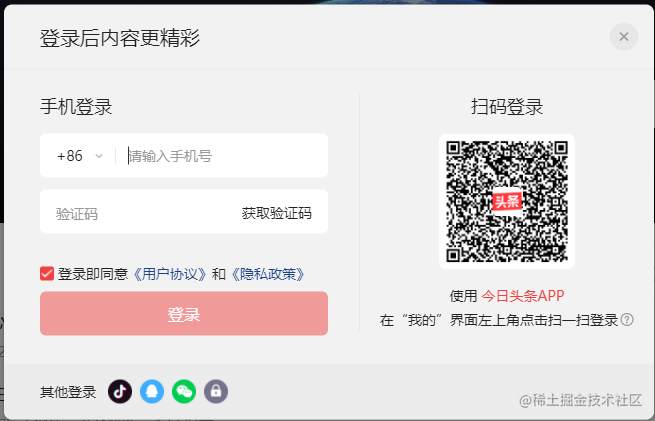
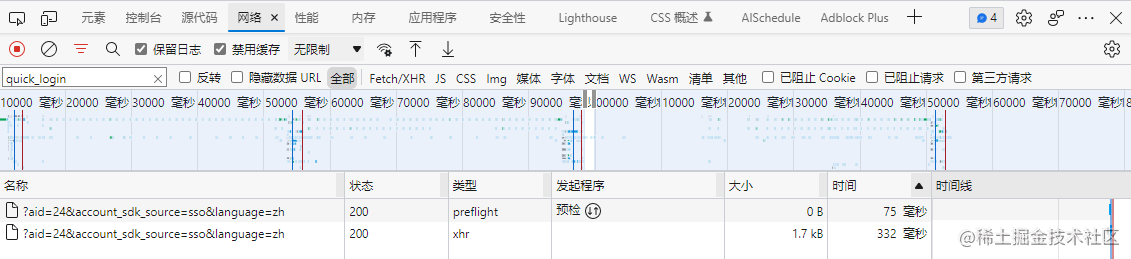
Cross-origin issues caused the request method to be OPTION.
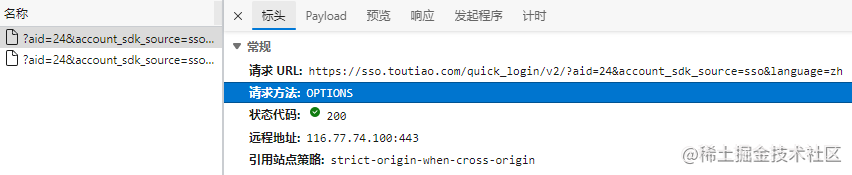
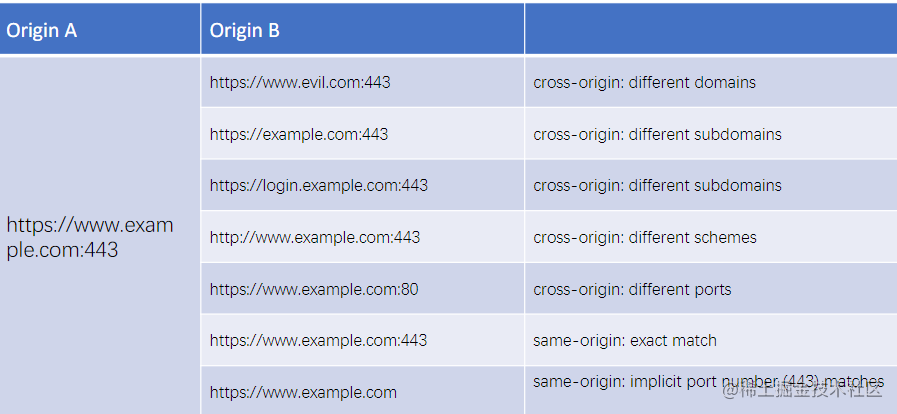
Protocol, hostname, port - if any one differs, a cross-origin issue occurs (HTTP’s default port is 443).
Solving Cross-Origin Issues
-
Cross-Origin Resource Sharing (CORS)
-
Cross-Origin Resource Sharing(CORS) is an HTTP header-based mechanism that allows a server to indicate any origins (domain, protocol, and port) other than its own from which a browser should permit loading resources. CORS also relies on a mechanism by which browsers make a “preflight” request to the server hosting the cross-origin resource, checking whether the server will permit the actual request. In that preflight, the browser sends headers indicating the HTTP method and headers that will be used in the actual request.For security reasons, browsers restrict cross-origin HTTP requests initiated from scripts. For example,
XMLHttpRequestand the Fetch API follow the same-origin policy. This means that web applications using these APIs can only request HTTP resources from the same origin the application was loaded from, unless the response includes the correct CORS headers. -
Preflight request: Determines whether the server allows the cross-origin request (complex requests)
-
Related protocol headers
- access-control-…
-
-
Proxy servers
- Same-origin policy is a browser security policy, not an HTTP one
-
Iframe - many inconveniences
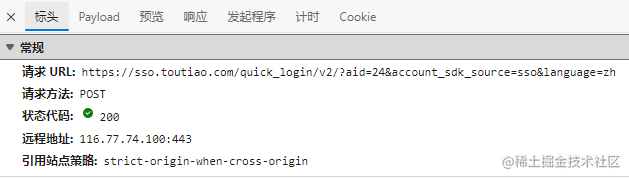
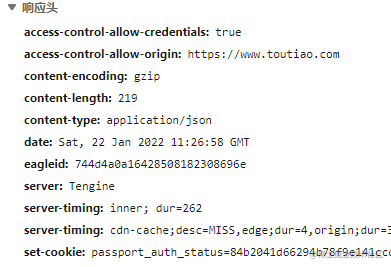
As shown above, what action was taken to what address during login?
- Used POST method
- Target domain: https://sso.toutiao.com
- Target: path/quick_login/v2/
What information was sent and returned?
- Sent information
- Post body, data format is form
- Expected data format is json
- Existing cookies
- Returned information
- Data format json
- Cookie setting information
So why can the login state be remembered the next time the page is visited?
Authentication
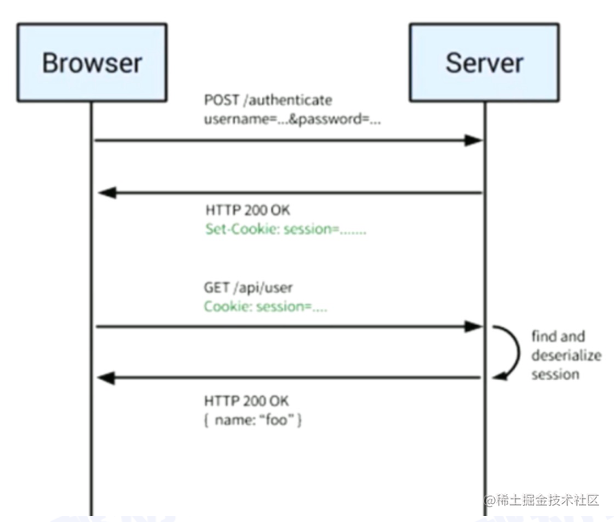
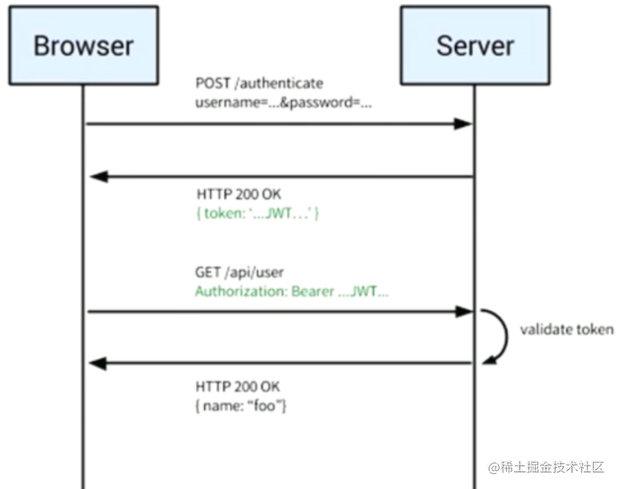
- Session + cookie (most portal websites use this)
- User submits a request to the server, including username, password, etc.
- Server processes and verifies correctness; if correct, returns a Session and sets it as a cookie (Set-Cookie: session = …)
- User’s subsequent requests: GET Cookie: session=…
- Server processes and verifies, then returns some login information
- JWT (JSON Web Token)
- Server doesn’t store locally
- The returned token is unique, with short login duration, etc.
- SSO: Single Sign On
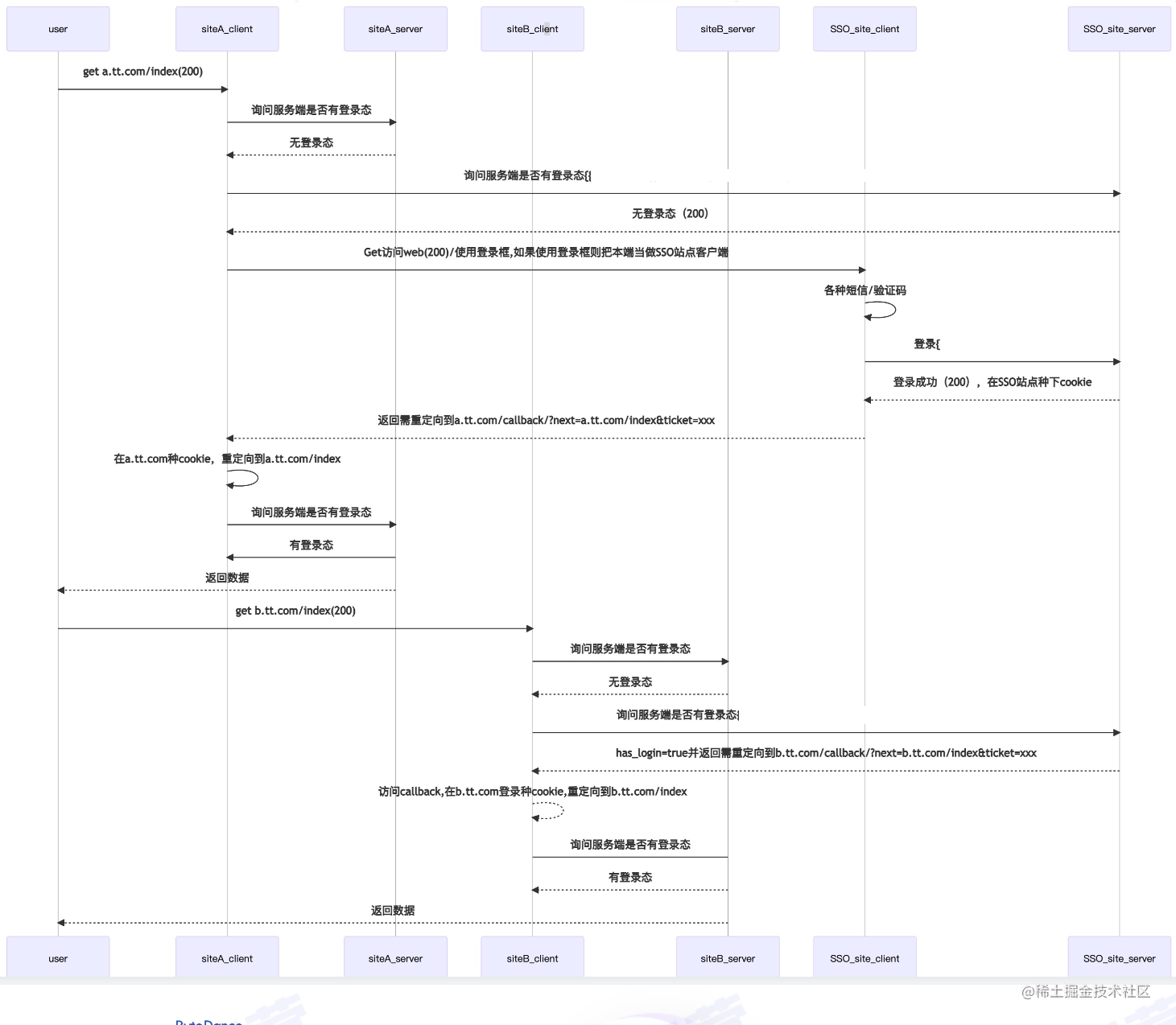
As shown in the diagram, the explanation is very clear.
Practical Applications
XMLHttpRequest - Web API Reference | MDN (mozilla.org)
AJAX via XHR
- XHR: XMLHttpRequest
- readyState
| 0 | UNSENT | Agent created, but open() method not yet called |
| 1 | OPENED | open() method has been called |
| 2 | HEADERS_RECEIVED | send() method has been called, headers and status are available |
| 3 | LOADING | Downloading; responseText property contains partial data |
| 4 | DONE | Download operation complete |
AJAX via Fetch
- Upgraded version of XMLHttpRequest
- Uses Promise
- Modular design with Response, Request, Header objects
- Supports chunked reading through data stream processing objects
Standard Library in Node: HTTP/HTTPS
- Default module, no additional dependencies needed Limited functionality / not very user-friendly
Commonly Used Request Library: axios
- Getting Started | Axios Chinese Documentation
- Supports both browser and Node.js environments
- Rich interceptors
// Global configuration
axios.defaults.baseURL = "https://api.example.com";
// Add request interceptor
axios.interceptors.request.use(function (config) {
 // Do something before sending the request
 return config;
}, function (error) {
 // Handle request error
 return Promise.reject(error);
});

// Send request
axios({
    method: 'get',
    url: 'https://test.com',
    responseType: 'stream
    }).then(function(response) {
    response.data.pipe(fs.createWriteStream('ada_lovelace.jpg'))
});
Network Optimization
-
HTTP/2 - A Real-World Performance Test and Analysis | CSS-Tricks - CSS-Tricks
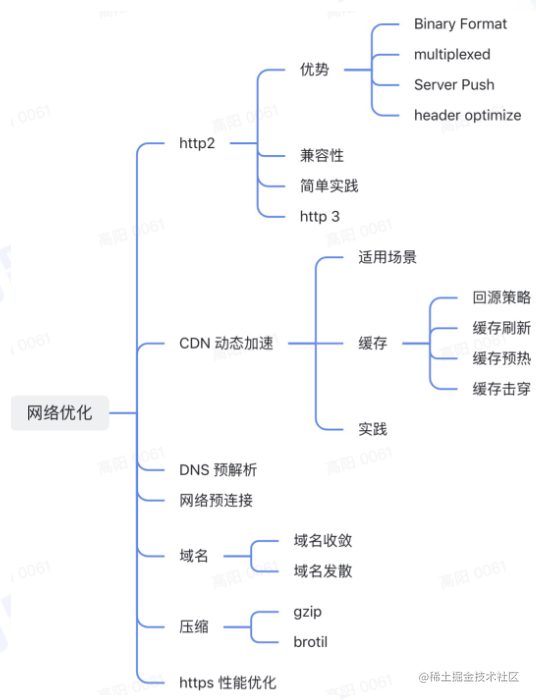
-
Pre-resolution, pre-connection, etc.
-
Retries are effective for ensuring stability, but prevent them from worsening bad situations (e.g., when the network connection is simply broken).
-
Use caching wisely as a last line of defense.
Learn More
HTTP Isn’t the Only Choice
Extension - Communication Methods
WebSocket
- A network technology for full-duplex communication between browsers and servers
- Typical scenario: high real-time requirements, e.g., chat rooms
- URL uses ws:// or wss:// prefix
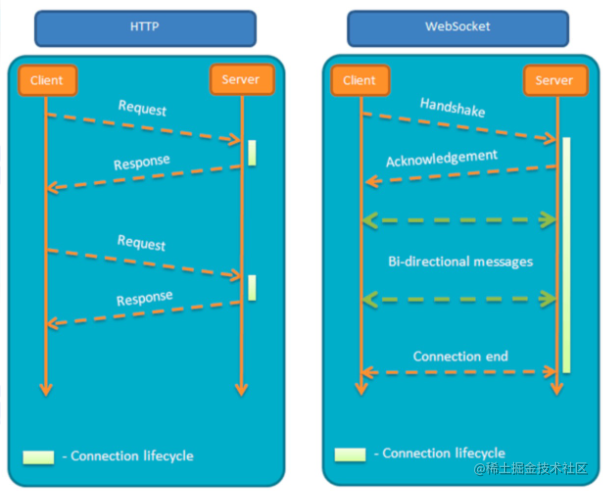
UDP
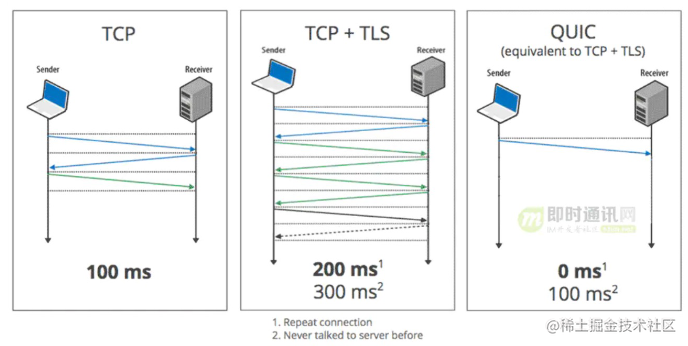
QUIC: Quick UDP Internet Connection, based on UDP
- 0-RTT connection establishment (except for first connection)
- TCP-like reliable transmission
- TLS-like encrypted transmission, supports perfect forward secrecy
- User-space congestion control, latest BBR algorithm
- Stream-based multiplexing like h2, but without TCP’s HOL problem
- Forward Error Correction (FEC)
- Connection migration similar to MPTCP
- Applications are still limited
Summary and Reflections
Today the instructor introduced HTTP and its common protocol analysis, message structure, caching strategy analysis, and explained its specific business scenario usage with a super gentle voice.
Most of the content cited in this article comes from Teacher Yang Chaonan’s class - HTTP Practical Guide.
喜欢的话,留下你的评论吧~