

This article has been machine-translated from Chinese. The translation may contain inaccuracies or awkward phrasing. If in doubt, please refer to the original Chinese version.
This lesson covered TypeScript’s use cases and basic syntax, advanced type applications, type protection and type guards
What is TypeScript
Development History
- 2012-10: Microsoft released the first version of TypeScript (0.8)
- 2014-10: Angular released version 2.0 based on TypeScript
- 2015-04: Microsoft released Visual Studio Code
- 2016-05: @types/react was released, enabling TypeScript for React development
- 2020-09: Vue released version 3.0 with official TypeScript support
- 2021-11: v4.5 was released
Why TypeScript
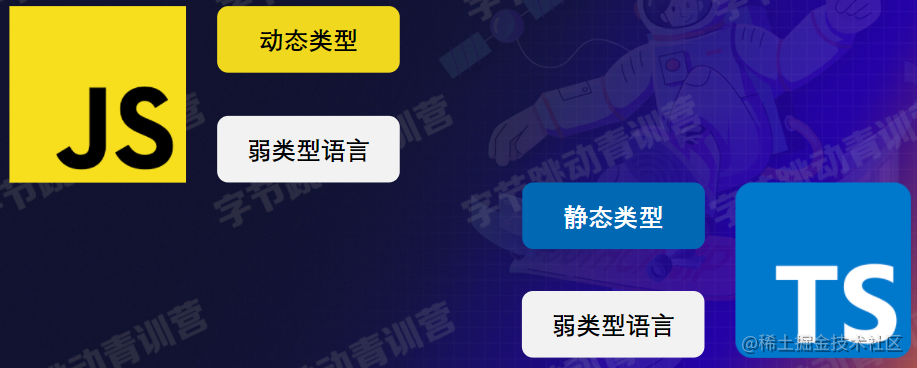
Dynamic types perform type matching during execution. JS’s weak typing performs implicit type conversion at runtime, while static types do not.
TypeScript is a static type language: like Java, C/C++, etc.
- Enhanced readability: TSDoc-based syntax parsing, IDE enhancement
- Enhanced maintainability: exposes most errors at compile time
- In large multi-person collaborative projects, you can achieve better stability and development efficiency
TypeScript is a superset of JS
- Contains and is compatible with all JS features, supports coexistence
- Supports gradual introduction and upgrade
Basic Syntax
Basic Data Types
JS ==> TS
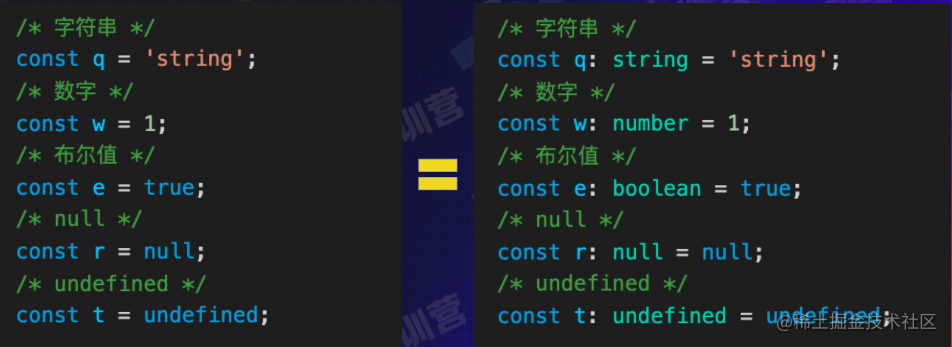
As you can see, the TS type definition syntax is: let variableName: type = value;
Object Types
Interfaces - TypeScript Chinese Website
// Create an object with the following properties, typed as IBytedancer
// I indicates a custom type (a naming convention) to distinguish from classes and objects
const bytedancer: IBytedancer = {
  jobId: 9303245,
  name: 'Lin',
  sex: 'man',
  age: 28,
  hobby: 'swimming',
};
// Define a type IBytedancer
interface IBytedancer {
  /* Readonly property readonly: constrains property from being assigned outside object initialization */
  readonly jobId: number;
  name: string;
  sex: 'man' | 'woman' | 'other';
  age: number;
  /* Optional property: defines that this property may not exist */
  hobby?: string;
  /* Index signature: constrains all object properties to be subtypes of this property */
  [key: string]: any; // any type
}
/* Error: Cannot assign to "jobId" because it is a read-only property */
bytedancer.jobId = 12345;
/* Success: with index signature, any property can be added */
bytedancer.plateform = 'data';
/* Error: missing property "name", while hobby is optional */
const bytedancer2: IBytedancer = {
  jobId: 89757,
  sex: 'woman',
  age: 18,
};
Function Types
JS:
function add(x, y!) {
 return x + y;
}
const mult = (x, y) =>  x * y;
TS: Functions - TypeScript Chinese Website
function add(x: number, y: number): number {
  return x + y;
}
const mult: (x: number, y: number) => number = (x, y) => x * y;
// Simplified syntax, defining interface IMult
interface IMult {
  (x: number, y: number): number;
}
const mult: IMult = (x, y) => x * y;
As you can see, the format is function functionName(parameter: type...): returnType
Function Overloading
/* Overload the getDate function, timestamp is an optional parameter */
function getDate(type: 'string', timestamp?: string): string;
function getDate(type: 'date', timestamp?: string): Date;
function getDate(type: 'string' | 'date', timestamp?: string): Date | string {
  const date = new Date(timestamp);
  return type === 'string' ? date.toLocaleString() : date;
}
const x = getDate('date'); // x: Date
const y = getDate('string', '2018-01-10'); // y: string
The simplified form is as follows:
interface IGetDate {
  (type: 'string', timestamp?: string): string; // Changing the return type to any here would make it pass
  (type: 'date', timestamp?: string): Date;
  (type: 'string' | 'date', timestamp?: string): Date | string;
}
/* Error: Type "(type: any, timestamp: any) => string | Date" is not assignable to type "IGetDate".
 Type "string | Date" is not assignable to type "string".
 Type "Date" is not assignable to type "string". ts(2322) */
const getDate2: IGetDate = (type, timestamp) => {
  const date = new Date(timestamp);
  return type === 'string' ? date.toLocaleString() : date;
};
Array Types
type is used to give a type a new name, similar to typedef in C++
/* "Type + square brackets" notation */
type IArr1 = number[];
/* Generic notation - these two are most commonly used */
type IArr2 = Array<string | number | Record<string, number>>;
/* Tuple notation */
type IArr3 = [number, number, string, string];
/* Interface notation */
interface IArr4 {
  [key: number]: any;
}

const arrl: IArr1 = [1, 2, 3, 4, 5, 6];
const arr2: IArr2 = [1, 2, '3', '4', { a: 1 }];
const arr3: IArr3 = [1, 2, '3', '4'];
const arr4: IArr4 = ['string', () => null, {}, []];
TypeScript Supplementary Types
- Void type: represents no assignment
- Any type: is a subtype of all types
- Enum type: supports forward and reverse mapping from enum values to enum names
/* Void type, represents no assignment */
type IEmptyFunction = () => void;
/* Any type, is a subtype of all types */
type IAnyType = any;
/* Enum type: supports forward and reverse mapping from enum values to enum names */
enum EnumExample {
  add = '+',
  mult = '*',
}
EnumExample['add'] === '+';
EnumExample['+'] === 'add';
enum ECorlor {
  Mon,
  Tue,
  Wed,
  Thu,
  Fri,
  Sat,
  Sun,
}
ECorlor['Mon'] === 0;
ECorlor[0] === 'Mon';
/* Generics */
type INumArr = Array<number>;
TypeScript Generics
Generics - if you’ve learned C++ before, you know what this is. It’s similar to C++: a feature that doesn’t specify the concrete type in advance, but specifies the type when used
function getRepeatArr(target) {
 return new Array(100).fill(target);
}
type IGetRepeatArr = (target: any) => any[];
/* A feature that doesn't specify the concrete type in advance, but specifies the type when used */
type IGetRepeatArrR = <T>(target: T) => T[];
Generics can also be used in the following scenarios:
/* Generic interface & multiple generics */
interface IX<T, U> {
  key: T;
  val: U;
}
/* Generic class */
class IMan<T> {
  instance: T;
}
/* Generic alias */
type ITypeArr<T> = Array<T>;
Generics can also constrain scope
/* Generic constraint: restricts the generic to conform to string */
type IGetRepeatStringArr = <T extends string>(target: T) => T[];
const getStrArr: IGetRepeatStringArr = (target) => new Array(100).fill(target);
/* Error: Argument of type "number" is not assignable to parameter of type "string" */
getStrArr(123);

/* Generic parameter default type */
type IGetRepeatArr<T = number> = (target: T) => T[]; // Similar to default assignment in structures
const getRepeatArr: IGetRepeatArr = (target) => new Array(100).fill(target); // Here IGetRepeatArr is a type alias, no argument is passed to this type alias
/* Error: Argument of type "string" is not assignable to parameter of type "number" */
getRepeatArr('123');
Type Aliases & Type Assertions
Type Assertions
Sometimes you’ll encounter a situation where you know more about a value’s details than TypeScript does. Usually this happens when you clearly know an entity has a more specific type than its current type.
Through type assertions, you can tell the compiler, “trust me, I know what I’m doing”. Type assertions are like type casting in other languages, but they don’t perform special data checking or restructuring. They have no runtime impact and only work at compile time. TypeScript assumes that you, the programmer, have performed the necessary checks.
let someValue: any = 'this is a string';

let strLength: number = (someValue as string).length;
/* Defined the alias type for IObjArr through the type keyword */
type IObjArr = Array<{
 key: string;
 [objKey: string]: any;
}>
function keyBy<T extends IObjArr>(objArr: Array<T>) {
 /* When type is not specified, result type is {} */
 const result = objArr.reduce((res, val, key) => {
  res[key] = val;
  return res;
 }, {});
    /* Assert result type as the correct type using the as keyword */
    return result as Record<string, T> ;
}
There are a few points to note in the above code:
reduce() executes a reducer function (in ascending order) you provide on each element of the array, consolidating results into a single return value.
Syntax:
arr.reduce(callback(accumulator, currentValue[, index[, array]])[, initialValue])
String/Number Literals
/* Allows specifying fixed values that strings/numbers must have */
/* IDomTag must be one of 'html', 'body', 'div', 'span' */
type IDomTag = 'html' | ' body' | 'div' | 'span';
/* IOddNumber must be one of 1, 3, 5, 7, 9 */
type IOddNumber = 1 | 3 | 5 | 7 | 9;
Advanced Types
Union/Intersection Types
Writing types for a book list -> TS type declarations are verbose with much repetition. Advanced Types
const bookList = [
  {
    // Plain JS
    author: 'xiaoming',
    type: 'history',
    range: '2001 -2021',
  },
  {
    author: 'xiaoli',
    type: 'Story',
    theme: 'love',
  },
];
// TS verbose version
interface IHistoryBook {
  author: String;
  type: String;
  range: String;
}
interface IStoryBook {
  author: String;
  type: String;
  theme: String;
}
type IBookList = Array<IHistoryBook | IStoryBook>;- Union type: IA | IB; A union type represents a value that can be one of several types
- Intersection type: IA & IB; Multiple types overlaid into one type that contains all the features of the required types
The above code can be simplified with TS to:
type IBookList = Array<
  {
    author: string;
  } & (
    | {
        type: 'history';
        range: string;
      }
    | {
        type: 'story';
        theme: string;
      }
  )
>;
/* Restricts author to string type only, while type can only be one of 'history'/'story', and different types may have different properties */
Type Protection and Type Guards
- When accessing union types, for program safety, only the intersection of the union type can be accessed
interface IA {
  a: 1;
  a1: 2;
}
interface IB {
  b: 1;
  b1: 2;
}
function log(arg: IA | IB) {
  /* Error: Property "a" does not exist on type "IA | IB". Property "a" does not exist on type "IB"
    Conclusion: When accessing union types, for program safety, only the intersection of the union type can be accessed */

  if (arg.a) {
    console.log(arg.a1);
  } else {
    console.log(arg.b1);
  }
}
The above error can be resolved through type guards: define a function whose return value is a type predicate, effective within the child scope
interface IA {
  a: 1;
  a1: 2;
}
interface IB {
  b: 1;
  b1: 2;
}

/* Type guard: define a function. Its return value is a type predicate, effective within the child scope */
function getIsIA(arg: IA | IB): arg is IA {
  return !!(arg as IA).a;
}
function log2(arg: IA | IB) {
  /* No more errors */
  if (getIsIA(arg)) {
    console.log(arg.a1);
  } else {
    console.log(arg.b1);
  }
}
Or use typeof and instanceof checks
// Implement function reverse that can reverse arrays or strings
function reverse(target: string | Array<any>) {
  /* typeof type protection */
  if (typeof target === 'string') {
    return target.split('').reverse().join('');
  }
  /* instanceof type protection */
  if (target instanceof Object) {
    return target.reverse();
  }
}
It won’t always be this troublesome. In fact, only when two types have no overlap do you need type guards. Like the book example above, automatic type inference can be performed.
// Implement the logBook function type
// The function accepts a book type and logs its related characteristics
function logBook(book: IBookItem) {
 // Union type + type protection = automatic type inference
 if (book.type === 'history'){
  console.log(book.range)
    } else{
        console.log book.theme);
    }
}
Let’s look at another case: implement a subset-safe merge function that merges sourceObj into targetObj, where sourceObj must be a subset of targetObj
function merge1(sourceObj, targetObj) {
  // In JS, implementing this without pollution is complex
  const result = { ...sourceObj };
  for (let key in targetObj) {
    const itemVal = sourceObj[key];
    itemVal && (result[key] = itemVal);
  }
  return result;
}
function merge2(sourceObj, targetObj) {
  // If the types of these two parameters are correct, you can do this
  return { ...sourceObj, ...targetObj };
}
A simple approach would be to write two types in TS for validation, but this results in verbose implementation, adding to target requires source to be updated accordingly, maintaining duplicate x, y
interface ISource0bj {
  x?: string;
  y?: string;
}
interface ITarget0bf {
  x: string;
  y: string;
}
type IMerge = (source0bj: ISource0bj, target0bj: ITarget0bj) => ITargetObj;
/* Type implementation is verbose: if obj type is complex, declaring source and target requires
repeating a lot of code twice
Error-prone: if target adds/removes keys, source needs to be updated accordingly */
Improving with generics, here are several key knowledge points:
- Partial: A common task is to make every property of a known type optional
TypeScript provides a way to create new types from old ones — mapped types. In mapped types, the new type transforms each property in the old type in the same way. (Just use it directly, it’s built into TS)
- The keyword keyof is equivalent to getting all keys of an object as string literals
- The keyword in is equivalent to getting one possible value from string literals, combined with generic P, it represents each key
- The keyword ?, by setting object optional options, can automatically infer subset types
interface IMerge {
  <T extends Record<string, any>>(sourceObj: Partial<T>, targetObj: T): T;
}
// Partial internal implementation
type IPartial<T extends Record<string, any>> = {
  [P in keyof T]?: T[P];
};
// Index types: keyword [keyof], equivalent to getting all keys of an object as string literals, e.g.
type IKeys = keyof { a: string; b: number }; // => type IKeys ="a" | "b"
// Keyword [in], equivalent to getting one possible value from string literals, combined with generic P, represents each key
// Keyword [ ? ], by setting object optional options, can automatically infer subset types
Function Return Value Types
Function return value types are not clear at definition time, and should also be expressed through generics
The code below: delayCall accepts a function as input, implements a 1s delay before running function func, returns a promise whose result is the return result of the input function
// How to implement the type declaration for function delayCall
// delayCall accepts a function as input, implements a 1s delay before running the function
// Returns a promise whose result is the return result of the input function
function delayCall(func) {
    return new Promisd(resolve => {
        setTimeout(() => {
            const result= func );
            resolve(result);
        },1000);
    });
}-
The keyword extends, when appearing with generics, indicates type inference. Its expression can be compared to a ternary expression
- Like
T === judgedType ? TypeA : TypeB->T extends judgedType ? TypeA : TypeB
- Like
-
The keyword infer, appearing in type inference, indicates defining a type variable that can be used to refer to a type
A simple infer example:
type ParamType<T> = T extends (...args: infer P) => any ? P : T;In this conditional statement
T extends (...args: infer P) => any ? P : T,infer Prepresents the function parameters to be inferred.The entire statement means: if
Tis assignable to(...args: infer P) => any, then the result is the parameterPfrom the(...args: infer P) => anytype, otherwise it returnsT.- Here it’s equivalent to referring to the function’s return value type as R
type IDelayCall = <T extends () => any>(func: T) => ReturnType<T>;
type IReturnType<T extends (...args: any) => any> = T extends (...args: any) => inferR ? R : any;

// Keyword [extends] when appearing with generics, indicates type inference, its expression can be compared to a ternary expression
// Like T === judgedType ? TypeA : TypeB
// Keyword [infer] appearing in type inference, indicates defining a type variable that can be used to refer to a type
// In this scenario, the function's return value type is used as a variable, represented by the new generic R, used in the type inference match result
Engineering Application
TypeScript Engineering Application — Web
- Configure webpack loader related configuration
- Configure tsconfig.js file (can define loose to strict)
- Run webpack to start/build
- When the loader processes TS files, it performs compilation and type checking
Related loaders:
- or babel-loader
TypeScript Engineering Application — Node
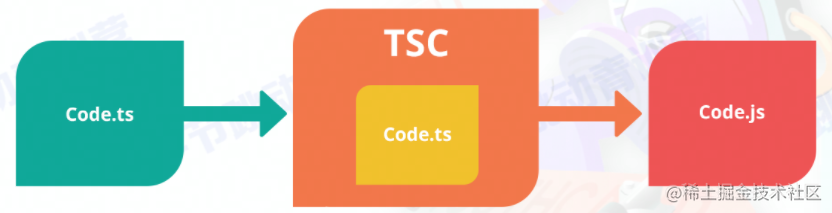
Using TSC for compilation
- Install Node and npm
- Configure tsconfig.js file
- Use npm to install tsc
- Use tsc to compile and get JS files
Summary and Reflections
This lesson covered TypeScript’s use cases and basic syntax, comparison with JS, advanced type applications, and later delved deeper into type protection and type guards, finally summarizing how TypeScript is applied in engineering. TypeScript, as a superset of JS, adds type checking functionality that can expose errors in code at the compile stage — something dynamic types like JS lack. In large multi-person collaborative projects, using TS often results in better stability and development efficiency.
Most of the content cited in this article comes from Teacher Lin Huang’s class and the official TS documentation~
喜欢的话,留下你的评论吧~