

This article has been machine-translated from Chinese. The translation may contain inaccuracies or awkward phrasing. If in doubt, please refer to the original Chinese version.
Web Multimedia History
- PC era: Flash and other playback plugins, rich clients.
- Mobile internet era: Flash and others were gradually phased out, HTML5 emerged, but its supported video formats were limited
- Media Source Extensions, supporting multiple video formats, etc.
Fundamental Knowledge
Encoding Formats
Image Basic Concepts
- Image resolution: Used to determine the pixel data that makes up an image, referring to the number of pixels an image has in the horizontal and vertical directions.
- Image depth: Image depth refers to the number of bits needed to store each pixel. Image depth determines the number of possible colors or possible grayscale levels for each pixel.
- For example, a color image uses R, G, B three components per pixel, each component using 8 bits, so the pixel depth is 24 bits, and the number of representable colors is 2^24, which is 16,777,216;
- While a monochrome image requires 8 bits per pixel, so the pixel depth is 8 bits, with a maximum of 2^8, which is 256 grayscale levels.
- Image resolution and image depth together determine the size of an image~
Video Basic Concepts
- Resolution: the image resolution of each frame
- Frame rate: the number of video frames contained in a video per unit of time
- Bitrate: refers to the amount of data transmitted per unit of time for a video, usually measured in kbps, meaning kilobits per second.
- Resolution, frame rate, and bitrate together determine the size of a video
Types of Video Frames
I-frame, P-frame, B-frame
I-frame (Intra-coded frame): An independent frame that carries all its own information, can be decoded independently without relying on other frames
P-frame (Predictive-coded frame): Requires referencing the preceding I-frame or P-frame for encoding
B-frame (Bi-directional predictive-coded frame): Depends on both preceding and following frames, representing the difference between the current frame and surrounding frames
1 -> 2 -> 3 ->……
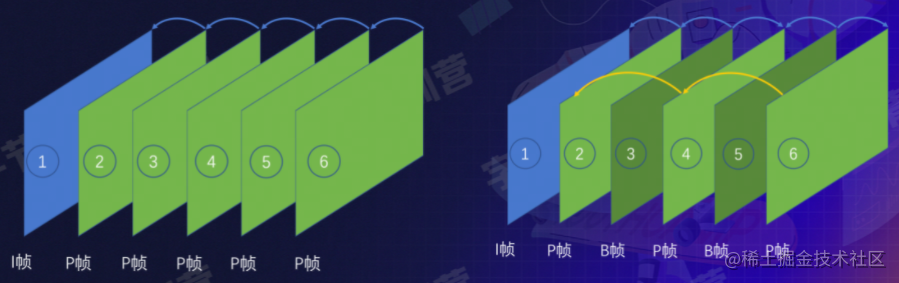
DTS (Decode Time Stamp): Determines when the bitstream should be sent to the decoder for decoding.
PTS (Presentation Time Stamp): Determines when the decoded video frame should be displayed
When no B-frames exist, the DTS order and PTS order should be the same
GOP (Group of Picture)
The interval between two I-frames, typically 2~4 seconds
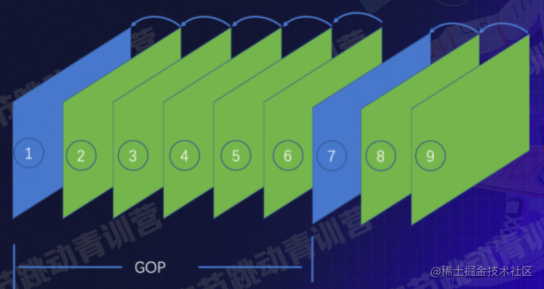
If there are many I-frames, the video will be larger
Why Do We Need Encoding?
Video resolution: 1920 x 1080
Then the size of one image in the video: 1920 x 1080 x 24/8 = 6,220,800 Bytes (5.2M)
Then for a video at 30FPS, 90 minutes long, the total size would be: 933GB, way too large!
Not to mention higher frame rates like 60FPS…
What does encoding compress away?
- First, spatial redundancy:

- Temporal redundancy: Only the ball’s position has changed below, everything else remains the same

-
Coding redundancy: For an image like this, blue can be represented by 1 and white by 0 (since there are only two colors, using something like Huffman encoding)

-
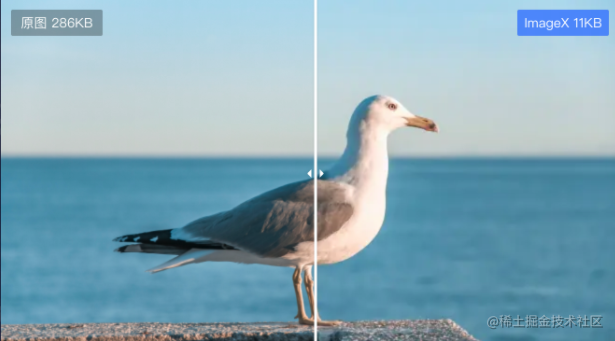
Visual redundancy
Encoding Data Processing Flow
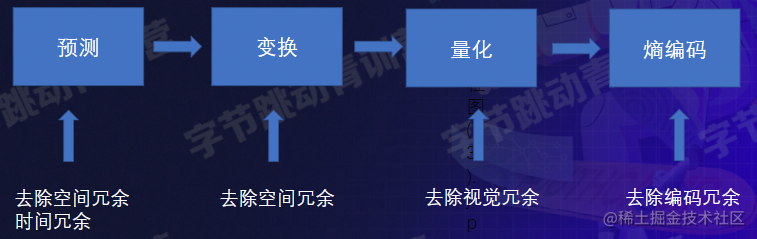
Removing spatial and temporal redundancy through prediction -> Transform to remove spatial redundancy
- Quantization removes visual redundancy: removing things the visual system can barely perceive
- Entropy encoding removes coding redundancy: frequently occurring items require shorter encoding
Container Formats
The video encoding described above stores only pure video information
Container format: a container for storing audio, video, images, or subtitle information

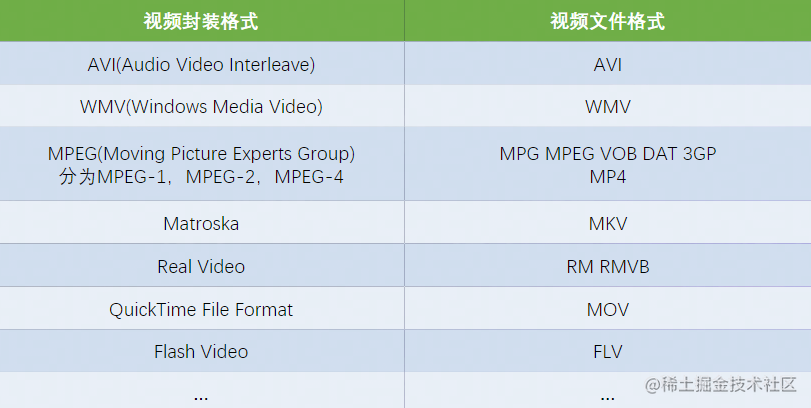
Multimedia Elements and Extended APIs
video & audio
The <video> tag is used to embed a media player in HTML or XHTML documents, supporting video playback within documents.
<!DOCTYPE html>
<html>
<body>
    <video src="./video.mp4" muted autoplay controls width=600 height=300></video>
    <video muted autoplay controls width=600 height=300>
        <source src="./video.mp4"></source>
    </video>
</body>
</html>
The <audio> element is used to embed audio content in documents.
<!DOCTYPE html>
<html>
<body>
    <audio src="./auido.mp3" muted autoplay controls width=600 he ight=300></audio>
    <audio muted autoplay controls width=600 height=300>
     <source src=" ./audio.mp3"></source>
    </audio>
</body>
</html>| Method | Description |
|---|---|
| play() | Start playing audio/video (asynchronous) |
| pause() | Pause currently playing audio/video |
| load() | Reload the audio/video element |
| canPlayType() | Check if the browser can play the specified audio/video type |
| addTextTrack() | Add a new text track to the audio/video |
| Property | Description |
|---|---|
| autoplay | Set or return whether the video auto-plays after loading. |
| controls | Set or return whether audio/video displays controls (e.g., play/pause) |
| currentTime | Set or return the current playback position in the audio/video (in seconds) |
| duration | Return the length of the current audio/video (in seconds) |
| src | Set or return the current source of the audio/video element |
| volume | Set or return the volume of the audio/video |
| buffered | Return a TimeRanges object representing the buffered portion of the audio/video |
| playbackRate | Set or return the playback speed of the audio/video. |
| error | Return a MediaError object representing the audio/video error state |
| readyState | Return the current ready state of the audio/video. |
| … | … |
| Event | Description |
|---|---|
| loadedmetadata | Triggered when the browser has loaded audio/video metadata |
| canplay | Triggered when the browser can start playing audio/video |
| play | Triggered when the audio/video has started or is no longer paused |
| playing | Triggered when the audio/video is ready after being paused due to buffering |
| pause | Triggered when the audio/video has been paused |
| timeupdate | Triggered when the current playback position has changed |
| seeking | Triggered when the user starts moving/jumping to a new position in the audio/video |
| seeked | Triggered when the user has moved/jumped to a new position in the audio/video |
| waiting | Triggered when the video stops because it needs to buffer the next frame |
| ended | Triggered when the current playlist has ended |
| … | … |
Limitations
- audio and video don’t support direct playback of HLS, FLV, and other video formats
- Video resource requests and loading cannot be controlled through code, making the following features impossible:
- Segment loading (saving bandwidth)
- Seamless quality switching
- Precise preloading
MSE (Extended API)
Media Source Extensions API
-
Plugin-free streaming media playback on the web
-
Supports playback of HLS, FLV, MP4, and other format videos
-
Enables video segment loading, seamless quality switching, adaptive bitrate, precise preloading, etc.
-
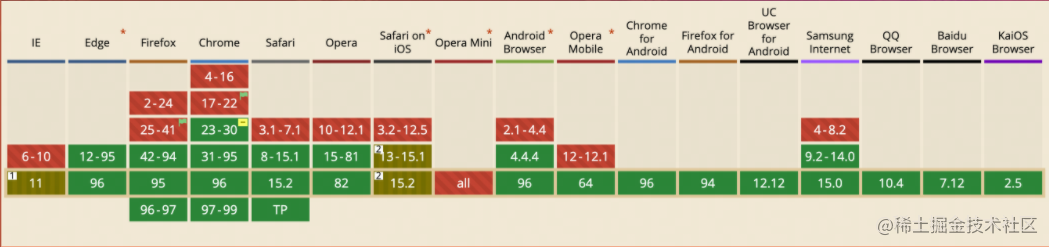
Basically supported by mainstream browsers, except Safari on iOS
- Create a mediaSource instance
- Create a URL pointing to the mediaSource
- Listen for the sourceopen event
- Create a sourceBuffer
- Add data to the sourceBuffer
- Listen for the updateend event
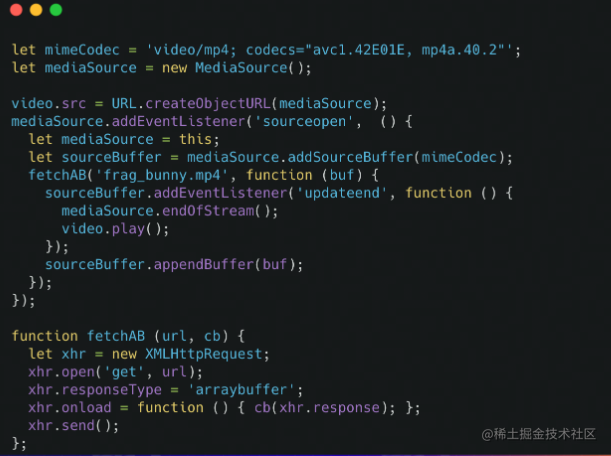
- Player playback flow

Streaming Protocols
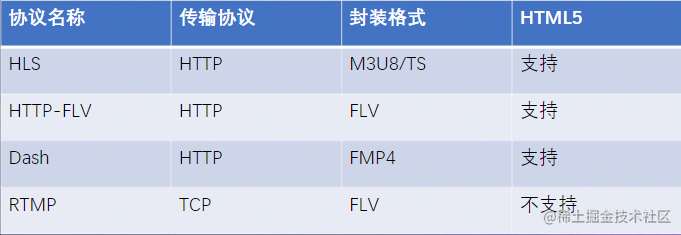
HLS stands for HTTP Live Streaming, an HTTP-based media streaming protocol proposed by Apple for real-time audio and video streaming transmission. Currently, the HLS protocol is widely used in video-on-demand and live streaming.
Application Scenarios
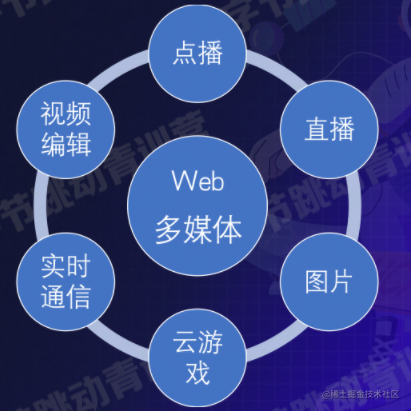
- VOD/Live streaming -> Video upload -> Video transcoding
- Images -> Supporting new image formats
- Cloud gaming -> No need to download cumbersome clients, runs on remote servers, with video streams transmitted back and forth (high latency requirements)
Summary and Reflections
This lesson introduced the basic concepts of Web multimedia technology, such as encoding formats, container formats, multimedia elements, streaming protocols, and described various application scenarios for Web multimedia
Most of the content cited in this article comes from Teacher Liu Liguo’s class and MDN
喜欢的话,留下你的评论吧~