

This article has been machine-translated from Chinese. The translation may contain inaccuracies or awkward phrasing. If in doubt, please refer to the original Chinese version.
Charts, pseudocode, etc. in this article were written with AI assistance
Background
When you fork an open-source project as your own blog theme, how do you elegantly sync updates from the upstream repository? Manually typing a bunch of Git commands is both tedious and error-prone; but clicking Fork’s Sync button directly might overwrite your custom configuration and content.
Many people find themselves torn between “keeping up to date” and “preserving modifications”: they either stop syncing after forking, or approach every update with anxiety.
This is also why many projects, like @fumadocs/cli, provide dedicated CLIs to handle updates and related operations.
This article will introduce how to simply build an interactive CLI tool that automates the fork sync workflow.
The core goals of this tool are:
- Safe: Check workspace status before updating, with optional backup
- Transparent: Preview all changes, letting users decide whether to update
- Friendly: Provide clear guidance when conflicts arise
The specific code can be found in this PR:

However, this PR is only the initial version — quite a bit has been patched on since then. The overall workflow is something I figured out after a weekend of research. If there are any shortcomings, it’s definitely due to my oversight, and I welcome feedback~
In this PR, I built an interactive TUI tool using Ink, providing blog content backup/restore, theme updates, content generation, backup management, and more:
pnpm koharu # Interactive main menu
pnpm koharu backup # Backup blog content (--full for complete backup)
pnpm koharu restore # Restore from backup (--latest, --dry-run, --force)
pnpm koharu update # Sync updates from upstream (--check, --skip-backup, --force)
pnpm koharu generate # Generate content assets (LQIP, similarities, AI summaries)
pnpm koharu clean # Clean old backups (--keep N)
pnpm koharu list # View all backups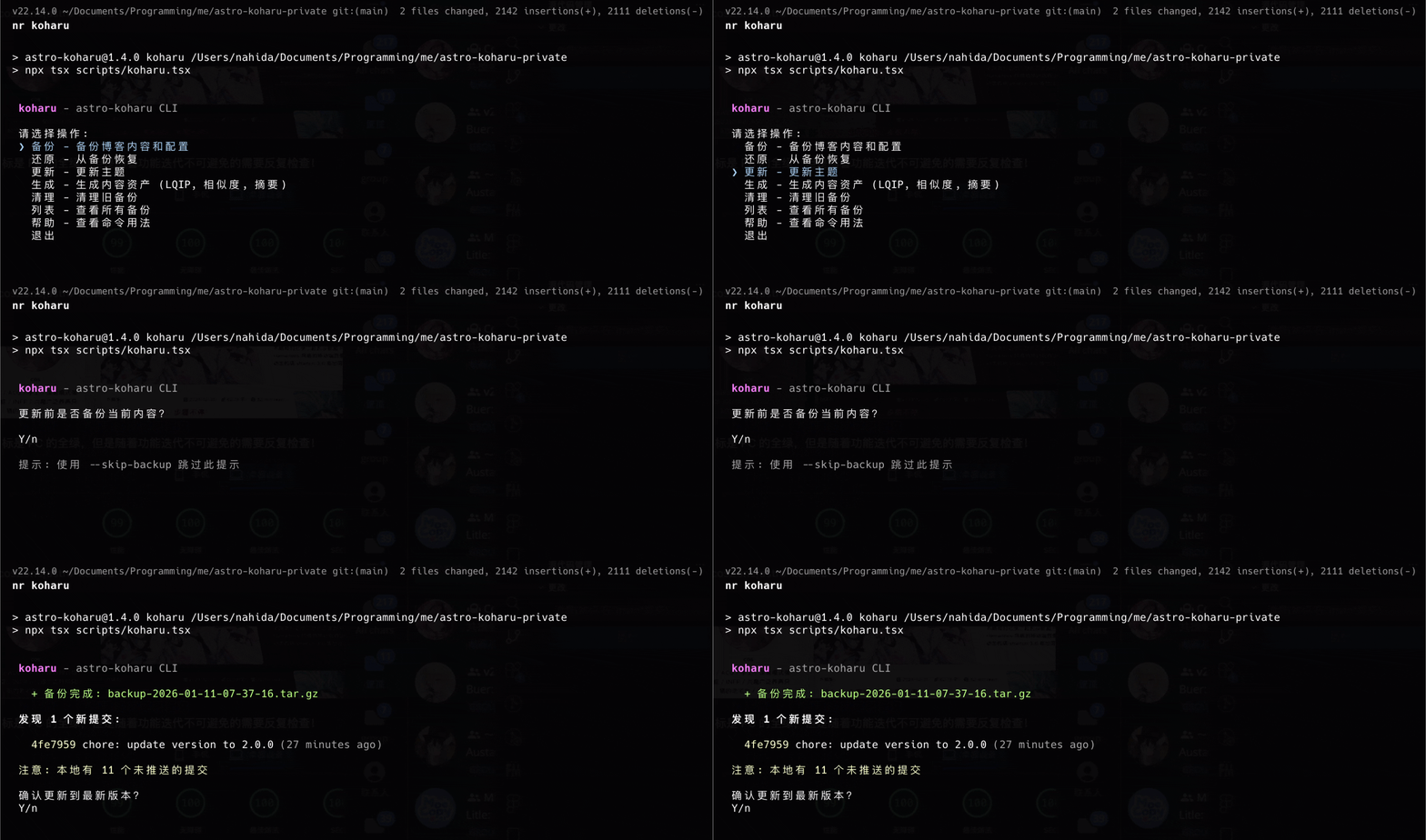
The backup feature can:
- Basic backup: blog posts, configuration, avatar, .env
- Full backup: including all images and generated asset files
- Automatically generate
manifest.jsonrecording theme version and backup metadata (timestamp, etc.)
The restore feature can:
- Interactively select backup files
- Support
--dry-runpreview mode - Display backup type, version, timestamp, and other metadata
The theme update feature can:
- Automatically configure upstream remote pointing to the original repository
- Preview commits to be merged (showing hash, message, time)
- Optional backup before updating, with conflict detection and handling
- Automatically install dependencies after successful merge
- Support
--checkfor checking updates only,--forceto skip workspace checks
Overall Architecture
infographic sequence-snake-steps-underline-text
data
  title Git Update Command Flow
  desc Complete workflow for syncing updates from upstream
  items
    - label 检查状态
      desc 验证当前分支和工作区状态
      icon mdi/source-branch-check
    - label 配置远程
      desc 确保 upstream remote 已配置
      icon mdi/source-repository
    - label 获取更新
      desc 从 upstream 拉取最新提交
      icon mdi/cloud-download
    - label 预览变更
      desc 显示待合并的提交列表
      icon mdi/file-find
    - label 确认备份
      desc 可选:备份当前内容
      icon mdi/backup-restore
    - label 执行合并
      desc 合并 upstream 分支到本地
      icon mdi/merge
    - label 处理结果
      desc 成功则安装依赖,冲突则提示解决
      icon mdi/check-circle
Detailed Git Commands for Updates
1. Check Current Branch
git rev-parse --abbrev-ref HEADPurpose: Get the name of the current branch.
Parameter breakdown:
rev-parse: Parse Git references--abbrev-ref: Output the short reference name (e.g.,main), not the full SHA
Use case: Ensure the user is on the correct branch (e.g., main) before updating, avoiding accidental merging of upstream code on a feature branch.
const currentBranch = execSync("git rev-parse --abbrev-ref HEAD")
  .toString()
  .trim();
if (currentBranch !== "main") {
  throw new Error(`仅支持在 main 分支执行更新,当前分支: ${currentBranch}`);
}
2. Check Workspace Status
git status --porcelainPurpose: Output workspace status in a machine-readable format.
Parameter breakdown:
--porcelain: Output a stable, easily parsed format unaffected by Git version or language settings
Output format:
M  modified-file.ts      # Staged modification
 M unstaged-file.ts      # Unstaged modification
?? untracked-file.ts     # Untracked file
A  new-file.ts           # Newly added file
D  deleted-file.ts       # Deleted file
The first two characters represent the staging area and working tree status respectively.
const statusOutput = execSync("git status --porcelain").toString();
const uncommittedFiles = statusOutput.split("\n").filter((line) => line.trim());
const isClean = uncommittedFiles.length === 0;
3. Managing Remote Repositories
Check if a Remote Exists
git remote get-url upstreamPurpose: Get the URL of a specified remote. Throws an error if it doesn’t exist.
Add upstream Remote
# Replace the URL with your upstream repository address
git remote add upstream https://github.com/original/repo.gitPurpose: Add a remote repository named upstream pointing to the original project.
Why do we need upstream?
After you fork a project, your origin points to your own fork, while upstream points to the original project. This allows you to:
- Pull updates from
upstream - Push your modifications to
origin
// UPSTREAM_URL needs to be replaced with your upstream repository address
const UPSTREAM_URL = "https://github.com/original/repo.git";

function ensureUpstreamRemote(): string {
  try {
    return execSync("git remote get-url upstream").toString().trim();
  } catch {
    execSync(`git remote add upstream ${UPSTREAM_URL}`);
    return UPSTREAM_URL;
  }
}
4. Fetch Remote Updates
git fetch upstreamPurpose: Download all the latest commits from the upstream remote repository, but without automatically merging into the local branch.
Difference from git pull:
fetchonly downloads data without modifying local codepull=fetch+merge, which automatically merges
Using fetch allows us to preview changes before deciding whether to merge.
5. Calculate Commit Differences
git rev-list --left-right --count HEAD...upstream/mainPurpose: Calculate the commit difference between the local branch and upstream/main.
Parameter breakdown:
rev-list: List commit records--left-right: Distinguish between left-side (local) and right-side (remote) commits--count: Only output the count, not individual commitsHEAD...upstream/main: Three dots indicate a symmetric difference
Example output:
2 5This means the local branch has 2 commits not in upstream (ahead), and upstream has 5 commits not in the local branch (behind).
const revList = execSync(
  "git rev-list --left-right --count HEAD...upstream/main"
)
  .toString()
  .trim();
const [aheadStr, behindStr] = revList.split("\t");
const aheadCount = parseInt(aheadStr, 10);
const behindCount = parseInt(behindStr, 10);

console.log(`本地领先 ${aheadCount} 个提交,落后 ${behindCount} 个提交`);
6. View Pending Commits
git log HEAD..upstream/main --pretty=format:"%h|%s|%ar|%an" --no-mergesPurpose: List commits that exist on upstream/main but not locally.
Parameter breakdown:
HEAD..upstream/main: Two dots indicate the difference from A to B (what B has that A doesn’t)--pretty=format:"...": Custom output format%h: Short hash%s: Commit message%ar: Relative time (e.g., “2 days ago”)%an: Author name
--no-merges: Exclude merge commits
Example output:
a1b2c3d|feat: add dark mode|2 days ago|Author Name
e4f5g6h|fix: typo in readme|3 days ago|Author Name
const commitFormat = "%h|%s|%ar|%an";
const output = execSync(
`git log HEAD..upstream/main --pretty=format:"${commitFormat}" --no-merges`
).toString();
const commits = output
.split("\n")
.filter(Boolean)
.map((line) => {
const [hash, message, date, author] = line.split("|");
return { hash, message, date, author };
});7. View Remote File Contents
git show upstream/main:package.jsonPurpose: Directly view the contents of a file on a remote branch without switching branches or merging.
Use case: Get the upstream repository’s version number to display “will update to version x.x.x”.
const packageJson = execSync("git show upstream/main:package.json").toString();
const { version } = JSON.parse(packageJson);
console.log(`最新版本: ${version}`);
8. Execute the Merge
git merge upstream/main --no-editPurpose: Merge the upstream/main branch into the current branch.
Parameter breakdown:
--no-edit: Use the auto-generated merge commit message without opening an editor
Merge strategies: Git automatically selects the appropriate merge strategy:
- Fast-forward: If there are no new local commits, simply move the pointer
- Three-way merge: If there’s a divergence, create a merge commit
Note: This tool uses merge to sync with upstream, preserving local history. If your need is to “force alignment with upstream” (discarding local modifications), you’d need to use a rebase or reset approach, which is outside the scope of this article.
9. Detect Merge Conflicts
git diff --name-only --diff-filter=UPurpose: List all files with unresolved conflicts.
Parameter breakdown:
--name-only: Only output file names--diff-filter=U: Only show Unmerged (conflicted) files
Another approach is to parse the output of git status --porcelain, looking for conflict markers:
const statusOutput = execSync("git status --porcelain").toString();
const conflictFiles = statusOutput
  .split("\n")
  .filter((line) => {
    const status = line.slice(0, 2);
    // U = Unmerged, AA = both added, DD = both deleted
    return status.includes("U") || status === "AA" || status === "DD";
  })
  // Note: simplified for demonstration purposes
  // For full compatibility with renames/special paths, more rigorous porcelain parsing is needed
  .map((line) => line.slice(3).trim());
10. Abort Merge
git merge --abortPurpose: Abort the current merge operation, restoring to the state before the merge.
Use case: When the user encounters conflicts but doesn’t want to resolve them manually, they can choose to abort the merge.
function abortMerge(): boolean {
  try {
    execSync("git merge --abort");
    return true;
  } catch {
    return false;
  }
}
State Machine Design
If we were to naively use useEffect, we’d end up with too many useEffect hooks, which is obviously not ideal.
The entire update flow uses a simple useReducer + Effect Map pattern, separating state transition logic from side effect handling to ensure the flow is clear and controllable.
Why Not Redux?
When designing CLI state management, Redux naturally comes to mind — after all, it’s the most mature state management solution in the React ecosystem, and we’re even using Ink for development. But for CLI tools, useReducer is a more appropriate choice for these reasons:
- Single state scope: CLI tools typically have a single component tree structure with no need for cross-page or cross-route state sharing.
- No need for middleware ecosystem: Redux’s strength lies in its middleware ecosystem (redux-thunk, redux-saga, redux-observable) for handling complex async flows. But our scenario doesn’t need that complexity.
- Minimal dependencies: CLI tools should start fast and run light.
useReduceris built into React and doesn’t introduce additional dependencies (React itself is a dependency, of course, but my project already needs it).
In short, Redux would be “over-engineering” for this scenario.
So What Do We Do?
- Reducer: Centrally manages all state transition logic; pure functions that are easy to test
- Effect Map: Maps states to side effects, handling async operations uniformly
- Single Effect: One
useEffectdrives the entire flow
Below is the complete state transition diagram showing all possible state transition paths and conditional branches:
Note: Mermaid stateDiagram state names cannot contain hyphens
-, so camelCase naming is used here.
stateDiagram-v2
    [*] --> checking: 开始更新

    checking --> error: 不在 main 分支
    checking --> dirtyWarning: 工作区不干净 && !force
    checking --> fetching: 工作区干净 || force

    dirtyWarning --> [*]: 用户取消
    dirtyWarning --> fetching: 用户继续

    fetching --> upToDate: behindCount = 0
    fetching --> backupConfirm: behindCount > 0 && !skipBackup
    fetching --> preview: behindCount > 0 && skipBackup

    backupConfirm --> backingUp: 用户确认备份
    backupConfirm --> preview: 用户跳过备份

    backingUp --> preview: 备份完成
    backingUp --> error: 备份失败

    preview --> [*]: checkOnly 模式
    preview --> merging: 用户确认更新
    preview --> [*]: 用户取消

    merging --> conflict: 合并冲突
    merging --> installing: 合并成功

    conflict --> [*]: 用户处理冲突

    installing --> done: 依赖安装成功
    installing --> error: 依赖安装失败

    done --> [*]
    error --> [*]
    upToDate --> [*]
Type Definitions
// 12 states covering the complete flow
type UpdateStatus =
  | "checking" // Check Git status
  | "dirty-warning" // Workspace has uncommitted changes
  | "backup-confirm" // Confirm backup
  | "backing-up" // Backing up
  | "fetching" // Fetching updates
  | "preview" // Show update preview
  | "merging" // Merging
  | "installing" // Installing dependencies
  | "done" // Complete
  | "conflict" // Has conflicts
  | "up-to-date" // Already up to date
  | "error"; // Error

// Actions drive state transitions
type UpdateAction =
  | { type: "GIT_CHECKED"; payload: GitStatusInfo }
  | { type: "FETCHED"; payload: UpdateInfo }
  | { type: "BACKUP_CONFIRM" | "BACKUP_SKIP" | "UPDATE_CONFIRM" | "INSTALLED" }
  | { type: "BACKUP_DONE"; backupFile: string }
  | { type: "MERGED"; payload: MergeResult }
  | { type: "ERROR"; error: string };
Centralized State Transitions in the Reducer
All state transition logic is centralized in the reducer, where each case only handles actions that are valid for the current state:
function updateReducer(state: UpdateState, action: UpdateAction): UpdateState {
  const { status, options } = state;

  // Universal error handling: any state can transition to error
  if (action.type === "ERROR") {
    return { ...state, status: "error", error: action.error };
  }

  switch (status) {
    case "checking": {
      if (action.type !== "GIT_CHECKED") return state;
      const { payload: gitStatus } = action;

      if (gitStatus.currentBranch !== "main") {
        return {
          ...state,
          status: "error",
          error: "仅支持在 main 分支执行更新",
        };
      }
      if (!gitStatus.isClean && !options.force) {
        return { ...state, status: "dirty-warning", gitStatus };
      }
      return { ...state, status: "fetching", gitStatus };
    }

    case "fetching": {
      if (action.type !== "FETCHED") return state;
      const { payload: updateInfo } = action;

      if (updateInfo.behindCount === 0) {
        return { ...state, status: "up-to-date", updateInfo };
      }
      const nextStatus = options.skipBackup ? "preview" : "backup-confirm";
      return { ...state, status: nextStatus, updateInfo };
    }

    // ... other state handling
  }
}
Effect Map: Unified Side Effect Handling
Each state that requires side effects corresponds to an effect function, which can return a cleanup function:
type EffectFn = (
  state: UpdateState,
  dispatch: Dispatch<UpdateAction>
) => (() => void) | undefined;

const statusEffects: Partial<Record<UpdateStatus, EffectFn>> = {
  checking: (_state, dispatch) => {
    const gitStatus = checkGitStatus();
    ensureUpstreamRemote();
    dispatch({ type: "GIT_CHECKED", payload: gitStatus });
    return undefined;
  },

  fetching: (_state, dispatch) => {
    fetchUpstream();
    const info = getUpdateInfo();
    dispatch({ type: "FETCHED", payload: info });
    return undefined;
  },

  installing: (_state, dispatch) => {
    let cancelled = false;
    installDeps().then((result) => {
      if (cancelled) return;
      dispatch(
        result.success
          ? { type: "INSTALLED" }
          : { type: "ERROR", error: result.error }
      );
    });
    return () => {
      cancelled = true;
    }; // cleanup
  },
};
Component Usage
The component only needs one core useEffect to drive the entire state machine:
function UpdateApp({ checkOnly, skipBackup, force }) {
  const [state, dispatch] = useReducer(
    updateReducer,
    { checkOnly, skipBackup, force },
    createInitialState
  );

  // Core: single effect handles all side effects
  useEffect(() => {
    const effect = statusEffects[state.status];
    if (!effect) return;
    return effect(state, dispatch);
  }, [state.status, state]);

  // UI rendering based on state.status
  return <Box>...</Box>;
}
The advantages of this pattern:
- Testability: The Reducer is a pure function that can be independently tested for state transitions
- Maintainability: State logic is centralized, not scattered across multiple
useEffecthooks - Extensibility: Adding new states only requires adding a case in both the reducer and the effect map
User Interaction Design
Using React Ink to build the terminal UI, providing a friendly interactive experience:
Update Preview
发现 5 个新提交:
  a1b2c3d feat: add dark mode (2 days ago)
  e4f5g6h fix: responsive layout (3 days ago)
  i7j8k9l docs: update readme (1 week ago)
  ... 还有 2 个提交

注意: 本地有 1 个未推送的提交

确认更新到最新版本? (Y/n)
Handling Conflicts
发现合并冲突
冲突文件:
  - src/config.ts
  - src/components/Header.tsx

你可以:
  1. 手动解决冲突后运行: git add . && git commit
  2. 中止合并恢复到更新前状态

备份文件: backup-2026-01-10-full.tar.gz

是否中止合并? (Y/n)
Complete Code Implementation
Git Operation Wrappers
import { execSync } from "node:child_process";

function git(args: string): string {
  return execSync(`git ${args}`, {
    encoding: "utf-8",
    stdio: ["pipe", "pipe", "pipe"],
  }).trim();
}

function gitSafe(args: string): string | null {
  try {
    return git(args);
  } catch {
    return null;
  }
}

export function checkGitStatus(): GitStatusInfo {
  const currentBranch = git("rev-parse --abbrev-ref HEAD");
  const statusOutput = gitSafe("status --porcelain") || "";
  const uncommittedFiles = statusOutput
    .split("\n")
    .filter((line) => line.trim());

  return {
    currentBranch,
    isClean: uncommittedFiles.length === 0,
    // Note: simplified handling; full compatibility requires more rigorous porcelain parsing
    uncommittedFiles: uncommittedFiles.map((line) => line.slice(3).trim()),
  };
}

export function getUpdateInfo(): UpdateInfo {
  const revList =
    gitSafe("rev-list --left-right --count HEAD...upstream/main") || "0\t0";
  const [aheadStr, behindStr] = revList.split("\t");

  const commitFormat = "%h|%s|%ar|%an";
  const commitsOutput =
    gitSafe(
      `log HEAD..upstream/main --pretty=format:"${commitFormat}" --no-merges`
    ) || "";

  const commits = commitsOutput
    .split("\n")
    .filter(Boolean)
    .map((line) => {
      const [hash, message, date, author] = line.split("|");
      return { hash, message, date, author };
    });

  return {
    behindCount: parseInt(behindStr, 10),
    aheadCount: parseInt(aheadStr, 10),
    commits,
  };
}

export function mergeUpstream(): MergeResult {
  try {
    git("merge upstream/main --no-edit");
    return { success: true, hasConflict: false, conflictFiles: [] };
  } catch {
    const conflictFiles = getConflictFiles();
    return {
      success: false,
      hasConflict: conflictFiles.length > 0,
      conflictFiles,
    };
  }
}

function getConflictFiles(): string[] {
  const output = gitSafe("diff --name-only --diff-filter=U") || "";
  return output.split("\n").filter(Boolean);
}
Git Command Cheat Sheet
| Command | Purpose | Scenario |
|---|---|---|
git rev-parse --abbrev-ref HEAD | Get current branch name | Verify branch |
git status --porcelain | Machine-readable status | Check workspace |
git remote get-url <name> | Get remote URL | Check remote |
git remote add <name> <url> | Add a remote | Configure upstream |
git fetch <remote> | Download remote updates | Fetch updates |
git rev-list --left-right --count A...B | Count commit differences | Calculate ahead/behind |
git log A..B --pretty=format:"..." | List different commits | Preview updates |
git show <ref>:<path> | View remote file | Get version number |
git merge <branch> --no-edit | Auto merge | Execute update |
git diff --name-only --diff-filter=U | List conflicted files | Detect conflicts |
git merge --abort | Abort merge | Rollback operation |
Git Commands by Category
To better understand the purpose of these commands, here they are organized by function:
infographic hierarchy-structure
data
  title Git 命令功能分类
  desc 按操作类型组织的命令清单
  items
    - label 状态检查
      icon mdi/information
      children
        - label git rev-parse
          desc 获取当前分支名
        - label git status --porcelain
          desc 检查工作区状态
    - label 远程管理
      icon mdi/server-network
      children
        - label git remote get-url
          desc 检查 remote 是否存在
        - label git remote add
          desc 添加 upstream remote
        - label git fetch
          desc 下载远程更新
    - label 提交分析
      icon mdi/source-commit
      children
        - label git rev-list
          desc 统计提交差异
        - label git log
          desc 查看提交历史
        - label git show
          desc 查看远程文件内容
    - label 合并操作
      icon mdi/source-merge
      children
        - label git merge
          desc 执行分支合并
        - label git merge --abort
          desc 中止合并恢复状态
    - label 冲突检测
      icon mdi/alert-octagon
      children
        - label git diff --diff-filter=U
          desc 列出未解决冲突文件
Backup and Restore Implementation
Beyond theme updates, the CLI also provides comprehensive backup and restore functionality to ensure user data safety.
Backup and restore are two complementary operations. The diagram below shows their complete workflows:
infographic compare-hierarchy-row-letter-card-compact-card
data
  title 备份与还原流程对比
  desc 两个互补操作的完整工作流
  items
    - label 备份流程
      icon mdi/backup-restore
      children
        - label 检查配置
          desc 确定备份类型和范围
        - label 创建临时目录
          desc 准备暂存空间
        - label 复制文件
          desc 按配置复制所需文件
        - label 生成 manifest
          desc 记录版本和元信息
        - label 压缩打包
          desc tar.gz 压缩存档
        - label 清理临时目录
          desc 删除暂存目录
    - label 还原流程
      icon mdi/restore
      children
        - label 选择备份
          desc 读取 manifest 显示备份信息
        - label 解压到临时目录
          desc 提取归档内容(包含 manifest)
        - label 读取 manifest.files
          desc 获取实际备份成功的文件列表
        - label 按映射复制文件
          desc 使用自动生成的 RESTORE_MAP
        - label 清理临时目录
          desc 删除解压的暂存文件
Backup Item Configuration
The backup system uses a configuration-driven approach to define the files and directories to back up:
export interface BackupItem {
  src: string; // Source path (relative to project root)
  dest: string; // Destination path within backup
  label: string; // Display label
  required: boolean; // Whether required (included in basic mode)
}

export const BACKUP_ITEMS: BackupItem[] = [
  // Basic backup items (required: true)
  {
    src: "src/content/blog",
    dest: "content/blog",
    label: "博客文章",
    required: true,
  },
  {
    src: "config/site.yaml",
    dest: "config/site.yaml",
    label: "网站配置",
    required: true,
  },
  {
    src: "src/pages/about.md",
    dest: "pages/about.md",
    label: "关于页面",
    required: true,
  },
  {
    src: "public/img/avatar.webp",
    dest: "img/avatar.webp",
    label: "用户头像",
    required: true,
  },
  { src: ".env", dest: "env", label: "环境变量", required: true },
  // Full backup extra items (required: false)
  { src: "public/img", dest: "img", label: "所有图片", required: false },
  {
    src: "src/assets/lqips.json",
    dest: "assets/lqips.json",
    label: "LQIP 数据",
    required: false,
  },
  {
    src: "src/assets/similarities.json",
    dest: "assets/similarities.json",
    label: "相似度数据",
    required: false,
  },
  {
    src: "src/assets/summaries.json",
    dest: "assets/summaries.json",
    label: "AI 摘要数据",
    required: false,
  },
];
Backup Flow
The backup operation uses tar.gz compression and generates a manifest.json to record metadata:
export function runBackup(
  isFullBackup: boolean,
  onProgress?: (results: BackupResult[]) => void
): BackupOutput {
  // 1. Create backup directory and temp directory
  fs.mkdirSync(BACKUP_DIR, { recursive: true });
  const timestamp = new Date().toISOString().replace(/[:.]/g, "-").slice(0, 19);
  const tempDir = path.join(BACKUP_DIR, `.tmp-backup-${timestamp}`);

  // 2. Filter backup items (basic backup only includes required: true items)
  const itemsToBackup = BACKUP_ITEMS.filter(
    (item) => item.required || isFullBackup
  );

  // 3. Copy files to temp directory
  const results: BackupResult[] = [];
  for (const item of itemsToBackup) {
    const srcPath = path.join(PROJECT_ROOT, item.src);
    const destPath = path.join(tempDir, item.dest);

    if (fs.existsSync(srcPath)) {
      fs.cpSync(srcPath, destPath, { recursive: true });
      results.push({ item, success: true, skipped: false });
    } else {
      results.push({ item, success: false, skipped: true });
    }
    onProgress?.([...results]); // Progress callback
  }

  // 4. Generate manifest.json
  const manifest = {
    name: "astro-koharu-backup",
    version: getVersion(),
    type: isFullBackup ? "full" : "basic",
    timestamp,
    created_at: new Date().toISOString(),
    files: Object.fromEntries(results.map((r) => [r.item.dest, r.success])),
  };
  fs.writeFileSync(
    path.join(tempDir, "manifest.json"),
    JSON.stringify(manifest, null, 2)
  );

  // 5. Compress and clean up
  tarCreate(backupFilePath, tempDir);
  fs.rmSync(tempDir, { recursive: true, force: true });

  return { results, backupFile: backupFilePath, fileSize, timestamp };
}
tar Operation Wrappers
Using system tar commands for compression and extraction, with path traversal security checks:
// Security validation: prevent path traversal attacks
function validateTarEntries(entries: string[], archivePath: string): void {
  for (const entry of entries) {
    if (entry.includes("\0")) {
      throw new Error(`tar entry contains null byte`);
    }
    const normalized = path.posix.normalize(entry);
    if (path.posix.isAbsolute(normalized)) {
      throw new Error(`tar entry is absolute path: ${entry}`);
    }
    if (normalized.split("/").includes("..")) {
      throw new Error(`tar entry contains parent traversal: ${entry}`);
    }
  }
}

// Create archive
export function tarCreate(archivePath: string, sourceDir: string): void {
  spawnSync("tar", ["-czf", archivePath, "-C", sourceDir, "."]);
}

// Extract to specified directory
export function tarExtract(archivePath: string, destDir: string): void {
  listTarEntries(archivePath); // Validate entry safety first
  spawnSync("tar", ["-xzf", archivePath, "-C", destDir]);
}

// Read manifest (without extracting the entire file)
export function tarExtractManifest(archivePath: string): string | null {
  const result = spawnSync("tar", ["-xzf", archivePath, "-O", "manifest.json"]);
  return result.status === 0 ? result.stdout : null;
}
Restore Flow
The restore operation is manifest-driven, ensuring only files that were actually backed up successfully are restored:
// Path mapping: auto-generated from backup item config, ensuring consistency
export const RESTORE_MAP: Record<string, string> = Object.fromEntries(
  BACKUP_ITEMS.map((item) => [item.dest, item.src])
);

export function restoreBackup(backupPath: string): RestoreResult {
  // 1. Create temp directory and extract
  const tempDir = fs.mkdtempSync(path.join(os.tmpdir(), "restore-"));
  tarExtract(backupPath, tempDir);

  // 2. Read manifest to get the actual list of backed-up files
  const manifestPath = path.join(tempDir, "manifest.json");
  const manifest = JSON.parse(fs.readFileSync(manifestPath, "utf-8"));

  const restored: string[] = [];
  const skipped: string[] = [];

  // 3. Restore based on manifest.files (only restore successfully backed-up files)
  for (const [backupPath, success] of Object.entries(manifest.files)) {
    // Skip files that failed to back up
    if (!success) {
      skipped.push(backupPath);
      continue;
    }

    const projectPath = RESTORE_MAP[backupPath];
    if (!projectPath) {
      console.warn(`未知的备份路径: ${backupPath},跳过`);
      skipped.push(backupPath);
      continue;
    }

    const srcPath = path.join(tempDir, backupPath);
    const destPath = path.join(PROJECT_ROOT, projectPath);

    if (fs.existsSync(srcPath)) {
      fs.mkdirSync(path.dirname(destPath), { recursive: true });
      fs.cpSync(srcPath, destPath, { recursive: true });
      restored.push(projectPath);
    } else {
      skipped.push(backupPath);
    }
  }

  // 4. Clean up temp directory
  fs.rmSync(tempDir, { recursive: true, force: true });

  return {
    restored,
    skipped,
    backupType: manifest.type,
    version: manifest.version,
  };
}
Dry-Run Mode in Detail
Dry-run (preview mode) is a common safety feature in CLI tools, allowing users to preview operation results before actual execution. This implementation uses a function separation + conditional rendering pattern.
The diagram below shows the core difference between preview mode and actual execution:
infographic compare-binary-horizontal-badge-card-arrow
data
  title Dry-Run 模式与实际执行对比
  desc 预览模式和实际还原的关键区别
  items
    - label 预览模式
      desc 安全的只读预览
      icon mdi/eye
      children
        - label 提取 manifest.json
          desc 调用 tarExtractManifest 不解压整个归档
        - label 读取 manifest.files
          desc 获取实际备份的文件列表
        - label 统计文件数量
          desc 调用 tarList 计算每个路径的文件数
        - label 不修改任何文件
          desc 零副作用,可安全执行
    - label 实际执行
      desc 基于 manifest 的还原
      icon mdi/content-save
      children
        - label 解压整个归档
          desc 调用 tarExtract 提取所有文件
        - label 读取 manifest.files
          desc 获取实际备份成功的文件列表
        - label 按 manifest 复制文件
          desc 只还原 success: true 的文件
        - label 显示跳过的文件
          desc 报告 success: false 的文件
Preview and Execution Functions
The key is providing two functions with similar functionality but different side effects:
// Preview function: only reads manifest, no extraction or file modification
export function getRestorePreview(backupPath: string): RestorePreviewItem[] {
  // Only extract manifest.json, not the entire archive
  const manifestContent = tarExtractManifest(backupPath);
  if (!manifestContent) {
    throw new Error("无法读取备份 manifest");
  }

  const manifest = JSON.parse(manifestContent);
  const previewItems: RestorePreviewItem[] = [];

  // Generate preview based on manifest.files
  for (const [backupPath, success] of Object.entries(manifest.files)) {
    if (!success) continue; // Skip files that failed to back up

    const projectPath = RESTORE_MAP[backupPath];
    if (!projectPath) continue;

    // Count files from archive (without extracting)
    const files = tarList(backupPath);
    const matchingFiles = files.filter(
      (f) => f === backupPath || f.startsWith(`${backupPath}/`)
    );
    const fileCount = matchingFiles.length;

    previewItems.push({
      path: projectPath,
      fileCount: fileCount || 1,
      backupPath,
    });
  }

  return previewItems;
}

// Execution function: actually extracts and copies files
export function restoreBackup(backupPath: string): RestoreResult {
  const tempDir = fs.mkdtempSync(path.join(os.tmpdir(), "restore-"));
  tarExtract(backupPath, tempDir); // Actual extraction

  // Read manifest to drive restore
  const manifest = JSON.parse(
    fs.readFileSync(path.join(tempDir, "manifest.json"), "utf-8")
  );

  const restored: string[] = [];
  for (const [backupPath, success] of Object.entries(manifest.files)) {
    if (!success) continue;
    const projectPath = RESTORE_MAP[backupPath];
    // ... actually copy files
    fs.cpSync(srcPath, destPath, { recursive: true });
    restored.push(projectPath);
  }

  return { restored, skipped: [], backupType: manifest.type };
}
The core difference between the two functions:
- Preview: Calls
tarExtractManifest()to only extract the manifest, then usestarList()to count files - Execution: Calls
tarExtract()to extract the entire archive, copies files based on manifest.files
Component Layer: Conditional Dispatch
In the React component, the dryRun parameter determines which function to call:
interface RestoreAppProps {
  dryRun?: boolean; // Whether in preview mode
  force?: boolean; // Whether to skip confirmation
}

export function RestoreApp({ dryRun = false, force = false }: RestoreAppProps) {
  const [result, setResult] = useState<{
    items: RestorePreviewItem[] | string[];
    backupType?: string;
    skipped?: string[];
  }>();

  // Preview mode: only read manifest
  const runDryRun = useCallback(() => {
    const previewItems = getRestorePreview(selectedBackup);
    setResult({ items: previewItems });
    setStatus("done");
  }, [selectedBackup]);

  // Actual restore: execute restore based on manifest
  const runRestore = useCallback(() => {
    setStatus("restoring");
    const { restored, skipped, backupType } = restoreBackup(selectedBackup);
    setResult({ items: restored, backupType, skipped });
    setStatus("done");
  }, [selectedBackup]);

  // Dispatch based on mode when confirming
  function handleConfirm() {
    if (dryRun) {
      runDryRun();
    } else {
      runRestore();
    }
  }
}
Key design points:
- Unified data structure:
resultcan hold both preview and execution results - Type differentiation: Preview returns
RestorePreviewItem[](with fileCount), execution returnsstring[] - Additional info: Execution mode returns
backupTypeandskippedfor displaying complete information
UI Layer: Differentiated Display
Preview mode and actual execution mode are clearly distinguished in the UI:
{
  /* Confirmation prompt: show backup type and file count */
}
<Text color="yellow">
  {dryRun ? "[预览模式] " : ""}
  确认还原 {result?.backupType} 备份? 此操作将覆盖现有文件
</Text>;

{
  /* Completion status: show different titles based on mode */
}
<Text bold color="green">
  {dryRun ? "预览模式" : "还原完成"}
</Text>;

{
  /* Result display: preview mode shows file count statistics */
}
{
  result?.items.map((item) => {
    const isPreviewItem = typeof item !== "string";
    const filePath = isPreviewItem ? item.path : item;
    const fileCount = isPreviewItem ? item.fileCount : 0;
    return (
      <Text key={filePath}>
        <Text color="green">{"  "}+ </Text>
        <Text>{filePath}</Text>
        {/* Preview mode additionally shows file count */}
        {isPreviewItem && fileCount > 1 && (
          <Text dimColor> ({fileCount} 文件)</Text>
        )}
      </Text>
    );
  });
}

{
  /* Summary text: uses "will" vs "already" to differentiate */
}
<Text>
  {dryRun ? "将" : "已"}还原: <Text color="green">{result?.items.length}</Text>{" "}
  项
</Text>;

{
  /* Show skipped files (actual execution mode only) */
}
{
  !dryRun && result?.skipped && result.skipped.length > 0 && (
    <Box flexDirection="column" marginTop={1}>
      <Text color="yellow">跳过的文件:</Text>
      {result.skipped.map((file) => (
        <Text key={file} dimColor>
          {"  "}- {file}
        </Text>
      ))}
    </Box>
  );
}

{
  /* Preview mode specific hint */
}
{
  dryRun && <Text color="yellow">这是预览模式,没有文件被修改</Text>;
}

{
  /* Actual execution mode: show next steps */
}
{
  !dryRun && (
    <Box flexDirection="column" marginTop={1}>
      <Text dimColor>后续步骤:</Text>
      <Text dimColor>{"  "}1. pnpm install # 安装依赖</Text>
      <Text dimColor>{"  "}2. pnpm build # 构建项目</Text>
    </Box>
  );
}
Command Line Usage
# Preview mode: see what will be restored
pnpm koharu restore --dry-run

# Actual execution
pnpm koharu restore

# Skip confirmation and execute directly
pnpm koharu restore --force

# Restore latest backup (preview)
pnpm koharu restore --latest --dry-run
Output Comparison
Preview mode output (Full backup):
备份文件: backup-2026-01-10-12-30-00-full.tar.gz
备份类型: full
主题版本: 1.2.0
备份时间: 2026-01-10 12:30:00

[预览模式] 确认还原 full 备份? 此操作将覆盖现有文件 (Y/n)

预览模式
  + src/content/blog (42 文件)
  + config/site.yaml
  + src/pages/about.md
  + .env
  + public/img (128 文件)
  + src/assets/lqips.json
  + src/assets/similarities.json
  + src/assets/summaries.json

将还原: 8 项
这是预览模式,没有文件被修改
Preview mode output (Basic backup):
备份文件: backup-2026-01-10-12-30-00-basic.tar.gz
备份类型: basic
主题版本: 1.2.0
备份时间: 2026-01-10 12:30:00

[预览模式] 确认还原 basic 备份? 此操作将覆盖现有文件 (Y/n)

预览模式
  + src/content/blog (42 文件)
  + config/site.yaml
  + src/pages/about.md
  + .env
  + public/img/avatar.webp

将还原: 5 项
这是预览模式,没有文件被修改
Actual execution output (with skipped files):
还原完成
  + src/content/blog
  + config/site.yaml
  + src/pages/about.md
  + .env
  + public/img

跳过的文件:
  - src/assets/lqips.json (备份时不存在)

已还原: 5 项
后续步骤:
  1. pnpm install # 安装依赖
  2. pnpm build # 构建项目
  3. pnpm dev # 启动开发服务器
Closing Thoughts
If you’ve read this far, that’s impressive. If you found it helpful, feel free to give me a star~
I personally find this CLI implementation extremely useful for my own needs. My only regret is not building it sooner. If you’re reading this article, go ahead and build your own with confidence.
Related links below:
React Ink
- Ink - GitHub - React for interactive command-line apps, official repository
- Ink UI - UI component library for Ink, providing TextInput, Spinner, ProgressBar, and more
- Using Ink UI with React to build interactive, custom CLIs - LogRocket - Ink UI tutorial
- Building a Coding CLI with React Ink - Practical tutorial including streaming output implementation
- React + Ink CLI Tutorial - FreeCodeCamp - Getting started tutorial
- Node.js CLI Apps Best Practices - GitHub - Node.js CLI best practices checklist
Git Fork Syncing
- Syncing a fork - GitHub Docs - Official documentation
- Git Upstreams and Forks - Atlassian - Detailed tutorial by Atlassian
- How to Sync Your Fork with the Original Git Repository - FreeCodeCamp - Complete sync guide
State Machines and useReducer
- How to Use useReducer as a Finite State Machine - Kyle Shevlin - Classic article on using useReducer as a state machine
- Turning your React Component into a Finite State Machine - DEV - State machine practical tutorial
喜欢的话,留下你的评论吧~