

This article has been machine-translated from Chinese. The translation may contain inaccuracies or awkward phrasing. If in doubt, please refer to the original Chinese version.
This blog post about URL beautification is very well-written~ I recommend checking it out: Hexo Blog Optimization: Custom Article URLs. Below is just my personal solution.
The Problem
Here’s what happened: today when sharing an interview experience, I pasted the link in a group chat and noticed that the URL looked absolutely terrible after encoding QAQ. So I searched online for Hexo URL optimization and found this method.
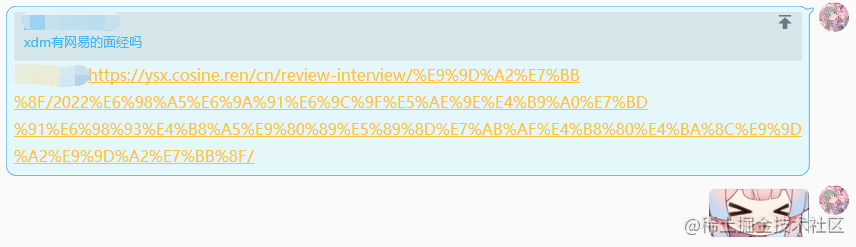
When Hexo generates articles, the URL is based on the filename. Since the filenames are in Chinese, the URL gets encoded, resulting in an excessively long URL like the one shown above.
Exploring Solutions
First, referring to the official configuration Permalinks | Hexo, the available variables are as follows:
| Variable | Description |
|---|---|
:year | Published year of posts (4-digit) |
:month | Published month of posts (2-digit) |
:i_month | Published month of posts (without leading zeros) |
:day | Published day of posts (2-digit) |
:i_day | Published day of posts (without leading zeros) |
:hour | Published hour of posts (2-digit) |
:minute | Published minute of posts (2-digit) |
:second | Published second of posts (2-digit) |
:title | Filename (relative to “source/_posts/” folder) |
:name | Filename |
:post_title | Post title |
:id | Post ID (not persistent across cache reset) |
:category | Categories. If the post is uncategorized, it will use the default_category value. |
:hash | SHA1 hash of filename (same as :title) and date (12-hexadecimal) |
You can adjust the default values of each variable in permalinks under the permalink_defaults parameter:
url: https://ysx.cosine.ren/ # My custom domain URL
root: /
# permalink: :lang/:title/
permalink: :lang/:link/
permalink_defaults:
  lang: cn
Of course, you could use dates, categories, IDs, or hashes for URLs, but this creates several problems:
-
Using dates, categories, etc. is not SEO-friendly
- When using dates as URLs, Baidu’s search engine crawler believes that for small to medium-sized sites, 3 layers are sufficient to hold all content. So it frequently crawls content in the first three layers and considers content beyond three layers unimportant, crawling it less frequently. For this reason, it’s best not to have more than 2 slashes after the permalink.
-
Using algorithms to generate unique hashes or IDs for each article
- This method is commonly used by larger content publishing platforms, such as CSDN article IDs, Bilibili’s BV numbers, etc. It can simply manage large amounts of content without duplication, but the generated URLs are not intuitive. Good URLs should ideally be self-descriptive.
For personal blog articles, the article URL should roughly reflect its content. Therefore, manually setting a descriptive URL suffix for each article is what I consider the most appropriate approach.
Solution Steps
In Hexo’s configuration file _config.yml, add the following configuration:
url: https://ysx.cosine.ren/ # My custom domain URL
root: /
# permalink: :lang/:title/
permalink: :lang/:link/
permalink_defaults:
  lang: cn
When writing blog posts in the future, you can simply add a descriptive link in the article, like this:
---
title: Hexo博客url优化
link: hexo-url-optimization # Actual article link: https://ysx.cosine.ren/cn/hexo-url-optimization/
catalog: true
lang: cn
date: 2022-04-14 21:18:56
subtitle: 关于博客url转义后过于冗长这件事。
header-img: /img/header_img/galaxy-ngc-3190-wallpaper-for-2880x1800-60-653.jpg
tags:
  - 前端
  - hexo
categories:
  - 工具
---
One more step: in the post.md and draft.md files under the scaffolds directory, set the link default to the article title to avoid forgetting:
---
title: { { title } }
link: { { title } }
subtitle:
date: { { date } }
catalog: true
header-img: /img/header_img/galaxy-ngc-3190-wallpaper-for-2880x1800-60-653.jpg
tags:
  - 前端
  - JavaScript
categories:
  - 笔记
---
Now, each time you publish an article, you just need to change the value in the link attribute to a beautified name~
喜欢的话,留下你的评论吧~