This is the inaugural issue of FE Bits, a weekly frontend digest. It curates and summarizes the latest developments in the global frontend ecosystem, including important technical updates, article recommendations, tool and library updates, and in-depth analysis of high-quality industry content. Topics covered include TypeScript, React, CSS Masonry, Web security, Node.js/Bun, next-gen frontend architecture (Remix 3), Web interactive effects, and indie development practices.
This article has been machine-translated from Chinese. The translation may contain inaccuracies or awkward phrasing. If in doubt, please refer to the original Chinese version.
I was hesitating whether to post this on the blog too, but given my update frequency, I figured I might as well~~
Preface
Today is August 2, 2025, Saturday — nothing special about this day.
I’m cos (cosine). I’ve been regularly sharing thoughts on my channel, and wanted to document them, so I wrote up this weekly digest’s description. Let’s just get started!
Casually updated, picking up fresh tidbits from the broader frontend world worth savoring. No competition, just broadcasting — sharing the latest and most fun tech with fellow curious minds~
No big news pushes here, no chasing hot topics. It’s like chatting with you in a friend circle, talking about interesting little things in frontend and tech.
Not everything has to “change the world,” but each item made me think “hey, that’s cool, I want to share this with you.”
Maybe it’s news I stumbled upon late at night, or inspiration from a work break, or just a little rant.
Bottom line: both code and life should be a bit more relaxed. Take it slow, read easy, chat easy — don’t let new tech stress you out too much.
I’m in no rush anyway — and neither should you~
Actually, you could find all this news yourself. I’ve just used AI and my own summaries to aggregate and translate things, because quality Chinese frontend weeklies are rare these days — most have either stopped updating or expanded their scope. So I figured I’d just do it myself~
I hope this weekly doesn’t feel too serious, more natural, but I’m still figuring things out. It’s just me maintaining this for now, so I rely heavily on AI and automation, which means it’s a bit less “human.” Feedback in the comments is very welcome.
I aim to update every Sunday. If there’s not enough content for a given week, it may be merged into the next issue as a biweekly~ I recommend subscribing via Folo to this weekly’s Quaily RSS.
This weekly is also open-sourced at fe-bits-weekly, feel free to follow along.
Ecosystem & Community Updates
AI Commentary: Wow, the community has been busy! TypeScript 5.9 RC dropped with import defer and Node 20’s new modules, TanStack DB served up its first Beta adding some “local storage magic” to Query with blazing-fast incremental updates. The HTML and Stack Overflow annual surveys are open again — React remains the “dream framework,” while Svelte wins on “charm.” Parcel and React Native haven’t been idle either — one is pushing hard on React Server Components, the other is doing precompilation on iOS claiming “10x faster,” the competition is fierce! es-toolkit quietly rose to become Lodash’s “affordable alternative star,” and Vercel introduced a new trick called “Fluid compute” — basically “serverless servers” (what a name… genius). As for the Tabs vs Spaces “holy war”? Someone declared “it’s settled”: Spaces won. On the security front… the npm world isn’t peaceful — the is package was hijacked via phishing, Stylus got accidentally removed in a “guilt by association” mishap (now restored), scaring Google into pulling out “OSS Rebuild” as backup. Oh, and W3C published a “values statement,” and the sweetest news — MDN documentation turns 20!
TanStack DB first Beta released, bringing efficient incremental updates and optimistic writes to TanStack Query, implementing differential dataflow for local-side storage scenarios.
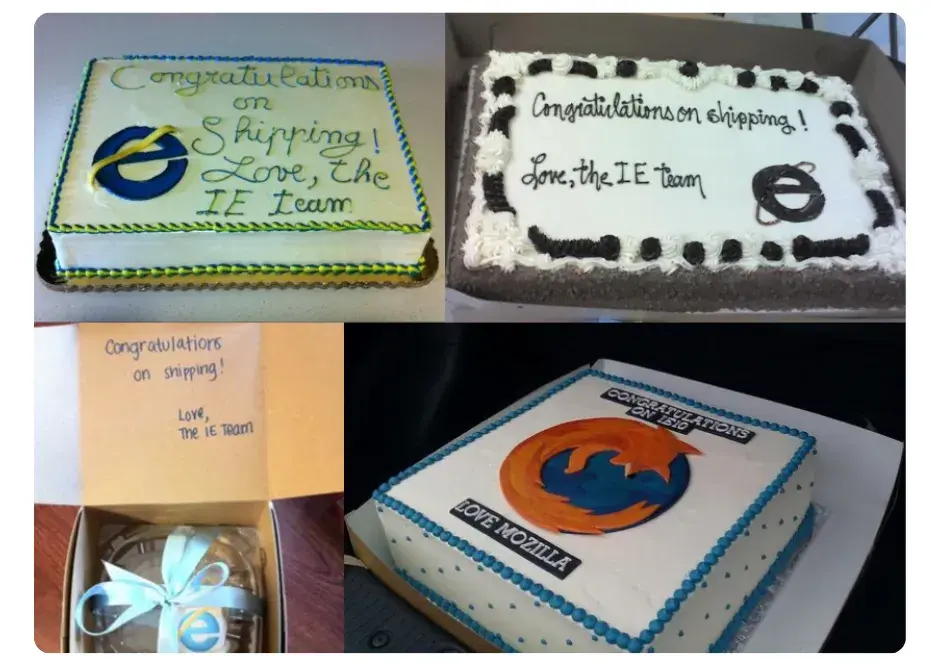
There’s a long tradition among browser makers of sending each other cakes to celebrate important milestones. A good cake is very important for maintaining the collaborative spirit between teams that sometimes compete but ultimately build an open web everyone can enjoy. Microsoft sent Mozilla cakes for Firefox 2, 3, and 4, and we also sent a Mozilla cake for IE10.
Editor’s note: What a fun way to celebrate a birthday!
npm accidentally removed the widely-used Stylus library, breaking builds and CI/CD pipelines for developers worldwide. The removal happened because one of Stylus’s maintainers published an unrelated malicious package, resulting in their account and associated packages being banned, taking Stylus down with it. The npm page has since been restored.
Google launched OSS Rebuild, attempting to make open-source ecosystems (like npm) more secure by allowing packages to be compared with their upstream source.
Articles & Videos
“TailwindCSS v4 New Color System and Theme Switching” introduces the evolution of dark mode color switching in TailwindCSS, from using CSS variables to the new v4’s color-mix() function and @layer features. The author also recommends their own Pastel color system library for better applying these features.
“Indie Hacker Budget Stack (Web Practice)” focuses on indie development, analyzing how cost-sensitive indie developers can leverage the Next.js ecosystem and combine free/cheap services from cloud platforms, Cloudflare, and VPS. The key message: spend less time “deal-hunting” on tech stacks and cloud services, and put more energy into product refinement and marketing for a “low-cost, high-focus, fast-fail” indie development path.
“The Useless useCallback” discusses the overuse of React’s useCallback and performance-related practices, analyzing potential issues with useCallback and useMemo, and looking ahead at how React Compiler and useEffectEvent might improve things.
Editor’s note: This is practically a daily topic in the React world, haha.
“Performance Extensibility API” allows custom tracks for Chrome DevTools performance panel analysis. The article explores how this API bridges the gap in browser meta-performance metrics (like Core Web Vitals) and demonstrates practical applications in Web performance monitoring and optimization.
“Responsive Video is (Almost) Easy Now” covers implementing responsive video through HTML’s video tag, explaining how to serve both vertical and horizontal video for different scenarios.
“When Is WebAssembly Going to Get DOM Support?” analyzes the current state and future of WASM integration with DOM and other Web APIs. The author argues that while WASM was initially separate from JavaScript, it can manipulate the DOM indirectly through JS. Currently, major browsers aren’t pushing to standardize native DOM support. Developers should focus on performance and maintainability, choose good toolchains, and not chase a completely “JS-free” WASM approach.
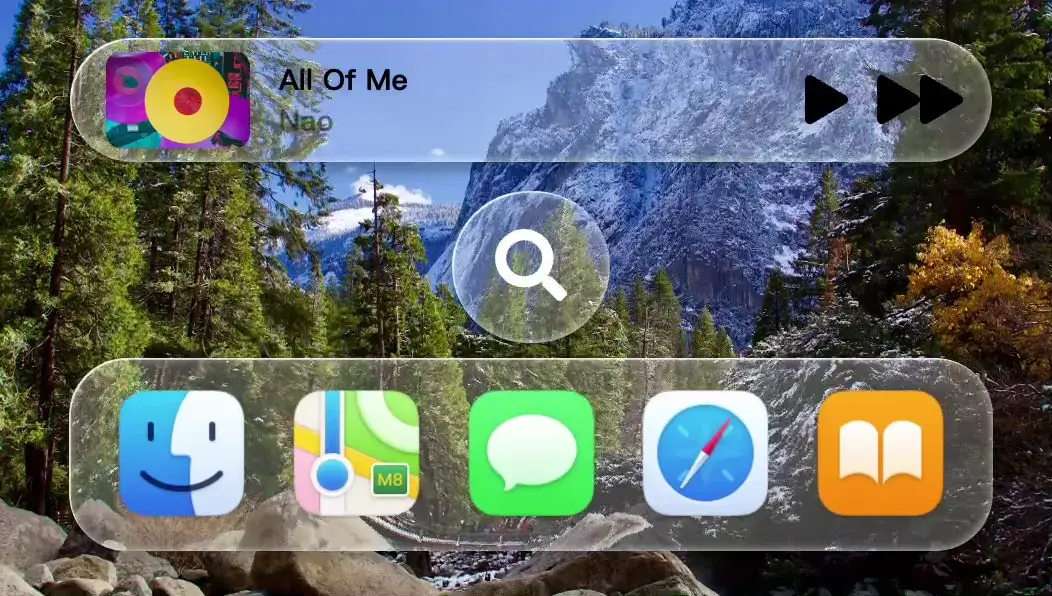
“Liquid Glass on the Web” is a curated collection of Liquid Glass Web implementation demos — some of them are truly beautiful~
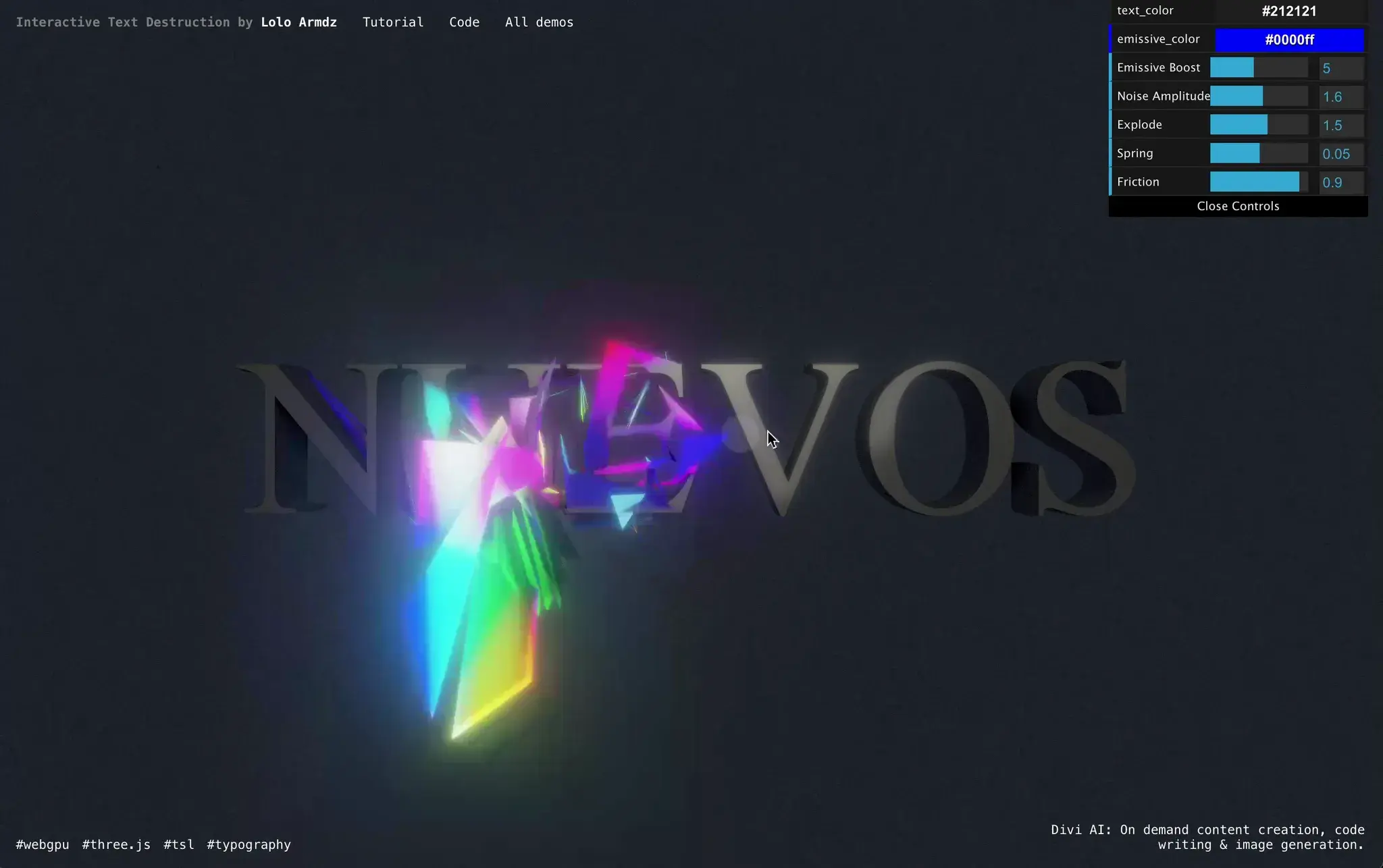
“Interactive Text Destruction with Three.js, WebGPU, and TSL” systematically explains how to create stunning 3D interactive text explosion effects using Three.js, WebGPU, and Three Shader Language (TSL). It covers everything from font preparation, scene setup, vertex and physics simulation, to advanced post-processing, fully demonstrating the fusion of art and technology in modern Web graphics.
Editor’s note: After reading this, I suddenly realized my own article on this topic was terrible — not at all a beginner-friendly tutorial, haha~ I feel like these step-by-step guides are really hard to write well.
“Brick by brick: Help us build CSS Masonry” — The Chrome and Edge teams announced that CSS Masonry layout is now available for developer testing in Chrome/Edge 140. The article covers the concept of CSS Masonry, comparisons with existing layouts, two syntax proposals under discussion, and more.
“Making a Masonry Layout That Works Today | CSS-Tricks” covers the current browser support status of CSS Masonry and its various syntax proposals, and proposes a method using concise JavaScript to implement masonry layout compatible with all major browsers.
“Creating a scroll-spy with 2 lines of CSS”: Chrome 140 introduces scroll-target-group and :target-current, enabling a two-line CSS implementation of table-of-contents highlight tracking. Adding it as progressive enhancement for users is very easy. As a standards-track feature, it should eventually land across browsers.
Code, Tools & Library Updates
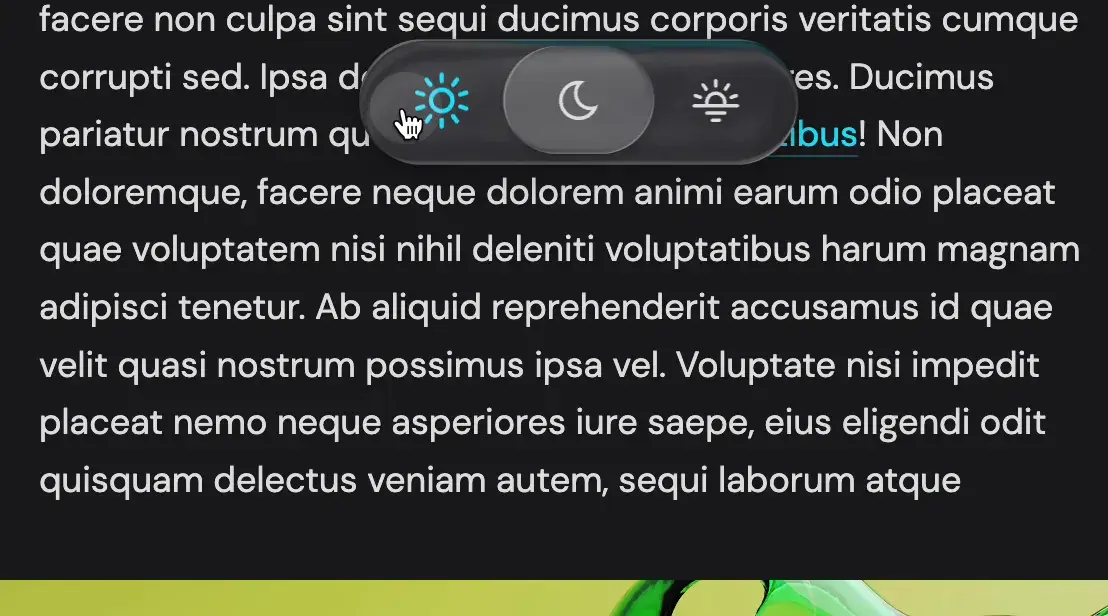
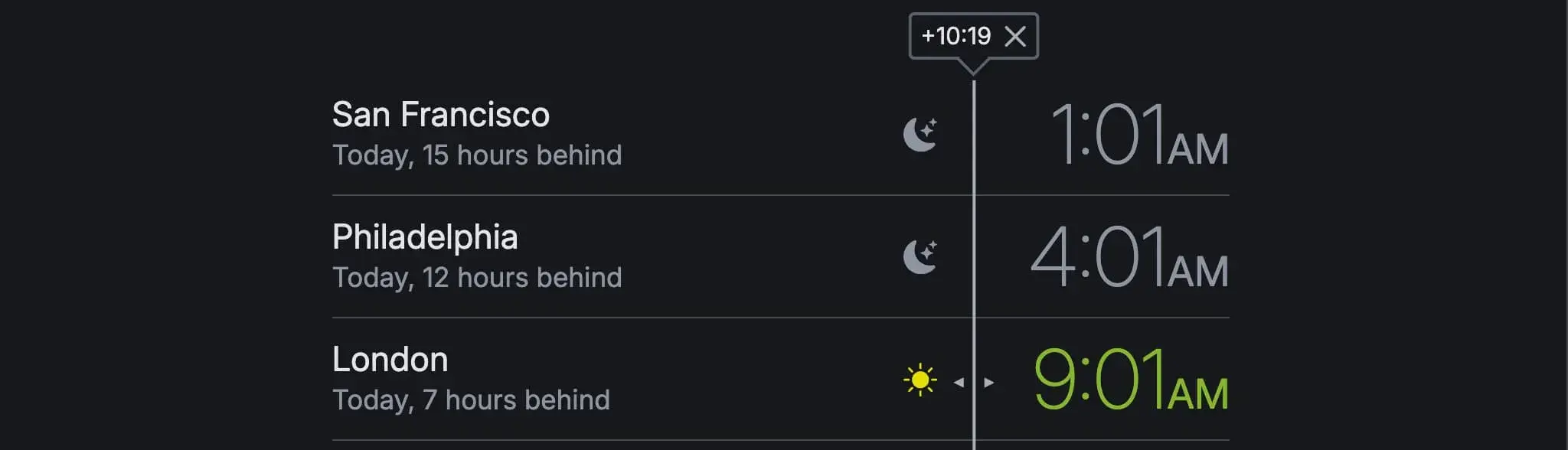
World Clock Slider: A smart clock component supporting swipe to quickly view current times across different timezone cities. Smooth interaction, dark mode support — very cool.
StaticSearch: Add search to static sites without a backend, JavaScript-based with JSON data storage.
Oklchroma: A one-click harmonious palette generator based on OKLCH color space, with built-in curve gradient algorithms.
AudioTee.js: Capture macOS system audio output for Node.js, outputting in PCM format at regular intervals.
FossFLOW: Isometric infrastructure diagramming tool with rich icons and data management.
difit: A CLI tool for viewing and reviewing local git diffs with a GitHub-style viewer; comments can be copied as AI prompts.
7.css: A CSS design system faithfully recreating the classic Windows 7/XP UI.
Better Upload supports minimalist file uploads for various S3-compatible storage, compatible with Next.js, TanStack Start, Remix, and Hono frameworks.
Transformers.js 3.7: Supports ONNX pretrained model inference in browsers and Node.js. v3.7 adds support for Voxtral (speech transcription and audio understanding), LFM2, and ModernBERT.
match-sorter 8.1: Provides deterministic algorithms for array filtering and sorting, making it easy to achieve predictable best-match sorting.
React Native Reanimated 4 officially brings CSS-like animations and transitions to React Native, combining complex capabilities with high performance.
Rooks.js 8.4 provides nearly 100 custom hooks covering online status, window size, speech synthesis, keyboard input, and more.
Deep Dives
This section presents detailed analysis of articles that caught my interest, combined with AI summaries~
Summaries made using my own MoeCopy AI browser extension! Ultra-lightweight — just enter your own API key to use. Give it a try~ If you like it, a star would be appreciated. Chrome Web Store
The Many, Many, Many JavaScript Runtimes of the Last Decade
AI Summary: Over the past decade, JavaScript (JS) runtimes have experienced explosive growth, spanning cloud, edge, microcontrollers, smart TVs, mobile/desktop native apps, and many more environments. With the emergence of different engines and runtimes like Node.js, Deno, Bun, Cloudflare Workers, Hermes, QuickJS, etc., JS developers have gained unprecedented freedom of choice. The article systematically examines the reasons behind the proliferation of JS runtimes: hardware diversity, task scenario diversification, integration needs with native APIs, and cross-platform/multi-language interop. The ultimate conclusion: no single JS runtime can “rule them all” — different scenarios inevitably produce different optimal solutions, which in turn drives ecosystem prosperity and continued technological innovation.
1. Server-side, Edge Computing, and Cloud
Node.js (V8 engine, 2009)
AWS Lambda/Lambda@Edge (Node.js as underlying runtime)
Along the way, it was open-sourced as Cordova, and a UI toolkit Ionic was created for it
The Ionic team went on to announce Cordova’s successor, Capacitor, in 2019
Electron (renamed in 2015)
Its roots trace back to node-webkit (2012), later renamed NW.js (2015)
In 2013, GitHub started developing Atom Shell (similar to NW.js), renamed to Electron in 2015
On smart TVs:
Amazon Fire TV / Fire Stick / Samsung Tizen TV (Chromium + Cordova)
Apple TV once offered a TVMLKit JS framework (based on JavaScriptCore)
Not based on Web technologies, only implemented a very small portion of the DOM spec
Roku (BrightScript, not ECMAScript)
React Native Ecosystem
React Native (JS runtime initially JavaScriptCore, later Hermes, can also interface with multiple engines)
Hermes (Meta’s in-house engine, 2019, became default in 2022, Static Hermes as 2023 successor)
React Native began implementing an engine-agnostic JavaScript Interface (JSI), enabling it to work with various engines. Now available with Hermes, JSC, V8, QuickJS, Chakra, Duktape.
In fact, React Native looks set to become the most engine-agnostic JavaScript runtime, as Microsoft, Callstack, and the React Native community (including myself!) are currently working to provide Node-API support, which is even broader in its support than JSI (more on this later). Considering the first-class native code interop promised by Static Hermes, it has come a long way from its initial single-engine, message-posting runtime.
Other Native Solutions
NativeScript (2014, JSCore/V8, later unified to V8, now refactored as an engine-agnostic library based on Node-API, supporting iOS/Android/Universal Windows/Android TV/Android Wear/tvOS PoC)
Node.js attempts at native app development
Node.js was initially mainly for server-side use; participation in native app development was usually limited to calling Node.js SDK or native plugins, making it difficult to build complete GUI apps.
In 2017, Janea Systems first ported Node.js to mobile (core obstacle: iOS prohibits JIT), using an engine-swapping strategy (ChakraCore, SpiderMonkey, JavaScriptCore, JerryScript, etc.) to circumvent restrictions, gradually moving toward JITless V8.
Remained niche; as of 2023, mobile adaptation continued by Andre Staltz.
Samsung also independently developed a lightweight Node.js based on the Escargot engine for Tizen OS, but with limited reach.
On desktop, various native capability libraries were developed around Node.js (NodObjC, objc, NativeScript for macOS, NodeRT, nodeQt, NodeGUI, etc.), but none grew into mainstream end-to-end development frameworks that could compete with Electron.
5. Others/Supplementary/Mentioned but Not Detailed
Lynx (ByteDance 2025, PrimJS engine, compatible with JSCore/QuickJS/V8 via Node-API)
LibWeb (Ladybird browser, LibJS engine, 2020)
In addition, I have an honorable mention list that I simply couldn’t fit into the story (though admittedly, some exceed the “last decade” boundary):
gjs (SpiderMonkey-based JavaScript runtime, with GNOME bindings, 2008)
MuJS (highly embeddable, 2013)
JavaScript for Automation (JXA): Apple’s JavaScriptCore-based JavaScript runtime
The article essentially surveys all the mainstream, iconic, cutting-edge, and niche JavaScript runtimes, underlying engines, and cross-language environment integrations of the past decade, covering:
Cloud, Edge, Server
IoT & Microcontrollers
Cross-platform Native Development
Desktop and TV and other special platforms
Multi-language Interop
Various underlying engines and their implementations
If anything was missed, more “mentioned but not detailed” niche projects can be found in the original article’s appendix.
So, in summary, the JavaScript runtimes listed in the article are mainly:
The engines mentioned or underpinning them are spread across: V8, JavaScriptCore, Hermes, QuickJS, SpiderMonkey, Chakra, JerryScript, Duktape, XS, PrimJS, and others.
That really is many, many indeed~
Remix 3 and the End of React-Centric Architectures
AI Summary: This article introduces the important changes brought by Remix 3, namely that frontend development is no longer solely React-centric, marking the gradual end of the “React-Centric” architecture era. Remix 3 provides native support for multiple frontend frameworks, promoting a more open and diverse Web architecture trend. The article explores Remix 3’s main features, technical innovations, and the far-reaching impact of these changes on the development community, code structure, and ecosystem.
Remix 3’s Technical Transformation
Remix 3 is no longer limited to React, starting to support multiple frontend frameworks, giving developers greater freedom.
Introduces core innovations in Remix 3’s routing mechanisms, data fetching, and rendering models.
Limitations and Challenges of React-Centric Architecture
Discusses issues caused by React’s previous dominance, such as ecosystem lock-in and excessive code coupling.
Emphasizes that open architectures can better meet different business scenario needs.
Cross-Ecosystem and Multi-Framework Compatibility
Remix 3 uses abstraction layers and adaptation mechanisms to integrate with Vue, Svelte, Solid, and other modern frontend frameworks.
Explores the “future frontend development” trend of breaking through single-framework limitations toward business-centric, more pluggable architecture design.
Impact on Developers and Community
Remix 3 drives more active community discussions, facilitating free collaboration and exchange between different tech stacks.
Developer experience upgrade: more flexible toolchains, higher productivity, and better maintainability.
Making a Masonry Layout That Works Today | CSS-Tricks
AI Summary: This article introduces the current browser support status of CSS Masonry Layout and its various syntax proposals, and proposes a method using concise JavaScript to implement masonry layout compatible with all major browsers. The author explains the implementation principles in detail, covers tips for image compatibility and responsive layout, and shares how to use related utility libraries, providing CSS Grid users with a production-ready, flexible masonry solution.
CSS Masonry Layout Community Activity & Support Status
The introduction of Masonry layout is under ongoing discussion, with three main syntax proposals: display: masonry, grid-template-rows: masonry, item-pack: collapse
No unified standard has been reached; different browsers support different syntaxes (e.g., Firefox and Chrome are testing different approaches)
JS Polyfill for Masonry Compatibility
How to detect whether the browser natively supports grid-template-rows: masonry
If not supported, use a Polyfill approach — pure JavaScript Masonry implementation (only about 66 lines of code)
Masonry Implementation Principles Explained
Leveraging CSS Grid features, set grid-auto-rows to 0 and row-gap to 1px
Use JS to get each grid item’s actual height, then adjust grid-row-end to achieve self-adapting height and “stacking”
After restoring correct row gaps, the layout is complete with strong compatibility
Image and Media Compatibility Handling
Images not yet loaded on first render cause layout glitches; need to wait for image/video loading before calculating layout
Related JS helper functions are provided to ensure all media is loaded before executing the layout function
Responsive Adaptation
Use ResizeObserver to monitor container width changes for responsive adaptive layout
Library and Reuse Recommendations
Recommends the author’s open-source Splendid Labz library for quick Masonry layout integration and more layout tools
Provides complete npm, CSS, and JS usage examples
Understanding the Performance Extensibility API in Chrome DevTools
AI Summary: Google Chrome’s Performance Extensibility API allows developers to integrate custom performance marks (performance.mark) and measures (performance.measure) into Chrome DevTools’ performance panel, enabling finer-grained, structured, and visual performance profiling for custom applications, team code, and third-party packages. The article covers not only minimal viable practices and advanced features of the API (custom tracks, colors, grouping, and metadata) but also discusses how to leverage these new capabilities to better organize cross-team, cross-module, or third-party dependency performance data to improve frontend optimization efficiency and readability.
Background and Significance
Google Chrome’s Performance Extensibility API lets developers customize performance analysis data and display it more clearly in DevTools’ performance panel.
Applicable to scenarios involving specific application segment performance monitoring, cross-team collaboration, and API/third-party package development.
Introduces the basic usage of performance.mark() and performance.measure(), demonstrating how to mark important events and measure stage durations.
DevTools can automatically capture these marks for visual inspection of durations and start/end points.
Extensibility API Minimal Implementation
Enable DevTools new features (Show custom tracks).
For marks, dataType is required; for measures, track is required; everything else is optional.
Marks create more visible “flags” but lack precise timing info — biased toward locating focus points rather than precise timing.
Measures can directly create custom tracks and display time intervals.
Advanced Usage and Enhanced Capabilities
Support for custom colors (limited palette), toolTipText display, and attaching metadata (properties).
Measures can serve as detailed event descriptions with metadata enumeration (e.g., resource loading performance breakdown).
All extensions (color, tooltipText, properties) apply to both marks and measures, but measures are more practical.
Track and trackGroup Organization
Support for creating custom tracks (e.g., CSS, JS, API) to distinguish different event flows.
Support for trackGroup, grouping multiple tracks into one group (e.g., First Party < CSS, JS>), suitable for team collaboration and distinguishing own vs. third-party data flows.
Simple to implement, greatly improving cross-team, modular performance organization and traceability.
Practice Recommendations and Best Practices
Start with minimal implementation; don’t over-extend marks.
Prefer using measures for custom track/trackGroup organization.
For third-party libraries or frameworks, move custom instrumentation into a separate trackGroup to improve positioning and use case analysis efficiency.
Appendix: Practical Code Examples
Provides a practical demo combining the Resource Timing API, showing how to automatically retrieve and display resource performance details.
AI Summary: This article deeply explores how React’s useCallback (and partially useMemo) is abused in many development practices, often being ineffective or even adding unnecessary complexity. The author points out that memoization is only necessary when “referential stability” is needed, but in most cases, due to improper component, props, or state passing and dependency management, memoization brings no performance improvement and can actually make code maintenance more difficult. Using real project examples, the author analyzes how memoization’s chain dependencies are easily broken, and recommends the Latest Ref Pattern and the upcoming useEffectEvent solution to simplify side effect dependency management.
The True Motivation for Memoization
Only two main reasons: performance optimization and reducing frequent side effect triggers.
The core is maintaining “referential stability” to prevent unnecessary re-renders or side effects.
Incorrect/Useless useCallback Scenario Analysis
If the target component isn’t wrapped in React.memo, useCallback/useMemo is completely useless.
If the component itself doesn’t care about props’ referential stability, extra memoization has no effect — e.g., native button event handlers.
Non-primitive props passed in shouldn’t be used as internal dependency arrays, since their stability can’t be controlled.
Real-World Examples of Chain Memoization Failure
Multi-layered useMemo/useCallback with props passed through — if any single link isn’t memoized, all downstream optimization fails.
This problem can’t be fully fixed by “memoizing everything” and instead increases comprehension and maintenance burden, making it hard for developers to trace and clean up useless optimizations.
Recommended New Dependency Management Patterns
Latest Ref Pattern: Save the current latest value via useRef, always sync through effect, no passive dependencies needed.
useEffectEvent (upcoming React native feature): Can safely access latest props/state directly within side effects without explicit dependencies.
Conclusions and Recommendations
Only use useCallback/useMemo where truly necessary — don’t overuse.
Prefer more robust dependency management patterns, reducing the complexity of manual memoization and improving component maintainability and developer experience.
Shadow DOM Principles and Practical Applications in Web Components
AI Summary: This article provides an in-depth introduction to the principles and practical applications of Shadow DOM in Web Components. The author not only explains Shadow DOM’s importance in isolating HTML and CSS and avoiding component conflicts, but also details how to create Shadow Root through imperative and declarative methods along with related configuration (cloning, serialization, focus delegation), and introduces the slot mechanism for content distribution. The article serves as a clear practical guide for frontend developers looking to improve component encapsulation, maintainability, and security.
Web Components & Shadow DOM Overview
Web Components consist of Custom Elements, HTML Templates, and Shadow DOM, which can be used individually or in combination.
Traditional DOM architecture easily leads to style and script pollution, making maintenance difficult.
Shadow DOM enables local encapsulation of DOM, CSS, and JS, improving component independence and security.
Why Shadow DOM Is Needed
Modern applications often integrate components from different sources, easily causing ID conflicts and style overrides.
Native HTML elements like video and details use Shadow DOM by default to avoid global impact.
Shadow Root Host Elements and Creation Methods
Most HTML elements (div, section, span, etc.) can serve as Shadow Root hosts.
Creation methods include:
Imperative (JavaScript): attachShadow({mode}), with options for open or closed mode; closed is recommended by default for enhanced security.
Declarative (HTML): Using <template shadowrootmode=""> to embed shadow root, usable with Custom Elements, supporting open/closed modes.
Discussion of script access differences and security considerations between open/closed modes.
Shadow DOM Configuration Options
clonable: Allows nodes with shadow root to be fully cloned (including template content), improving component reusability.
serializable: Enables serializing shadow root content as strings for caching or cross-node injection, but beware of data leakage risks in closed mode.
delegatesFocus: When enabled, focus on the host automatically transfers to the first focusable element within the shadow root, commonly used for custom form components to enhance UX.
Slot and Content Distribution
Through slots, content insertion and distribution between host and Shadow DOM is possible, supporting default and named slots with fallback content.
The slotchange event monitors slot content changes for reactive component behavior.
Slotted content still belongs to the light DOM and can be directly manipulated at the document level.
Practical Advice and Limitations
Recommend a closed-first strategy for enhanced component security; use open only in special scenarios.
Note limitations related to forms and accessibility (ARIA), some of which require newer APIs like ElementInternals.
AI Summary: This article critiques the trend of prioritizing SPAs (Single Page Applications), arguing that with advances in modern CSS and browsers (View Transitions API, Speculation Rules, etc.), achieving smooth, native page interactions no longer requires complex JS frameworks and large amounts of frontend code. The author calls on developers to return to standard HTML + CSS + native browser capabilities to build faster, more maintainable, SEO-friendly websites, emphasizing the complexity, performance costs, accessibility issues, and disconnect from browser evolution that SPAs bring.
The “App-Like” Myth and SPA’s False Assumptions
Many projects choose SPA architecture due to outdated requirements to “feel like an app,” ignoring whether it’s actually needed.
Choosing SPA isn’t driven by genuine technical needs but rather compromising architectural simplicity for interaction smoothness.
Today’s assumptions are outdated — SPA is no longer the only way to achieve smooth experiences.
SPA’s “Fake Smoothness” and Performance Harm
SPA’s “no-refresh feel” is often an illusion, manifesting as loading animations, scroll glitches, and inconsistent routing behavior.
Heavy JavaScript introduction degrades performance, complicates SEO, and worsens the experience.
The technical burden of modern SPAs disproportionately pays for “smoothness.”
Modern Web Platform Evolution (CSS & Native Browser Features)
Browsers now natively support declarative page transitions (View Transitions API) — advanced experiences like fade animations without JS.
Combined with Speculation Rules (predictive preloading), instant-click navigation can be achieved without JS routing.
Native MPA (Multi-Page Application) approaches can implement element transitions, state preservation, and URL correctness through CSS animations.
Example code clearly shows how to implement page transitions and shared element animations with CSS.
Browser Empowerment and Simple Architecture Advantages
Modern browsers provide features like Back/Forward Cache — as long as the structure is readable and there’s no JS routing hijacking, you naturally get excellent experiences.
Browsers are willing to help with performance optimization, but the prerequisite is that developers don’t artificially increase complexity.
Performance Reality: SPA vs Modern MPA
Real SPAs (like Next.js, etc.) have large JS bundles, slow loads, and unstable SEO and navigation.
MPA + View Transitions + Speculation Rules requires virtually no JS, loads extremely fast, and naturally supports SEO and history management.
Native methods not only replace SPA behavior but offer better performance and maintainability.
Reflection: “Websites Are Not Apps”
Ordinary websites don’t need SPA state management, complex routing, masses of components, or hydration.
Excessive JS actually increases development, operations costs, and user burden.
Rationally choose development approaches — “build websites the website way,” embrace standard tech stacks.
Outlook and Suggestions: Build Websites with Modern Web Tech
Native declarative transitions, pre-rendering, graceful degradation, and maintainable architecture are already sufficient for the vast majority of scenarios.
SPA was a strategy born from old-era limitations; it’s now largely unnecessary.
Developers should build main sites with modern server-side rendering and plain HTML + CSS, only adding JS enhancement where necessary.
Interactive Text Destruction with Three.js, WebGPU, and Three Shader Language (TSL)
AI Summary: This article is a detailed tutorial on creating interactive text destruction effects using Three.js, WebGPU, and Three Shader Language (TSL). Through step-by-step code examples and explanations, it demonstrates how to create dynamic 3D text effects on the Web, using pointer position and spring physics to implement text deformation and destruction animations, enhanced with post-processing techniques. The article provides technical implementation details and shares the author’s reflections on the evolution of Web interactive experiences, emphasizing how tools like Three.js are breathing creative life back into the Web.
TextGeometry:
Content: Uses TextGeometry to create 3D text, configuring font, size, depth, bevel parameters, and applying MeshStandardMaterial. Centers the text by computing BoundingBox.
Summary: Implements 3D text creation and centering, preparing for subsequent interactive effects.
Three Shader Language (TSL):
Content: Details the core logic of implementing text destruction effects with TSL. Includes storing original vertex positions and normals, creating storage buffers for simulation data, running initialization and update compute functions on the GPU, using uniforms to pass pointer position data, implementing dynamic deformation through spring physics and friction, and adding noise and rotation to enhance the chaotic animation feel.
Summary: Achieves pointer-position-based vertex deformation and dynamic animation effects through TSL, demonstrating GPU computing applications in interactive design.
Materials and Post-Processing:
Content: Adjusts material emissive color, offsets hue through velocity buffer for varied effects, and adds fog and background color. Introduces post-processing including ambient occlusion (AO), bloom, and noise effects to enhance visual quality.
Summary: Enhances visual expressiveness through material adjustments and post-processing, making the destruction effect more impactful.
AI Summary: This article systematically covers how indie developers can quickly bootstrap and iterate on products at low cost during Web full-stack development. Drawing from hands-on experience, the author provides detailed analysis of mainstream tech stacks (centered on Next.js), various low-cost cloud deployment models (free cloud platforms, all-in-one Cloudflare, self-hosting, etc.), and guidance on common startup cost items (domains, email, payments), aiming to help new indie developers find the optimal path balancing cost control with efficiency while focusing on the product itself.
Choosing the Latest Tech Stack - Recommends Next.js as the preferred full-stack development framework due to its active ecosystem, comprehensive documentation, and AI code generation friendliness.
Details complementary libraries and tools (Drizzle ORM, Better Auth, Stripe, React Email, Tailwind CSS, etc.), explaining the advantages and use cases of each category. - Explains selection principles, emphasizing “universality of third-party dependencies” and “ease of deployment across different platforms.”
Clarify Your Needs and Costs
Emphasizes that “profitable/ready-to-profit” projects need serious cost budgeting.
Outlines three low-cost paths for indie development: A. Leveraging cloud platform free tiers (Supabase/Neon/Vercel, etc.), B. All services based on Cloudflare, C. Self-hosting (cheap VPS + open-source PaaS).
Analyzes pros and cons: cloud platform deployment is simple with low ops pressure but unpredictable costs; Cloudflare suits high-traffic/no-revenue phases; self-hosting offers maximum freedom but requires handling ops/security.
Cloud Platform Approach
Subdivided into “beginner completely free combo” and “stable operations combo for small businesses,” comparing mainstream cloud platforms (Vercel, Railway, Fly.io), databases (Supabase, Neon, Upstash), object storage (Cloudflare R2), email services (Resend), etc. in terms of free tiers and core pros/cons.
Emphasizes that costs can spike quickly when traffic increases or free tiers are exhausted — needs a monetization model to support.
Recommends newcomers prioritize cloud services to save ops energy and focus on product and marketing.
Going All-In on Cloudflare
Summarizes Cloudflare’s advantages as an all-in-one service platform (free CDN, extremely low cost, rich services), suitable for “willing to tinker” and “high-traffic, low-revenue” indie developers.
Pros: Ultimate cost control and controllability. Cons: Self-responsibility for security, backups, scaling, and ongoing ops pressure.
Other Cost Items
Domain: Recommends buying on Cloudflare first, balancing cost, speed, and stability.
Email services: If relying on login/marketing, options include Resend, plunk, or self-hosted solutions (Unsend+AWS SES, etc.).
Payment platforms: Recommends Stripe/Paddle first; initially can explore Creem.io and other new platforms, with shared verification/withdrawal experiences.
Final Thoughts
Reminds that “budget stack doesn’t mean endless tinkering” — indie development should focus on product and market validation, allocating time resources wisely.
Recommends the author’s NextDevKit as a one-click multi-platform deployment tool to lower the technical barrier for beginners.
Encourages readers to share their own tech stacks and practical experiences to collectively optimize development and deployment workflows.
That wraps up the first issue of this weekly! Feedback and corrections are very welcome!
Actually, you could find all this news yourself. I’ve just used AI and my own summaries to aggregate and translate things, because quality Chinese frontend weeklies are rare these days — most have either stopped updating or expanded their scope, so I figured I’d just do it myself~ I hope this weekly doesn’t feel too serious, more natural, but I’m still figuring things out. It’s just me maintaining this for now, so I rely heavily on AI and automation, which means it’s a bit less “human.” Feedback in the comments is very welcome.
Thanks for reading~
I recommend subscribing via Folo to this weekly’s Quaily RSS.
Public chat/comments: @cosine_public — feel free to join, and you can also submit your own articles in the group~
This weekly is also open-sourced at fe-bits-weekly, feel free to follow along.



喜欢的话,留下你的评论吧~