

This article has been machine-translated from Chinese. The translation may contain inaccuracies or awkward phrasing. If in doubt, please refer to the original Chinese version.
I. Using urllib3 to Make HTTP Requests
1. Generating Requests
- Generate requests through the request method with the following prototype:
urllib3.request(method, url, fields=None, headers=None, **urlopen_kw)
| Parameter | Description |
|---|---|
| method | Accepts string. The request type, such as “GET” (commonly used), “HEAD”, “DELETE”, etc. No default value. |
| url | Accepts string. The URL as a string. No default value. |
| fields | Accepts dict. Parameters for the request type. Defaults to None. |
| headers | Accepts dict. Request header parameters. Defaults to None. |
| **urlopen_kw | Accepts dict and Python data types. Additional parameters depending on specific requirements and request type. |
Code:
import urllib3
http = urllib3.PoolManager()
rq = http.request('GET',url='https://www.pythonscraping.com/pages/page3.html')
print('Server response code:', rq.status)
print('Response body:', rq.data)
2. Handling Request Headers
Pass in the headers parameter by defining a dictionary. Define a dictionary containing User-Agent information, using Firefox and Chrome browsers with the operating system “Windows NT 6.1; Win64; x64”, and send a GET request with headers to “https://www.tipdm/index.html”.
import urllib3
http = urllib3.PoolManager()
head = {'User-Agent':'Window NT 6.1;Win64; x64'}
http.request('GET',url='https://www.pythonscraping.com/pages/page3.html',headers=head)
3. Timeout Settings
To prevent packet loss due to network instability, add timeout parameter settings to requests, typically as floating-point numbers. You can set it directly after the URL for all parameters of that request, or set connect and read timeout separately. Setting the timeout parameter in the PoolManager instance applies it to all requests under that instance.
Direct setting:
http.request('GET',url='',headers=head,timeout=3.0)
#Timeout and abort after 3shttp.request('GET',url='https://www.pythonscraping.com/pages/page3.html',headers=head,timeout=urllib3.Timeout(connect=1.0,read=2.0))
#Connection timeout after 1s, read timeout after 2sApplied to all requests of the instance:
import urllib3
http = urllib3.PoolManager(timeout=4.0)
head = {'User-Agent':'Window NT 6.1;Win64; x64'}
http.request('GET',url='https://www.pythonscraping.com/pages/page3.html',headers=head)
#Timeout after 4s
4. Request Retry Settings
The urllib3 library can control retries through the retries parameter. By default, it performs 3 request retries and 3 redirects. Custom retry counts can be set by assigning an integer to the retries parameter. You can define a retries instance to customize retry and redirect counts. To disable both retries and redirects, set retries to False. To disable only redirects, set redirect to False. Similar to Timeout settings, setting the retries parameter in the PoolManager instance controls the retry strategy for all requests under that instance.
Applied to all requests of the instance:
import urllib3
http = urllib3.PoolManager(timeout=4.0,retries=10)
head = {'User-Agent':'Window NT 6.1;Win64; x64'}
http.request('GET',url='https://www.pythonscraping.com/pages/page3.html',headers=head)
#Timeout after 4s, retry 10 times
5. Generating a Complete HTTP Request
Use the urllib3 library to generate a complete request to https://www.pythonscraping.com/pages/page3.html. The request should include a URL, request headers, timeout, and retry settings.
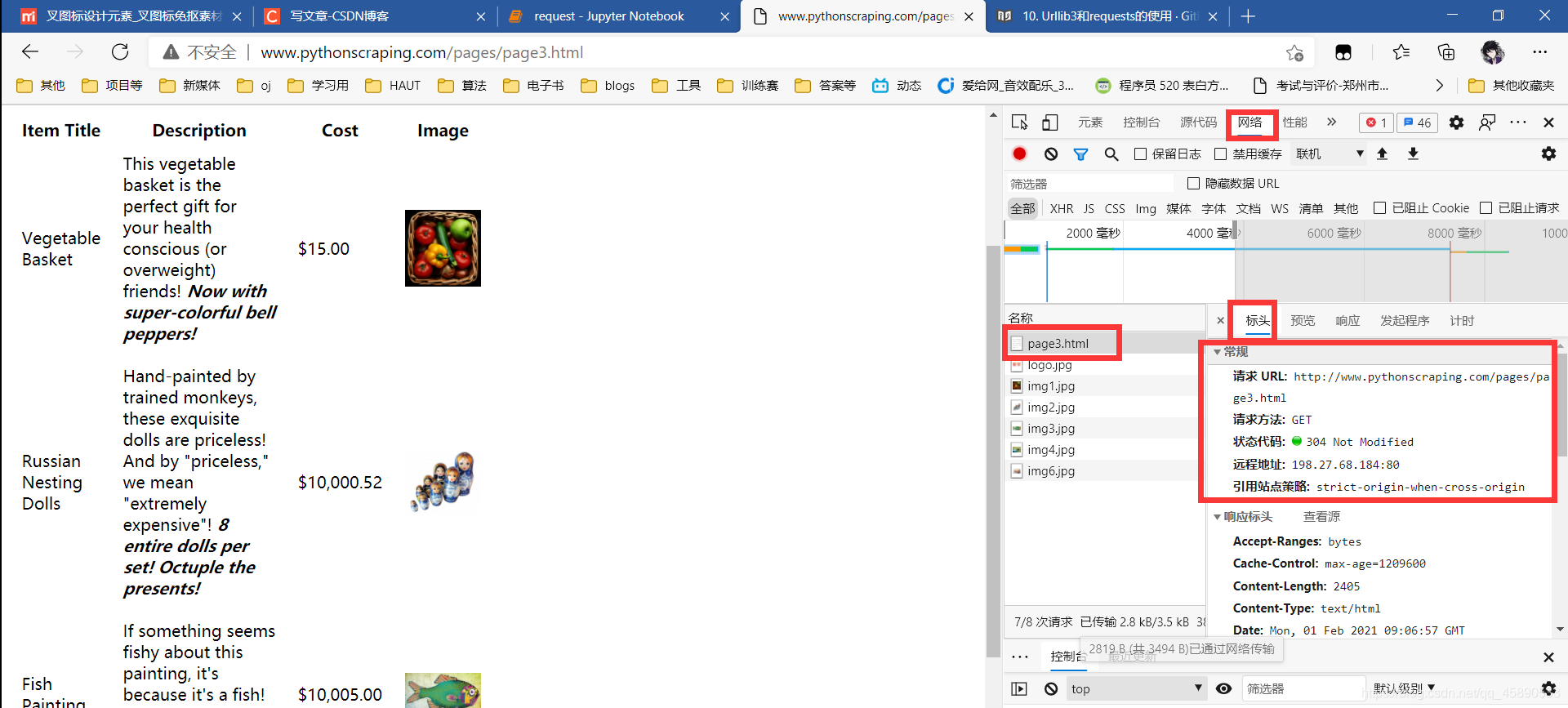
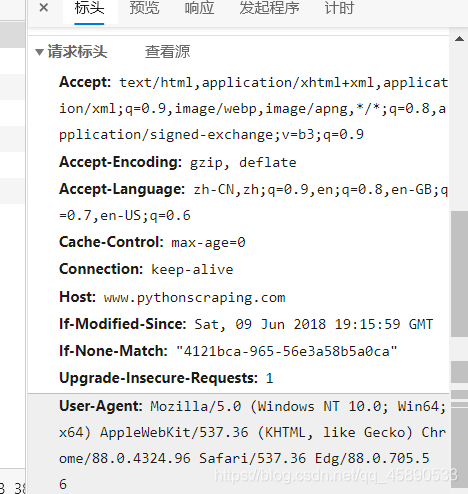
import urllib3
#Request instance
http = urllib3.PoolManager()
#URL
url = 'https://www.pythonscraping.com/pages/page3.html'
#Request headers
head = {'User-Agent':'Mozilla/5.0 (Windows NT 10.0; Win64; x64) AppleWebKit/537.36 (KHTML, like Gecko) Chrome/88.0.4324.96 Safari/537.36 Edg/88.0.705.56'}
#Timeout
tm = urllib3.Timeout(connect=1.0,read=3.0)
#Retry and redirect settings, generate request
rq = http.request('GET',url=url,headers=head,timeout=tm,redirect=4)
print('Server response code:', rq.status)
print('Response body:', rq.data.decode('utf-8'))
Server response code: 200
Response body: <html>
<head>
<style>
img{
width:75px;
}
table{
width:50%;
}
td{
margin:10px;
padding:10px;
}
.wrapper{
width:800px;
}
.excitingNote{
font-style:italic;
font-weight:bold;
}
</style>
</head>
<body>
<div id="wrapper">
<img src="../img/gifts/logo.jpg" style="float:left;">
<h1>Totally Normal Gifts</h1>
<div id="content">Here is a collection of totally normal, totally reasonable gifts that your friends are sure to love! Our collection is
hand-curated by well-paid, free-range Tibetan monks.<p>
We haven't figured out how to make online shopping carts yet, but you can send us a check to:<br>
123 Main St.<br>
Abuja, Nigeria
</br>We will then send your totally amazing gift, pronto! Please include an extra $5.00 for gift wrapping.</div>
<table id="giftList">
<tr><th>
Item Title
</th><th>
Description
</th><th>
Cost
</th><th>
Image
</th></tr>
<tr id="gift1" class="gift"><td>
Vegetable Basket
</td><td>
This vegetable basket is the perfect gift for your health conscious (or overweight) friends!
<span class="excitingNote">Now with super-colorful bell peppers!</span>
</td><td>
$15.00
</td><td>
<img src="../img/gifts/img1.jpg">
</td></tr>
<tr id="gift2" class="gift"><td>
Russian Nesting Dolls
</td><td>
Hand-painted by trained monkeys, these exquisite dolls are priceless! And by "priceless," we mean "extremely expensive"! <span class="excitingNote">8 entire dolls per set! Octuple the presents!</span>
</td><td>
$10,000.52
</td><td>
<img src="../img/gifts/img2.jpg">
</td></tr>
<tr id="gift3" class="gift"><td>
Fish Painting
</td><td>
If something seems fishy about this painting, it's because it's a fish! <span class="excitingNote">Also hand-painted by trained monkeys!</span>
</td><td>
$10,005.00
</td><td>
<img src="../img/gifts/img3.jpg">
</td></tr>
<tr id="gift4" class="gift"><td>
Dead Parrot
</td><td>
This is an ex-parrot! <span class="excitingNote">Or maybe he's only resting?</span>
</td><td>
$0.50
</td><td>
<img src="../img/gifts/img4.jpg">
</td></tr>
<tr id="gift5" class="gift"><td>
Mystery Box
</td><td>
If you love suprises, this mystery box is for you! Do not place on light-colored surfaces. May cause oil staining. <span class="excitingNote">Keep your friends guessing!</span>
</td><td>
$1.50
</td><td>
<img src="../img/gifts/img6.jpg">
</td></tr>
</table>
</p>
<div id="footer">
© Totally Normal Gifts, Inc. <br>
+234 (617) 863-0736
</div>
</div>
</body>
</html>II. Using the requests Library for HTTP Requests
import requests url = 'https://www.pythonscraping.com/pages/page3.html' rq2 = requests.get(url) rq2.encoding = 'utf-8'
print('Response code:',rq2.status_code) print('Encoding:',rq2.encoding) print('Request headers:',rq2.headers) print('Body:',rq2.text)
Solving Character Encoding Issues
Note that when the requests library guesses incorrectly, you need to manually specify the encoding to avoid garbled characters in the parsed page content. Manual specification is not flexible and cannot adaptively handle different encodings during scraping. Using the chardet library is more convenient and flexible — it is an excellent string/file encoding detection module. The chardet library uses the detect method to detect the encoding of a given string. Common parameters:
| Parameter | Description |
|---|---|
| byte_str | Accepts string. The string whose encoding needs detection. No default value. |
import chardet
chardet.detect(rq2.content)
Output: 100% probability of being encoded in ASCII.

import requests
import chardet
url = 'https://www.pythonscraping.com/pages/page3.html'
head={'User-Agent': 'Mozilla/5.0 (Windows NT 10.0; Win64; x64) AppleWebKit/537.36 (KHTML, like Gecko) Chrome/88.0.4324.96 Safari/537.36 Edg/88.0.705.56'}
rq2 = requests.get(url,headers=head,timeout=2.0)
rq2.encoding = chardet.detect(rq2.content)['encoding']
print('Body:',rq2.content)
III. Parsing Web Pages
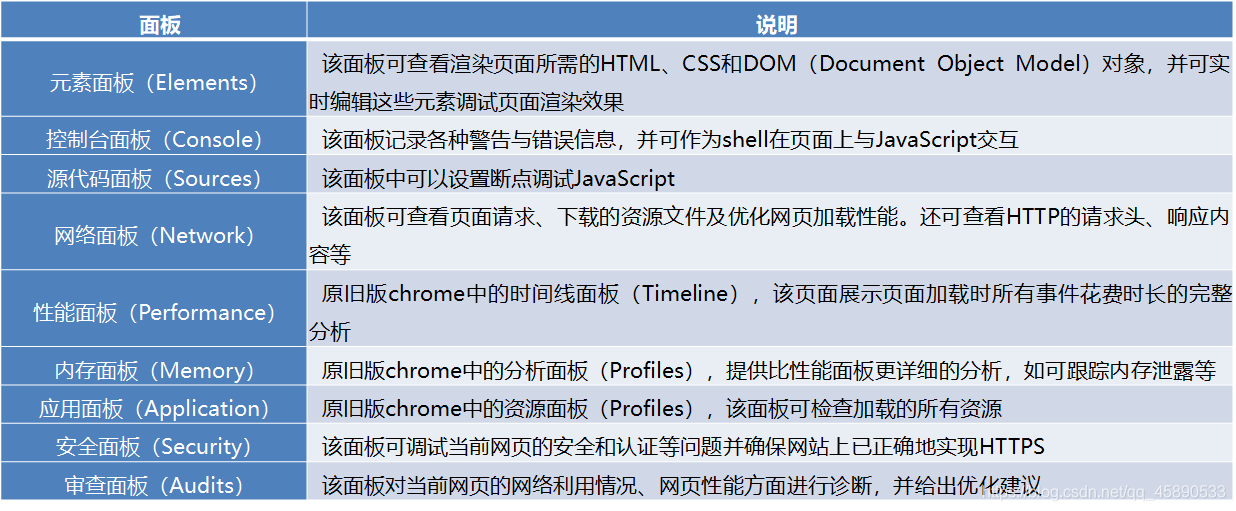
Chrome Developer Tools panel functions:
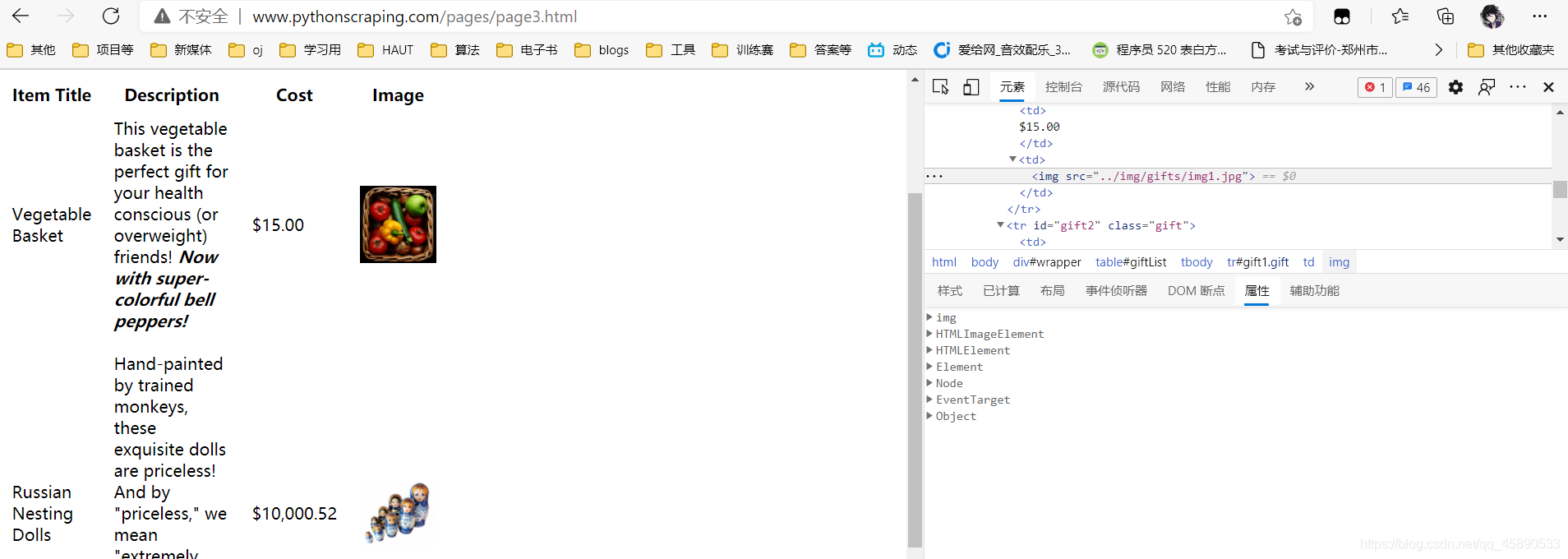
1. Elements Panel
In web scraping development, the Elements panel is mainly used to find the positions of page elements, such as image locations or text link positions. The left side of the panel shows the current page structure in a tree format; click the triangle to expand branches.
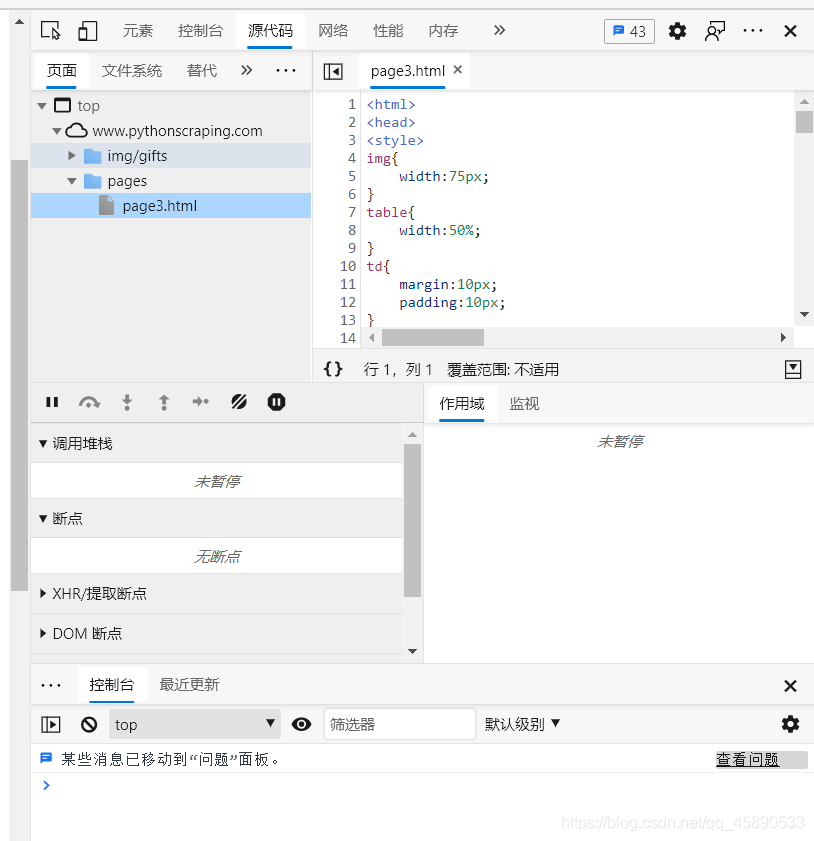
2. Sources Panel
Switch to the Sources panel.
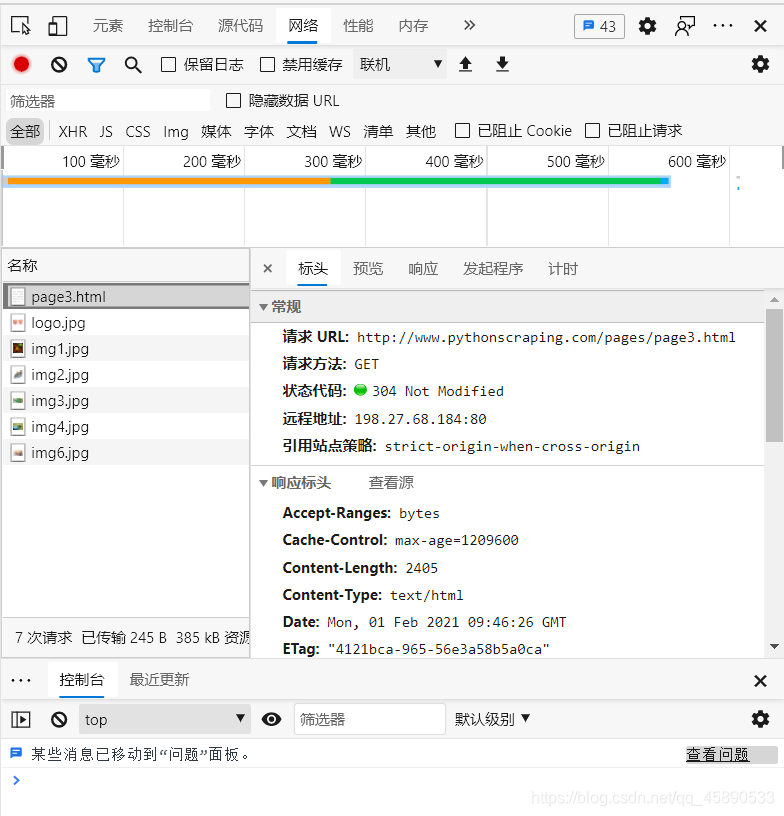
3. Network Panel
Switch to the Network panel. You need to reload the page first. Click a resource and the header information, preview, response, Cookies, and timing details will be displayed in the middle.
IV. Parsing Web Pages with Regular Expressions
1. Python Regular Expressions: Finding Names and Phone Numbers in a String
Regular expressions are tools for pattern matching and replacement. They allow users to construct matching patterns using a series of special characters, then compare these patterns against target strings or files, executing corresponding actions based on whether the target contains the pattern.
rawdata = “555-1239Moe Szyslak(636) 555-0113Burns, C.Montgomery555-6542Rev. Timothy Lovejoy555 8904Ned Flanders636-555-3226Simpson,Homer5553642Dr. Julius Hibbert ”
Let’s try:
import re
string = '1. A small sentence - 2.Anthoer tiny sentence. '
print('re.findall:',re.findall('sentence',string))
print('re.search:',re.search('sentence',string))
print('re.match:',re.match('sentence',string))
print('re.match:',re.match('1. A small sentence',string))
print('re.sub:',re.sub('small','large',string))
print('re.sub:',re.sub('small','',string))
Output: re.findall: [‘sentence’, ‘sentence’] re.search: <re.Match object; span=(11, 19), match=‘sentence’> re.match: None re.match: <re.Match object; span=(0, 19), match=‘1. A small sentence’> re.sub: 1. A large sentence - 2.Anthoer tiny sentence. re.sub: 1. A sentence - 2.Anthoer tiny sentence.
Common generalized symbols:
- Period ”.”: Can represent any single character except newline “\n”;
string = '1. A small sentence - 2.Anthoer tiny sentence. '
re.findall('A.',string)
Output: [‘A ’, ‘An’]
- Character class ”[]”: Enclosed in brackets; any character inside the brackets will be matched;
string = 'small smell smll smsmll sm3ll sm.ll sm?ll sm\nll sm\tll'
print('re.findall:',re.findall('sm.ll',string))
print('re.findall:',re.findall('sm[asdfg]ll',string))
print('re.findall:',re.findall('sm[a-zA-Z0-9]ll',string))
print('re.findall:',re.findall('sm\.ll',string))
print('re.findall:',re.findall('sm[.?]ll',string))
Output:
re.findall: ['small', 'smell', 'sm3ll', 'sm.ll', 'sm?ll', 'sm\tll']
re.findall: ['small']
re.findall: ['small', 'smell', 'sm3ll']
re.findall: ['sm.ll']
re.findall: ['sm.ll', 'sm?ll']- Quantifier ”{}”: Specifies how many times a pattern can be matched.
print('re.findall:',re.findall('sm..ll',string))
print('re.findall:',re.findall('sm.{2}ll',string))
print('re.findall:',re.findall('sm.{1,2}ll',string))
print('re.findall:',re.findall('sm.{1,}ll',string))
print('re.findall:',re.findall('sm.?ll',string)) # {0,1}
print('re.findall:',re.findall('sm.+ll',string)) # {0,}
print('re.findall:',re.findall('sm.*ll',string)) # {1,}
Output: re.findall: [‘smsmll’] re.findall: [‘smsmll’] re.findall: [‘small’, ‘smell’, ‘smsmll’, ‘sm3ll’, ‘sm.ll’, ‘sm?ll’, ‘sm\tll’] re.findall: [‘small smell smll smsmll sm3ll sm.ll sm?ll’, ‘sm\tll’] re.findall: [‘small’, ‘smell’, ‘smll’, ‘smll’, ‘sm3ll’, ‘sm.ll’, ‘sm?ll’, ‘sm\tll’] re.findall: [‘small smell smll smsmll sm3ll sm.ll sm?ll’, ‘sm\tll’] re.findall: [‘small smell smll smsmll sm3ll sm.ll sm?ll’, ‘sm\tll’]
PS: Greedy rule — matches as many characters as possible.
Complete Code
import pandas as pd
rawdata = '555-1239Moe Szyslak(636) 555-0113Burns, C.Montgomery555-6542Rev. Timothy Lovejoy555 8904Ned Flanders636-555-3226Simpson,Homer5553642Dr. Julius Hibbert'
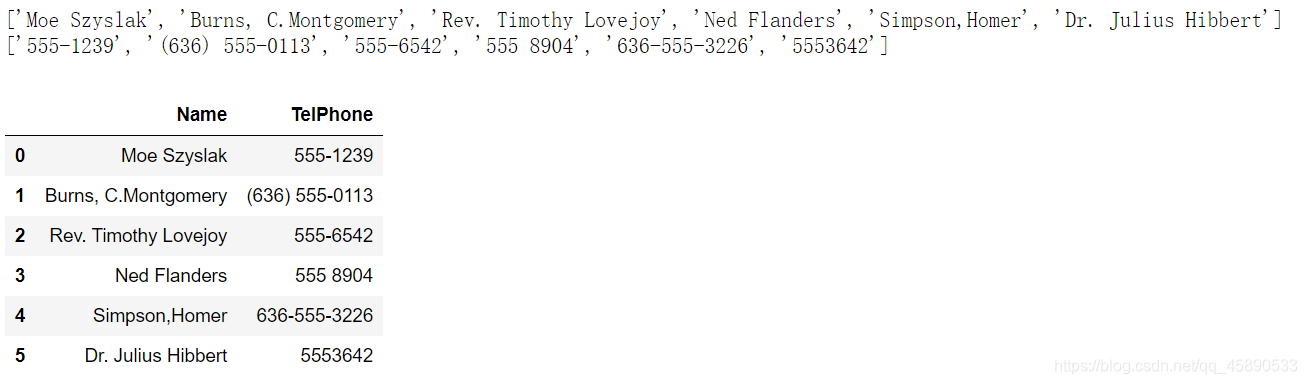
names = re.findall('[A-Z][A-Za-z,. ]*',rawdata)
print(names)
number = re.findall('\(?0-9\)?[ \-]?0-9[ \-]?0-9',rawdata)
print(number)
pd.DataFrame({'Name':names,'TelPhone':number})
Output:
V. Parsing Web Pages with XPath
XML Path Language (XPath) is a tree-structured language based on XML for finding nodes in the data structure tree and determining positions of parts of an XML document. Using XPath requires importing the etree module from the lxml library, and using the HTML class to initialize the HTML object to be matched (XPath can only process the DOM representation of documents). The basic syntax of the HTML class is as follows:
1. Basic Syntax
lxml.etree.HTML(text, parser=None, *, base_url=None)
| Parameter | Description |
|---|---|
| text | Accepts str. The string to convert to HTML. No default value. |
| parser | Accepts str. The HTML parser to use. No default value. |
| base_url | Accepts str. Sets the original URL of the document, used to find relative paths for external entities. Defaults to None. |
| If HTML nodes are not properly closed, the etree module also provides auto-completion. Call the tostring method to output the corrected HTML code, but the result is in bytes type and needs the decode method to convert to str type. |
XPath uses regex-like expressions to match content in HTML files. Common matching expressions are as follows:
| Expression | Description |
|---|---|
| nodename | Select all child nodes of the nodename node |
| / | Select direct child nodes from the current node |
| // | Select descendant nodes from the current node |
| . | Select the current node |
| .. | Select the parent node of the current node |
| @ | Select attributes |
2. Predicates
XPath predicates are used to find specific nodes or nodes containing specified values. Predicates are embedded in brackets after the path, as follows:
| Expression | Description |
|---|---|
| /html/body/div[1] | Select the first div child node under body |
| /html/body/div[last()] | Select the last div child node under body |
| /html/body/div[last()-1] | Select the second-to-last div child node under body |
| /html/body/div[positon()<3] | Select the first two div child nodes under body |
| /html/body/div[@id] | Select div child nodes under body with an id attribute |
| /html/body/div[@id=“content”] | Select the div child node under body with id value “content” |
| /html/body/div[xx>10.00] | Select child nodes under body where element xx > 10 |
3. Utility Functions
XPath also provides some utility functions for fuzzy searching. Sometimes you only know partial characteristics of the target; these functions enable fuzzy matching:
| Function | Example | Description |
|---|---|---|
| starts-with | //div[starts-with(@id,“co”)] | Select div nodes with id starting with “co” |
| contains | //div[contains(@id,“co”)] | Select div nodes with id containing “co” |
| and | //div[contains(@id,“co”)andcontains(@id,“en”)] | Select div nodes with id containing both “co” and “en” |
| text() | //li[contains(text(),“first”)] | Select nodes whose text contains “first” |
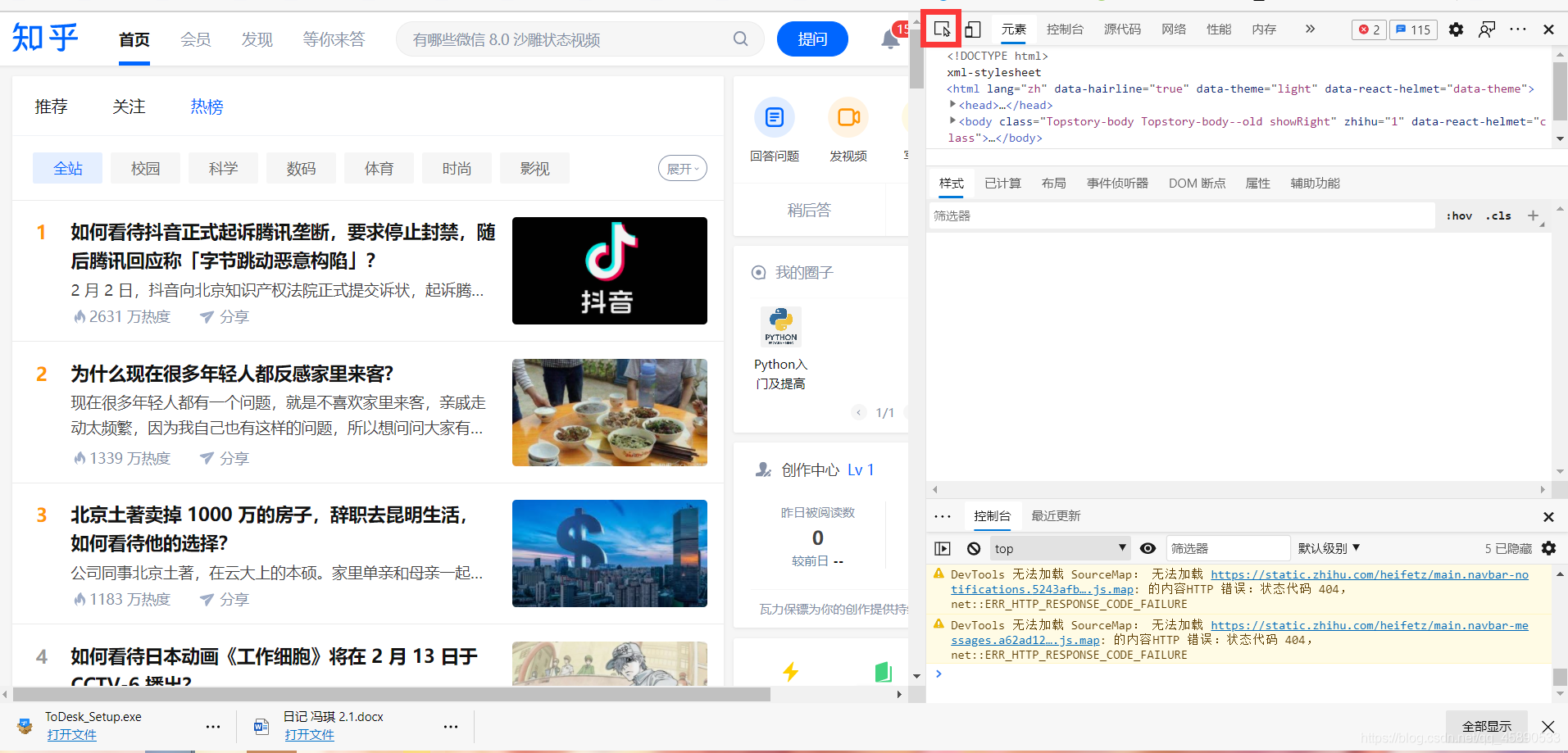
4. Using Google Developer Tools
Google Developer Tools provides a very convenient way to copy XPath paths.
import requests
from lxml import etree
url = "https://www.zhihu.com/hot"
hd = { 'Cookie':'your Cookie', #'Host':'www.zhihu.com',
        'User-Agent':'Mozilla/5.0 (X11; Linux x86_64) AppleWebKit/537.36 (KHTML, like Gecko) Chrome/50.0.2661.102 Safari/537.36'}

response = requests.get(url, headers=hd)
html_str = response.content.decode()
html = etree.HTML(html_str)
title = html.xpath("//section[@class='HotItem']/div[@class='HotItem-content']/a/@title")
href = html.xpath("//section[@class='HotItem']/div[@class='HotItem-content']/a/@href")
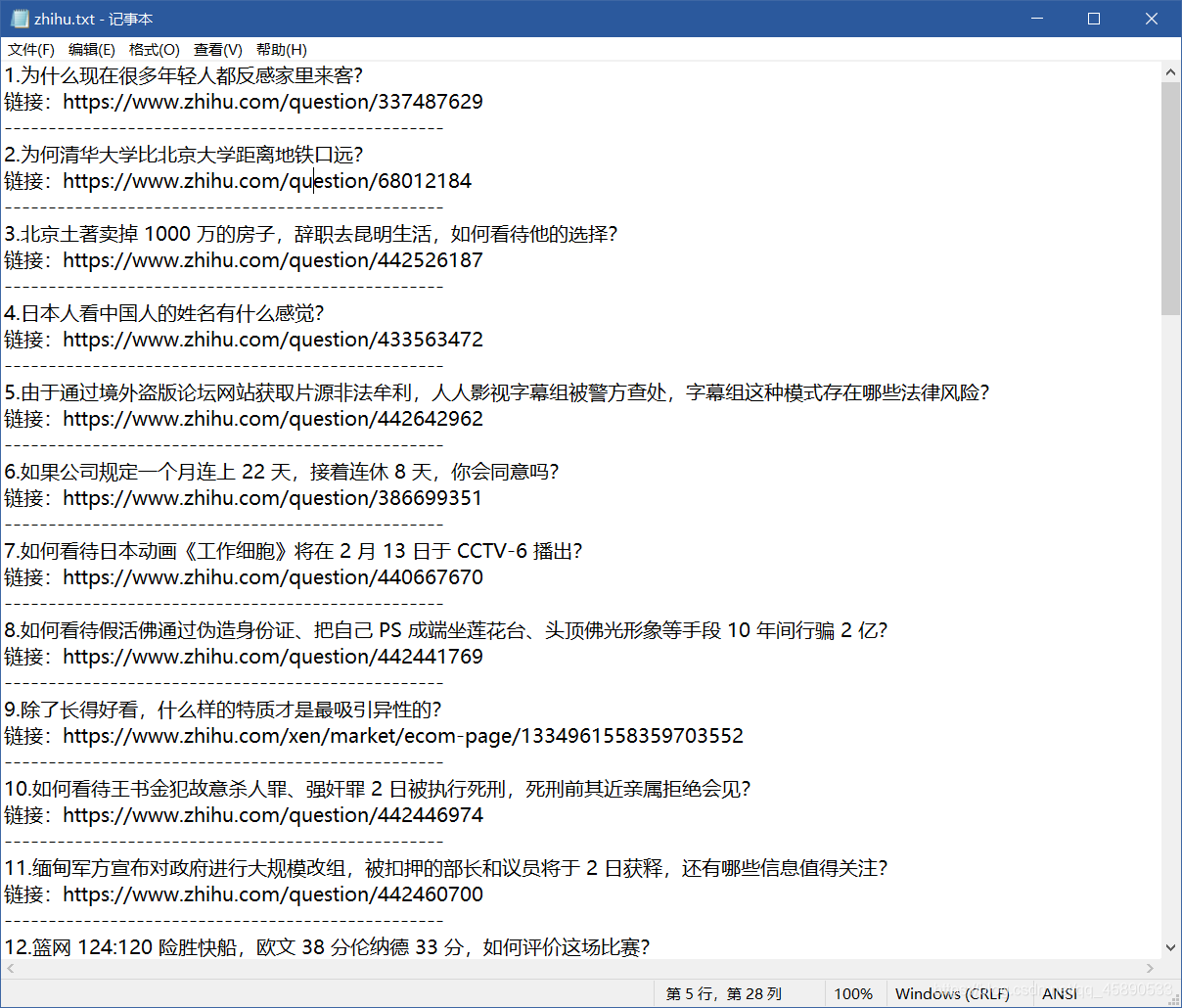
f = open("zhihu.txt",'r+')
for i in range(1,41):
    print(i,'.'+title[i])
    print('Link: '+href[i])
    print('-'*50)
    f.write(str(i)+'.'+title[i]+'\n')
    f.write('Link: '+href[i]+'\n')
    f.write('-'*50+'\n')
f.close()
Scraping result:
VI. Data Storage
1. Storing as JSON Format
import requests
from lxml import etree
import json
#Code above omitted
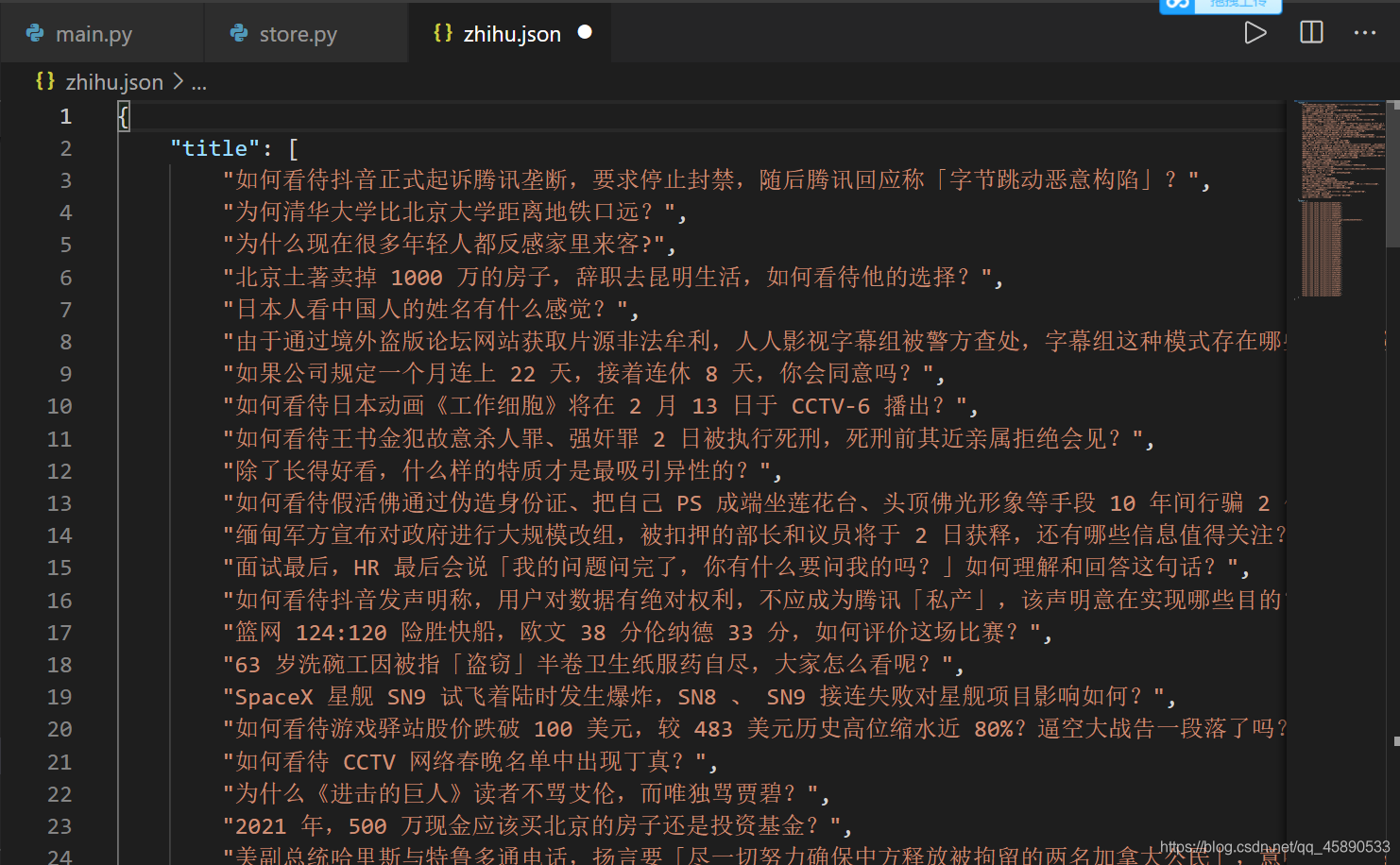
with open('zhihu.json','w') as j:
    json.dump({'title':title,'hrefL':href},j,ensure_ascii=False)
Storage result (PS: after file formatting):
喜欢的话,留下你的评论吧~