

This article has been machine-translated from Chinese. The translation may contain inaccuracies or awkward phrasing. If in doubt, please refer to the original Chinese version.
1. Design a Reflection Example to Demonstrate Usage of the Class Object
Project code: ReflectionTest
Java Reflection allows you to inspect all properties and methods of any class at runtime, call any method or property of any object, and modify its properties.
First, we create two test classes: Student and Teacher, with overridden toString methods for easy display.
package dao;
public class Student {
    private String name;                // Name
    private long stuNum;                // Student ID
    private int age;                    // Age
    private String profession;          // Major and class
    private double grade;               // Course grade
    public Student() {
        name = null;
        grade = 0;
    }
    public Student(String name, long stuNum, int age, String profession, double grade) {
        this.name = name;
        this.stuNum = stuNum;
        this.age = age;
        this.profession = profession;
        this.grade = grade;
    }
    public void setStudent(String name, double grade) {
        this.name = name;
        this.grade = grade;
    }
    public String getName() {return name;}

    public void setName(String name) {this.name = name;}

    public long getStuNum() {return stuNum;}

    public void setStuNum(long stuNum) {this.stuNum = stuNum;}

    public int getAge() {return age;}

    public void setAge(int age) {this.age = age;}

    public String getProfession() {return profession;}

    public void setProfession(String profession) {this.profession = profession;}

    public double getGrade() {return grade;}

    public void setGrade(double g) {this.grade = g;}

    @Override
    public String toString() {
        return "Student{" +
                "name='" + name + '\'' +
                ", stuNum=" + stuNum +
                ", age=" + age +
                ", profession='" + profession + '\'' +
                ", grade=" + grade +
                '}';
    }
}
Teacher class:
package dao;

public class Teacher {
    private String name;                // Name
    private int age;                    // Age
    private String prof;                // Department
    private String course;              // Course taught
    private double salary;               // Monthly salary
    public Teacher() {}
    public Teacher(String name, int age, String prof, String course, double salary) {
        this.name = name;
        this.age = age;
        this.prof = prof;
        this.course = course;
        this.salary = salary;
    }

//    getter & setter can be omitted
    public String getName() {return name;}

    public void setName(String name) {this.name = name;}

    public int getAge() {return age;}

    public void setAge(int age) {this.age = age;}

    public String getProf() {return prof;}

    public void setProf(String prof) {this.prof = prof;}

    public String getCourse() {return course;}

    public void setCourse(String course) {this.course = course;}

    public double getSalary() {return salary;}

    public void setSalary(double salary) {this.salary = salary;}

    @Override
    public String toString() {
        return "Teacher{" +
                "name='" + name + '\'' +
                ", age=" + age +
                ", prof='" + prof + '\'' +
                ", course='" + course + '\'' +
                ", salary=" + salary +
                '}';
    }
}
Through the Class object, we can dynamically obtain member variables, methods, interfaces, superclasses, constructors, etc. at runtime. Each class has one and only one Class instance in the JVM.
Consulting the API, the Class object has many methods:
- getName(): Get the fully qualified class name.
- getFields(): Get the public fields of the class.
- getDeclaredFields(): Get all fields of the class, including private and inherited ones.
- getMethods(): Get the public methods of the class.
- getDeclaredMethods(): Get all methods of the class, including private and inherited ones.
- getMethod(String name, Class[] parameterTypes): Get a specific method of the class, where name specifies the method name and parameterTypes specifies the parameter types.
- getConstructors(): Get the public constructors of the class.
- getConstructor(Class[] parameterTypes): Get a specific constructor, where parameterTypes specifies the parameter types.
- newInstance(): Create an instance of the class using its no-argument constructor.
Here is the test function:
import dao.Student;
import dao.Teacher;

import java.lang.reflect.*;

public class Main {
    public static void printClassInfo(Object object) {
        Class c = object.getClass();
        System.out.println("Name: " + c.getName());

        System.out.println("------------Fields----------");
        Field[] fields = c.getDeclaredFields(); // Get all declared fields including private ones (getFields only returns public fields)
        for(Field field : fields) {
            System.out.println("FieldName: " + field.getName());
        }

        System.out.println("------------Methods----------");
        Method[] methods = c.getMethods();      // Get all methods of the class
        for(Method method : methods) {
            System.out.println("Method: " + method.getName());
        }
    }
    public static void main(String[] args) {
        Teacher teacher = new Teacher("Wang", 30, "Computer Science", "Introduction to Computing", 7000);
        Student student = new Student("Li Ming", 201916012, 19, "CS F1901", 92);
        System.out.println( teacher.toString() );
        System.out.println( student.toString() );

        printClassInfo(teacher);
        System.out.println();

        printClassInfo(student);
    }
}
The output is shown in the figures below:
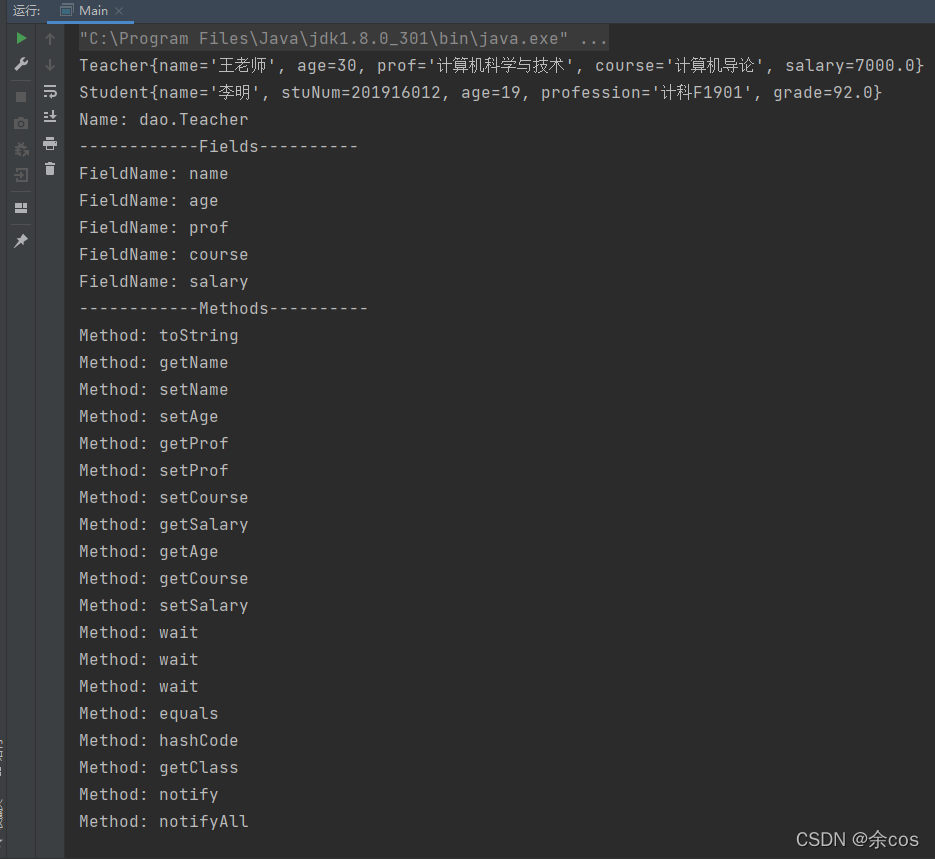
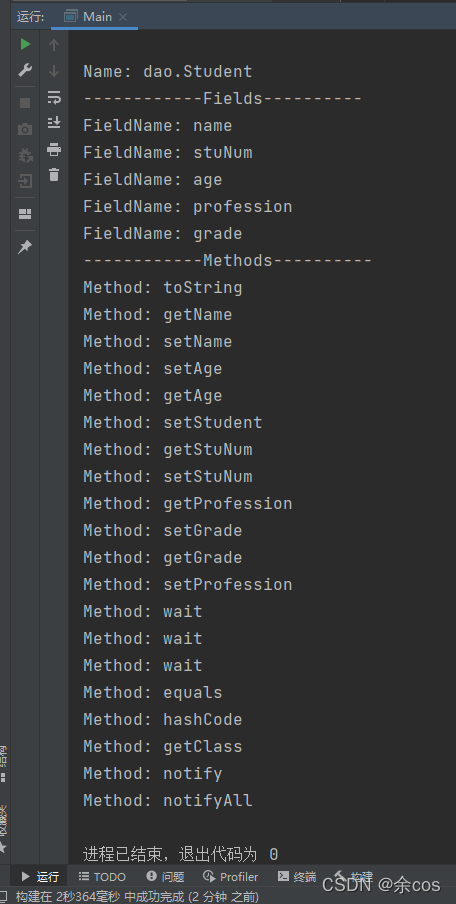
2. Design an Example to Demonstrate the Collection Interface, Iterator, and Comparator
The Collection is a container provided by Java for storing multiple data items. Here we use the single-column collection java.util.Collection as an example. Collection is the parent interface of all single-column collections (such as List), so it defines common methods for single-column collections (List and Set) that can be used to operate on all single-column collections. These methods include:
- public boolean add(Object o): Add the given object to the current collection.
- public void clear(): Clear all elements in the collection.
- public boolean remove(Object o): Remove the given object from the current collection.
- public boolean contains(Object o): Check if the current collection contains the given object.
- public boolean isEmpty(): Check if the current collection is empty.
- public int size(): Return the number of elements in the collection.
- public Object[] toArray(): Store the elements of the collection into an array.
Iterator: In development, we often need to traverse all elements in a collection. For this, JDK provides a special interface java.util.Iterator. The Iterator interface is primarily used for iterating (traversing) elements in a Collection, so an Iterator object is also called an iterator. public Iterator iterator(): Gets the iterator corresponding to the collection, used to traverse the collection’s elements. This concept is the same as the iterator in C++ STL. Common methods of the Iterator interface:
- public Object next(): Return the next element in the iteration.
- public boolean hasNext(): Return true if there are more elements to iterate.
Comparator: This refers to the comparability property of elements stored in a collection. If elements are comparable, they can be sorted accordingly. For the Comparable interface, it is typically implemented by classes that need comparison. It contains only one compareTo() method with a single parameter, returning an int. A return value greater than 0 indicates the object is greater than the parameter; less than 0 indicates it is smaller; equal to 0 means they are equal.
import java.util.*;

public class Main {
    public static <T> void printAll(Collection<T> collection) {
        Iterator<T> it = collection.iterator();
        while(it.hasNext()) {
            T nowT = it.next();
            System.out.println(nowT);
        }
    }
    public static void main(String[] args) {
        ArrayList<String> col = new ArrayList<String>();
        col.add("abcs");
        col.add("bdfs");
        Collections.addAll(col, "test1", "test4", "test2","csnw");
        // Use iterator to display all Collection elements
        printAll(col);

        System.out.println("\nSorted in ascending lexicographic order:");
        Collections.sort(col, new Comparator<String>() {
            @Override
            public int compare(String s1, String s2) {
                return s1.compareTo(s2);
            }
        });
        printAll(col);

        System.out.println("\nSorted in descending lexicographic order:");
        Collections.sort(col, new Comparator<String>() {
            @Override
            public int compare(String s1, String s2) {
                return s2.compareTo(s1);
            }
        });
        printAll(col);
    }
}
Output as shown:
3. Compare the Similarities and Differences of Regular Expressions in JavaScript, Python, and Java
When using Python regex, prefix the string with ‘r’ to tell the compiler that the string is a raw string and should not escape ”. For example, \n in a raw string consists of two characters, \ and n, rather than being interpreted as a newline. Since regex and \ can conflict, it is best to prefix strings with ‘r’ when using regular expressions.
Regular expressions in JavaScript and Java are basically the same, with differences in group references, objects, methods, and Java’s regex requiring an extra escape character "". For more specific similarities and differences, see this blog post: Regular Expressions: JavaScript, Java, Python Basic Syntax
- Self-study the Factory Design Pattern and Observer Pattern, and write corresponding examples.
Too lazy to write the fluff (lol). Here are two blog posts:
喜欢的话,留下你的评论吧~