

This article has been machine-translated from Chinese. The translation may contain inaccuracies or awkward phrasing. If in doubt, please refer to the original Chinese version.
Starting a new series… documenting my journey learning Redux, primarily based on the Redux official documentation, the Getting Started with Redux video series, and the accompanying notes and transcripts.
This covers the Redux Three Principles, Reducer, getState, dispatch, subscribe internals and implementation.
First, it should be made clear that while Redux is a great state management tool, you should still consider whether it’s the right fit for your use case.
Don’t use Redux just because someone told you to — take the time to understand the potential benefits and trade-offs of using it.
This article covers episodes 1-8 of the video tutorial series below, explaining the Redux Three Principles, Reducer, getState, dispatch, subscribe, and the internals and implementation of createStore, while building a simple counter. After watching these, you’ll have a solid general understanding of Redux.
Why learn it? Mainly because the projects I’ve been reading recently all use Redux to some extent, and I couldn’t understand anything without learning it.
Getting Started with Redux — Video Series Dan Abramov, the creator of Redux, demonstrates various concepts in 30 short clips (2-5 minutes). The linked GitHub repository contains notes and transcripts of the videos. Getting Started with Redux video series > Notes and Transcripts
Introduction
What is Redux?
Redux is a predictable state container for JavaScript applications.
It helps you write applications that behave consistently, run in different environments (client, server, and native), and are easy to test. Beyond that, it provides a great developer experience, such as a time-traveling debugger that allows live editing and previewing.
Besides being used with React, Redux also supports other UI libraries. It’s tiny (only 2kB, including dependencies) but has a powerful plugin ecosystem.
When to Use Redux
First, it should be made clear that while Redux is a great state management tool, you should still consider whether it’s the right fit for your use case. Don’t use Redux just because someone told you to — take the time to understand the potential benefits and trade-offs of using it.
Consider using Redux when you encounter the following issues in your project:
- You have a lot of data that changes over time
- You want a single source of truth for your state
- You find that managing all state in a top-level component is no longer maintainable
The Three Principles of Redux
Principle 1: Single Immutable State Tree
Redux: The Single Immutable State Tree from @dan_abramov on @eggheadio
The Single Immutable State Tree — note the key words: single, immutable, state tree.
The first principle of Redux is: The entire state of the application is represented by a single JavaScript object, whether the application is a simple small app or a complex application with extensive UI and state changes. This JavaScript object is called the state tree.
Here’s an example of the kind of state a Todo application might have:
"current_state:"
[object Object] {
  todos: [[object Object] {
    completed: true,
    id: 0,
    text: "hey",
  }, [object Object] {
    completed: false,
    id: 1,
    text: "ho",
  }],
  visibilityFilter: "SHOW_ACTIVE"
}
Principle 2: State Tree is Read-Only
Redux: Describing State Changes with Actions from @dan_abramov on @eggheadio
The second principle of Redux is that the state tree is read-only. We cannot directly modify or write to it; we can only modify it by “dispatching an Action”.
An Action is a plain JS object that describes a change. It’s the minimal representation of the change made to the data. Its structure is entirely up to us; the only requirement is that it must have a bound property type (usually a string, since it’s serializable).
dispatch an action
For example: In a Todo application, the component displaying todos doesn’t know how to add an item to the list. All it knows is that it needs to dispatch an action with a type of “add todo”, along with the todo text and a sequence number.
If toggling a task, similarly, the component doesn’t know how it happens. All it needs to do is dispatch an action with a type for toggling the todo, and pass in the ID of the todo to toggle.
As you can see, the state is read-only and can only be modified through dispatch operations.
Principle 3: To Describe State Changes, You Must Write a Pure Function (Reducer)
Redux: Pure and Impure Functions | egghead.io
Redux: The Reducer Function | egghead.io
The third principle of Redux is: to describe state changes, you must write a pure function that takes the application’s previous state and the action being dispatched, then returns the application’s next state. This pure function is called a Reducer.
Understanding Pure and Impure Functions
First, we need to understand what pure/impure functions are, because Redux sometimes requires us to write pure functions.
I’ve also mentioned this in a previous blog post: Learning JavaScript with Yueying. Let’s review it again here.
A pure function is one whose return value depends only on its parameters and has no side effects during execution, meaning it has no impact on the outside world.
It’s absolutely certain that calling a pure function with the same set of arguments will yield the same return value. They are predictable.
Furthermore, pure functions don’t modify the values passed to them. For example, a squareAll function that takes an array won’t overwrite the items within that array. Instead, it returns a new array by mapping over the items.
Pure function examples:
function square(x) {
  return x * x;
}
function squareAll(items) {
  return items.map(square); // Note: this creates a new array rather than directly returning items
}
Impure function examples:
function square(x) {
  updateXInDatabase(x); // Also affects x in the database
  return x * x;
}
function squareAll(items) {
  for (let i = 0; i < items.length; i++) {
    items[i] = square(items[i]); // And directly modifies items...
  }
}
When learning React earlier, I already came across the concept of immutability, which is helpful in many scenarios. For instance, in the Time Travel feature of the tic-tac-toe implementation in the React official documentation — if every step mutated the original object, operations like undo would become extremely complex.
Reducer
React pioneered the idea that the UI layer is most predictable when described as a pure function of the application state.
Redux complements this approach with another idea: mutations in the application state must be described by a pure function that takes the previous state and the action being dispatched, and returns the next state of the application.
Even in large applications, there’s still only one function that computes the new state of the application. It does this based on the entire application’s previous state and the action being dispatched.
However, this operation isn’t necessarily slow. If some parts of the state haven’t changed, their references can remain as-is. This is what makes Redux fast.
Here is a complete example
Initial State
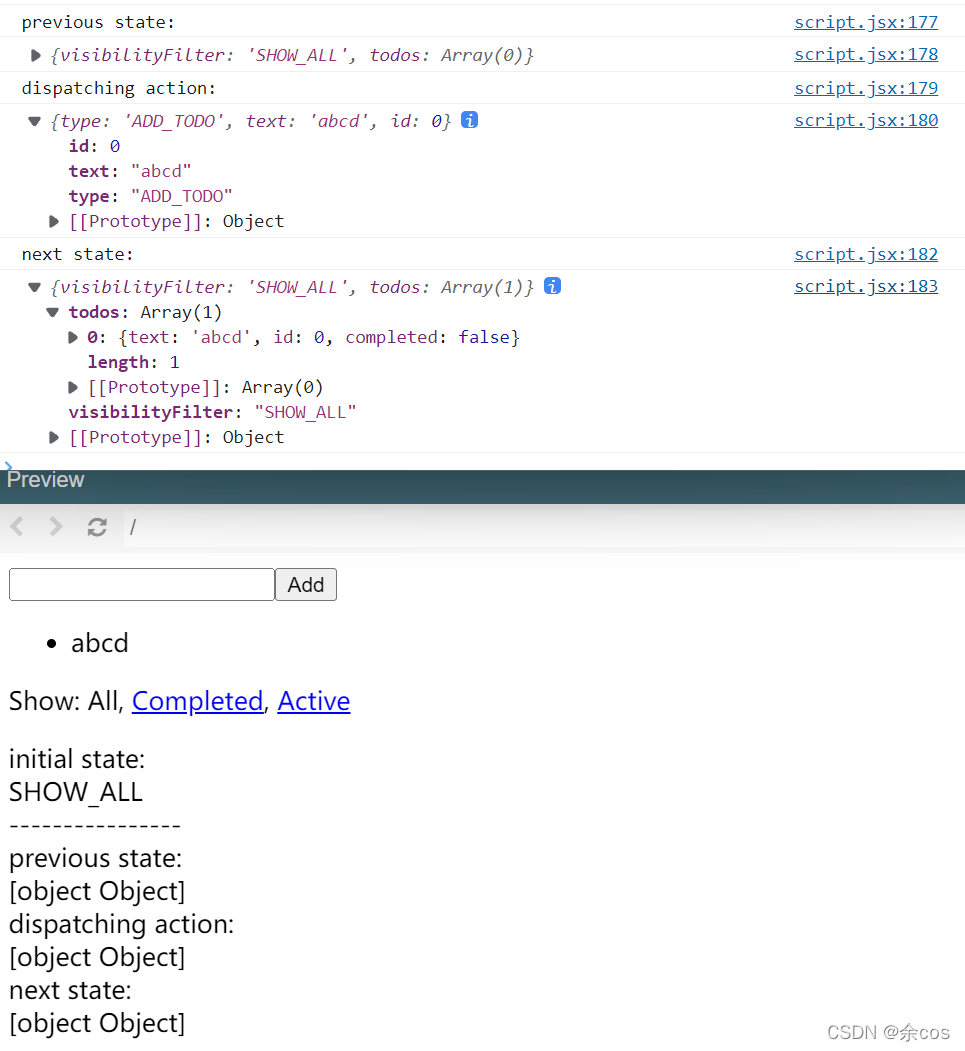
In the initial state, todos is empty and the filter is set to show all.

Adding a Todo
Changes as shown: In the initial state, todos has no content and the filter is set to show all. After dispatching the action, a todo has been added to the state while the visibility filter remains unchanged.
Completing a Todo
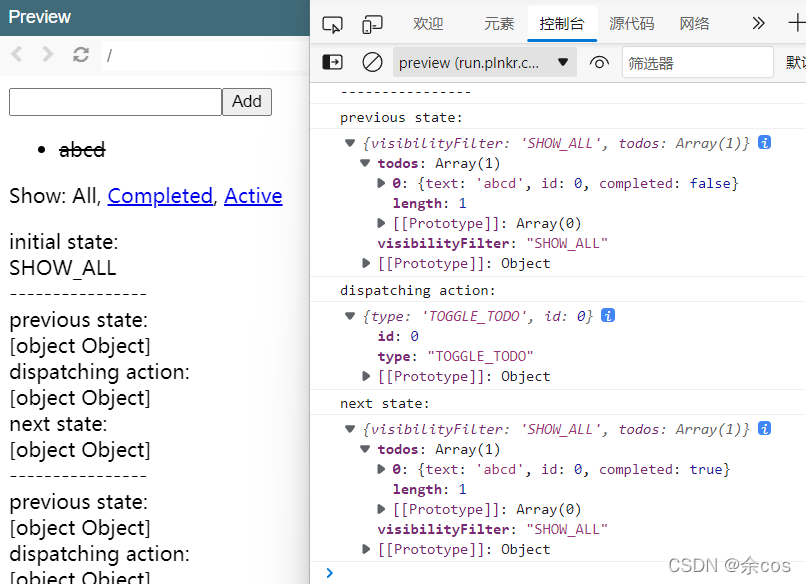
Click a todo to mark it as completed. You can see that when this action is dispatched, the todo text remains unchanged, but the complete status has been set to completed…
Changing the Visibility Filter
After adding another todo, click the “Active” filter. Observing the before and after state, you can see that only the visibilityFilter changed from “SHOW_ALL” to “SHOW_ACTIVE” — the todos content remains unchanged (abcd wasn’t deleted).

Writing a Counter Reducer with Tests
Redux: Writing a Counter Reducer with Tests | egghead.io
The first function we’ll write is a reducer for the counter example. We’ll also use expect for assertions.
eggheadio-projects/getting-started-with-redux: null - Plunker (plnkr.co)
const counter = (state = 0, action) => {
  switch (action.type) {
    case 'INCREMENT':
      return state + 1;
    case 'DECREMENT':
      return state - 1;
    default:
      return state;
  }
};

expect(counter(0, { type: 'INCREMENT' })).toEqual(1);

expect(counter(1, { type: 'INCREMENT' })).toEqual(2);

expect(counter(2, { type: 'DECREMENT' })).toEqual(1);

expect(counter(1, { type: 'DECREMENT' })).toEqual(0);

expect(counter(1, { type: 'SOMETHING_ELSE' })).toEqual(1);

expect(counter(undefined, {})).toEqual(0);
As shown above, the counter Reducer has two recognized types (INCREMENT and DECREMENT), representing count +1 and -1 respectively. When writing a Reducer, if the incoming state is undefined, you need to return an object representing the initial state (initstate). In this counter example, we return 0 because our count starts at 0. If the incoming action is not recognized by the Reducer (SOMETHING_ELSE), we just return the current state.
Store Methods: getState(), dispatch(), and subscribe()
Redux: Store Methods: getState(), dispatch(), and subscribe() | egghead.io
This section uses built-in functions from Redux. We use ES6 destructuring syntax to import createStore.
const counter = (state = 0, action) => {
  switch (action.type) {
    case 'INCREMENT':
      return state + 1;
    case 'DECREMENT':
      return state - 1;
    default:
      return state;
  }
};

const { createStore } = Redux; // Redux CDN import syntax
// import { createStore } from 'redux' // npm module syntax

const store = createStore(counter);
createStorecreates a Redux store to hold the complete state of your application. There should only be one store in your application.Parameters
reducer(Function): Takes two arguments — the current state tree and the action to process — and returns the new state tree.- [
preloadedState] (any): The initial state. In isomorphic apps, you can choose whether to hydrate the state sent from the server or restore a previous user session. If you usecombineReducersto create thereducer, it must be a plain object with the same structure as the keys passed in. Otherwise, you can freely pass in anything thereducercan understand.enhancer(Function): Store enhancer, optional. Lets you enhance the store with third-party capabilities such as middleware, time travel, persistence. It’s a higher-order function that composes a store creator and returns a new, enhanced store creator. The only built-in store enhancer in Redux isapplyMiddleware().Return Value
(
Store): An object that holds the complete state of your application. The only way to change the state is to dispatch an action. You can also subscribe to state changes and then update the UI.
The store created by createStore has 3 important methods:
getState() - Get State
getState() retrieves the current state of the Redux store. It returns the current state tree of your application. It equals the last value returned by the store’s reducer.
dispatch() - Dispatch an Action
dispatch() is the most commonly used method. It dispatches an action. This is the only way to trigger a state change.
It will synchronously call the store’s reducer function with the result of the current getState() and the passed-in action. Its return value becomes the next state. From this point on, it becomes the return value of getState(), and change listeners will be triggered.
subscribe() - Register a Listener
Adds a change listener. It is called every time an action is dispatched, and some part of the state tree may have changed. You can call getState() inside the callback to get the current state.
You can call dispatch() inside a change listener, but note the following:
- Listeners should call
dispatch()only in response to user actions or under specific conditions (e.g., dispatching an action when the store has a specific field). While callingdispatch()unconditionally is technically possible, it may lead to infinite loops as eachdispatch()modifies the store. - Subscriptions are snapshotted before each
dispatch()call. If you subscribe or unsubscribe while a listener is being called, it won’t affect the currentdispatch(). However, the nextdispatch()call, whether nested or not, will use the most recent snapshot of the subscription list. - Listeners should not rely on seeing all state changes, as state may have changed multiple times due to nested
dispatch()calls before the listener was called. Ensure all listeners are registered beforedispatch()starts, so that each listener sees the most up-to-date state at the time it was registered.
This is a low-level API. In most cases, you won’t use it directly but instead use bindings for React (or other libraries). If you want the callback to use the current state, you can write a custom observeStore utility. The Store is also an Observable, so you can subscribe to updates using libraries like RxJS.
To unsubscribe a change listener, simply call the function returned by subscribe.
// ... `counter` reducer as above ...

const { createStore } = Redux;
const store = createStore(counter);

store.subscribe(() => {
  document.body.innerText = store.getState();
});

document.addEventListener('click', () => {
  store.dispatch({ type: 'INCREMENT' });
});
With the above approach, the initial state won’t be rendered because rendering happens inside the subscribe callback. After fixing this:
const render = () => {
  document.body.innerText = store.getState();
};

store.subscribe(render);
render(); // Call once first to render the initial state 0; subsequent renders happen after each dispatch

document.addEventListener('click', () => {
  store.dispatch({ type: 'INCREMENT' });
});
The documentation excerpted from the official site above may seem hard to understand, but the simplified implementation below should make it clear.
Implementing a Simple createStore
Redux: Implementing Store from Scratch | egghead.io
In our previous learning, we examined how to use createStore(), but to better understand it, let’s write it from scratch!
First, let’s review what we learned from the previous examples:
-
The
createStorefunction accepts areducerfunction. This reducer function returns the current state and is called by the internaldispatchfunction. -
The store created by
createStoreneeds two internal variables:state— the current state, a JavaScript objectlisteners— a listener array, an array of functions
-
The store created by
createStoreneeds these three methods:getState,dispatch, andsubscribegetStatereturns the current statedispatchis the only way to change the internal state. It takes an action and computes the new state by passing the internal current state and the action to thereducerfunction (the argument to createStore). After updating, we notify all change listeners (by calling them).subscribetakes a listener function as a parameter and pushes it into the internal listeners array. To allow unsubscribing,subscribereturns a function — calling this returned function unsubscribes the listener. Internally, this function usesfilter()to reassign the listeners array to a new array (excluding the listener with the same reference).- When returning the
store, we need to populate the initial state. We dispatch a dummyactionto let thereducerreturn the initial value.
const createStore = (reducer) => {
  // Returns store, which can call getState, dispatch, subscribe
  let state;
  let listeners = [];
  const getState = () => state; // External code can get the current state by calling getState

  const dispatch = (action) => {
    state = reducer(state, action); // Since reducer is a pure function, each returned state won't modify the original state~
    listeners.forEach((listener) => listener()); // In the dispatch event, call the listeners after the reducer succeeds~
  };

  const subscribe = (listener) => {
    // Add a listener!
    listeners.push(listener);
    return () => {
      // Return a function to allow unsubscribing
      listeners = listeners.filter((l) => l !== listener);
    };
  };

  dispatch({}); // To give state an initial value!

  return { getState, dispatch, subscribe };
};
Improving the Counter
Redux: Implementing Store from Scratch | egghead.io
Improved example: Counter (cos)
In the previous section, we implemented a counter Reducer. Here, let’s improve it by actually rendering it with React.
Writing the Counter Component
Write a Counter component that is a “dumb component”. It contains no business logic.
A dumb component only specifies how to render the current state to output and how to bind callback functions passed via props to event handlers.
// Counter component
const Counter = ({ value, onIncrement, onDecrement, onElse }) => (
  <div>
    <h1>{value}</h1>
    <button onClick={onIncrement}>+</button>
    <button onClick={onDecrement}>-</button>
    <button onClick={onElse}>else</button>
  </div>
);
// The render function for this component
const render = () => {
  console.log('render!');
  ReactDOM.render(
    <Counter
      value={store.getState()}
      onIncrement={() =>
        store.dispatch({
          type: 'INCREMENT',
        })
      }
      onDecrement={() =>
        store.dispatch({
          type: 'DECREMENT',
        })
      }
      onElse={() =>
        store.dispatch({
          type: 'else',
        })
      }
    />,
    document.getElementById('root'),
  );
};
When this dumb component renders, we specify that its value should come from the Redux store’s current state. When the user presses a button, the corresponding action is dispatched to the Redux store.
Calling createStore and Adding Listeners
Call createStore to create a store, then call store.subscribe to add a render listener.
const counter = (state = 0, action) => {
  console.log('now state:', state);
  switch (action.type) {
    case 'INCREMENT':
      return state + 1;
    case 'DECREMENT':
      return state - 1;
    default:
      return state;
  }
};
// store create with counter reducer
const { createStore } = Redux;
const store = createStore(counter);
store.subscribe(render); // Add listener, re-render on every state update
render();
The reducer specifies how to compute the next state based on the current state and the incoming action. Finally, we subscribe to the store (passing in the render function), so that the render function runs every time dispatch changes the state.
PS: The original text says “Finally, we subscribe to the Redux store so our
render()function runs any time the state changes so ourCountergets the current state.” It says render is triggered whenever state changes, but based on the createStore implementation above, this doesn’t feel entirely accurate — render is triggered even when the state value doesn’t actually change. It fires on every dispatch (i.e., whenever an action is sent). Testing confirms this behavior. (Perhaps it’s understood that Redux expects every dispatch to have the intent to change state; if the videos mention this later, I’ll come back to correct this.)
Examining the Process
Let’s understand the process through the following example:
Try it out: Counter (cos)
Initial Value
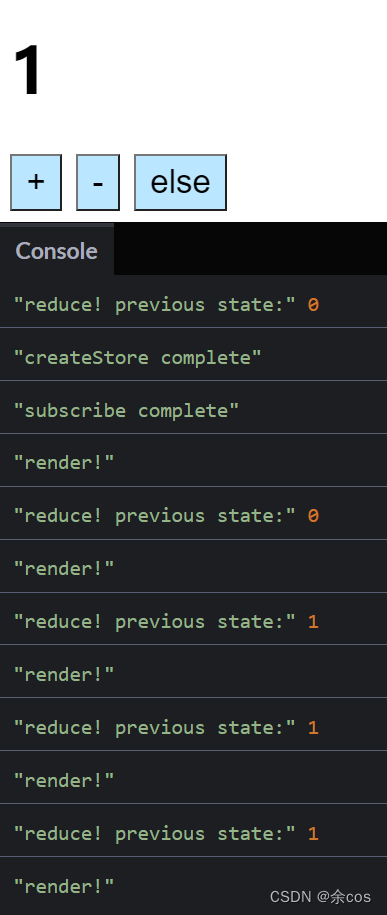
Without doing anything, you can see that createStore already dispatched once, setting the state to its initial value of 0 via the reducer (the counter function), and performed one render. (Note this.)

Incrementing the Count
Click the + button once, and you’ll see render is called again.

else
After clicking “else” several times, you’ll notice it re-renders every time, but the state value appears unchanged, and the component visually appears the same.
Summary
First, it should be made clear that while Redux is a great state management tool, you should still consider whether it’s the right fit for your use case.
- Don’t use Redux just because someone told you to — take the time to understand the potential benefits and trade-offs of using it.
After watching episodes 1-8, I basically understood when Redux is best used and its drawbacks, learned the Redux Three Principles, Reducer, getState, dispatch, subscribe, and the internals and implementation of createStore, and built an extremely simple counter (and also learned what a dumb component is along the way).
The Three Principles of Redux:
- The entire state of the application is represented by a single JavaScript object, and this JavaScript object is called the state tree.
- The state tree is read-only. It cannot be directly modified or written to; it can only be modified indirectly by “dispatching an Action”.
- To describe state changes, you must write a pure function that takes the application’s previous state and the dispatched action, and returns the application’s next state. This pure function is called a Reducer.
The createStore function accepts a reducer function. This Reducer function returns the current state and is called by the internal dispatch function.
-
The store created by
createStoreneeds two internal variables:state— the current state, a JavaScript objectlisteners— a listener array, an array of functions
-
The store created by
createStorealso needs these three methods:getState,dispatch, andsubscribegetStatereturns the current statedispatchtakes an action and computes the new state by passing the internal current state and the action to thereducerfunction (the argument to createStore). After updating, we notify all change listeners (by calling them).subscribetakes a listener function as a parameter and pushes it into the internal listeners array. To allow unsubscribing,subscribereturns a function — calling this returned function unsubscribes the listener. Internally, this function usesfilter()to reassign the listeners array to a new array (excluding the listener with the same reference).- When returning the
store, we need to populate the initial state. We dispatch a dummyactionto let thereducerreturn the initial value.
喜欢的话,留下你的评论吧~